How to exluce items from search?

Hi Support,
We have both remote sessions and credentials in our RDM. When searching for something it returns both sessions and credentials which match the search. Normally this isn't an issue, but with a huge amount of items there are times we'd like to search just for a certain type. For exmaple, search for just sessions and exclude credentials from the search.
Is there a way to do this?
Thanks,
David.
All Comments (4)
I did find this in the help section; https://help.remotedesktopmanager.com/index.html?view_searchfilter.htm
However, I'm running RDM 12.6 and this doesn't appear to exist anymore?
Thanks,
David.
Hi David,
this do exist.
However it could be a problem with UI.
Try to reset layout: Go to Window -> Reset Layout
After that restart RDM; it should be in default Layout appear at bottom in status bar
Kind Regards
Markus
======================
Option 2:
Got to File -> Options -> User Interface -> Filter
and check "Location:" - it must not be "None"
set to your favorite (default: Status bar)
Kind Regards
Markus
======================
Hello,
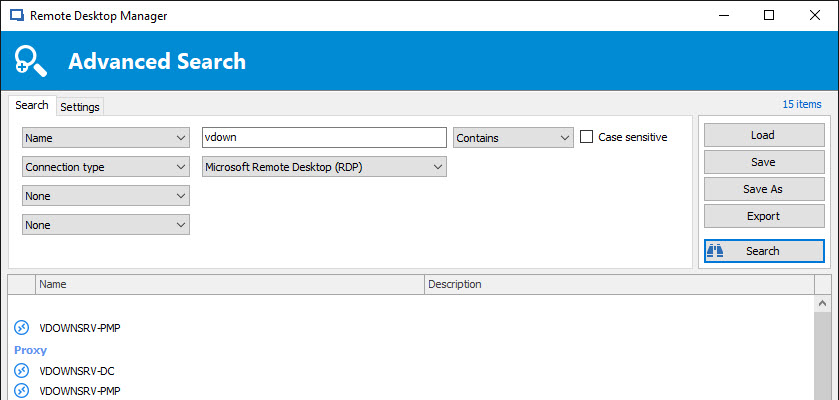
It's possible to do a search with a part of the name of the session + the session type if you want.
To do so, go in View -> Advanced Search and execute your search using the Name and Connection type fields.
See print screen below for an example.
Best regards,
Jeff Dagenais
2017-08-31_09-11-54.jpg