SSH private key in thycotic

Is it possible to setup a SSH connection using the private key & passphrase stored in a thycotic credential repository?
All Comments (18)
Hello,
This is actually a pretty good question.
Let me verify this with our engineering department and get back to you on this next week.
Best regards,
Jeff Dagenais
Hi Jeff,
Any update from your guys?
Thanks
Hello,
Our engineering department is still evaluating the feasibility of that integration.
We had difficulty with our Secret Server in our test environment last week. We should be able to look at this later this week or in two weeks.
Sorry about that.
Best regards,
Jeff Dagenais
Hello Cédric,
Good news, the engineering department confirm that they will add this feature in the list, but because of the complexity of the integration we do not have any estimate.
Regards,
David Grandolfo
Hello,
We will have support for the private key entries in Secret Server for RDM 13. You'll have to enable the private key mode in the Secret Server credential entry.
For the moment we cannot support the feature if your Secret Server instance is set to Windows Authentication. We're looking into what we can do to change this.
Regards,
Hubert Mireault
Hi,
I tried to use this setting in a test thycotic credentials connection but each time I select "as private key" put username , domain & password it reverts back to "as credentials" after saving.
version 13.0.6.0
Thanks for your feedback
Hello,
This issue should be fixed in the latest RDM stable version, 13.5.0.0. Could you try it out and see if it fixes the problem?
Regards,
Hubert Mireault
Hi,
Thanks for the answer, the latest version 13.5.0 solves the issue but I am requested to enter username & password when trying to connect.
This should not be the case as I want a SSH Key login, no username or password.
Did I miss something?
Thanks.
Cédric
The username is required as it should not be possible to login to an SSH terminal with only the private key. This is why it's possible to specify the username in the Secret Server entry when set to private key mode.
You shouldn't have to enter the password though, the option is only there if you want to use the entry differently or for certain systems as a backup login method.
Regards,
Hubert Mireault
Thanks for your prompt answer.
Ok, the username is set in the Secret Server entry. the secret is working from Thycotic.
RDM connection still request the password, and if I provide a wrong one then connection fails... other choice is to press "cancel" then it cancels the connection process.
see attached screenshots
prompt.png
test_connection.png
SecretServer.png
That looks like an issue, we'll take a look at it. Thank you Cédric.
Regards,
Hubert Mireault
Bonjour,
Puisque nous avons eu plusieurs communications en français, je prends la liberté de vous répondre dans cette langue.
Nous venons de tester la liaison avec Thycotic utilisant les mêmes configurations dont vous nous faites part. Suite à ces tests, l'entrée Thycotic semble bien fonctionner.
Je crois que la problématique est que l'utilisateur qui est utilisé pour se connecter à Thycotic n'a probablement pas accès à voir le mot de passe directement sur le serveur Thycotic.
Pouvez-vous nous confirmer le tout svp?
Cordialement,
David Grandolfo
Hi,
I will continue in English as some colleagues are following this topic and do not read french.
The Thycotic secret is working correctly from thycotic
We are not using a Thycotic ssh template with a password, because we do want to make key login only.
I provided screenshots of the thycotic setup and successful connection from thycotic without password.
And the user used to connect to thycotic form RDM has complete access to the secret, he has no access to password as it should not be used.
Regards
Cédric
key login from thycotic.png
thycotic_setup.png
Hi Cédric,
Thanks for this information,
I had a chat with my colleague about this and I need to test that specific scenario.
I will let you know for the result if this an issue with the application or something else.
Best regards,
David Grandolfo
Hi Cédric,
I just tested the same scenario as you and I created a specific Template for having the same session as you.
I tested with a private with and without passphrase, in both of the case when I call the private key from RDM I do not have any Password Prompt to connect to the server.
It's look like the issue is somewhere else.
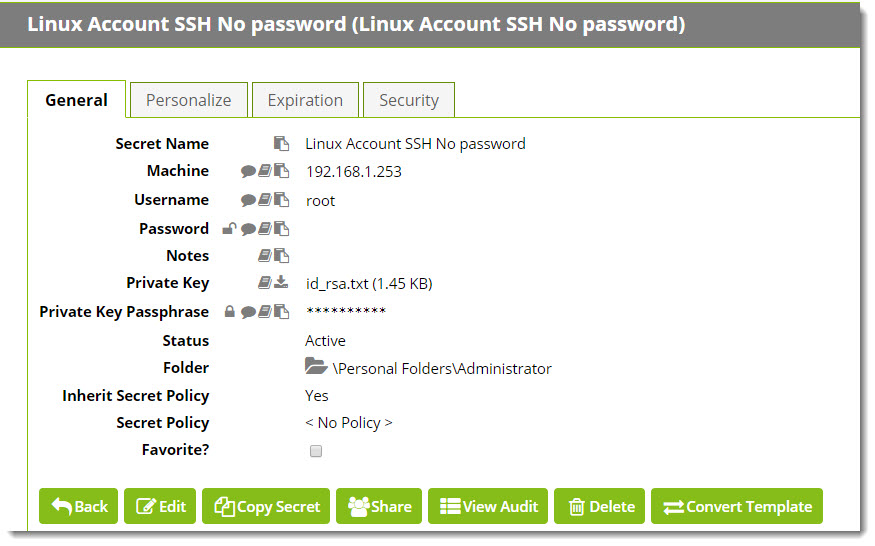
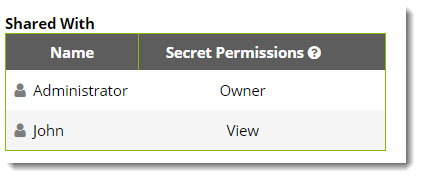
We don't have a lot of security in our Thycotic, my use is able to View the credentials. What about you, do you have specific access from your user to the entry?
I tried with List only and I got error from Thycotic.
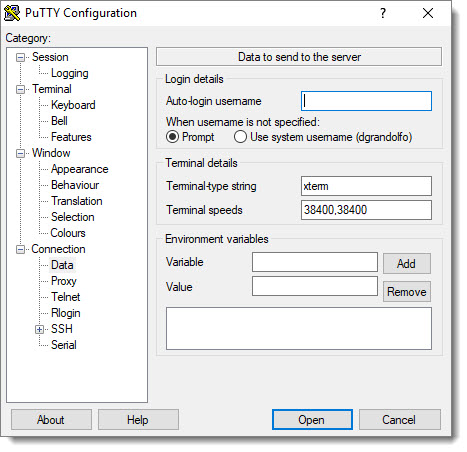
If possible could you also have a look with Putty. If you create a session for your server in Putty and link the Private key and add the username (Connection-- Data -- Auto-login username) Do you have the same Password pop-up?
Best regards,
David Grandolfo
Thycotic_Access.jpg
Putty_username.jpg
Thycotic.jpg
Hi David,
My user has also access to the secret.
When creating a connection in putty with "test" user and with the private key, no password pop-up.
Best Regards
Cédric
2018-04-03_14-40-14.png
2018-04-03_14-45-16.png
Hello,
I would need to verify this with David, however, he's in vacation this week.
I will have a chat with him on monday, next week.
Sorry for the delay.
Best regards,
Jeff Dagenais
Hello Cedric,
Thanks for all the information, base on this I'm not able to view exactly what is the difference between my test and your infrastructure. I would like to do a remote session to continue the diagnostic.
I just sent you an email to plan a remote session call to view the issue in real time.
Best regards,
David Grandolfo