Is there anyway to use advanced parameters with the built in SSH Shell?
Is there anyway to use advanced parameters with the built in SSH Shell?

I have connections that I need to access via PAM in a particular way. An example of something that works via cmd/powershell (first with $variables$ and then a dummy example):
I have tried every possible combination of VPN/Gateway/Tunnel etc that I can imagine. Is there a way to achieve the same functionality using the built in ssh shell?
All Comments (17)
Hello,
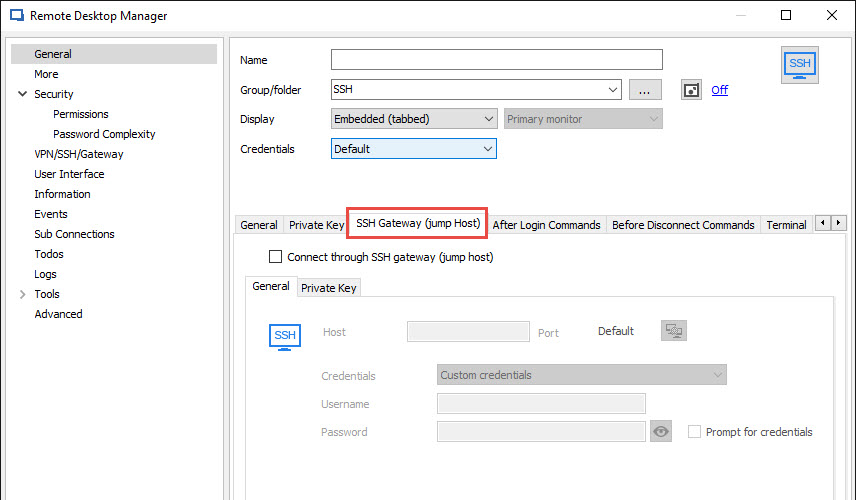
In our SSH Shell session, there's a tab to configure a Jump Host. Is this what you are looking for?
Best regards,
Jeff Dagenais
2017-08-14_20-21-44.jpg
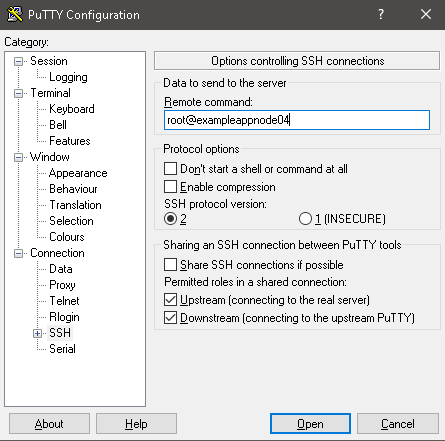
It is not. What I need is a SSH session that allocates a TTY for the command '$remoteuser$@$remotenode$'
Hello,
The SSH Shell session is our own integration of Putty.
How do you make this work in putty? Could you post some print screens.
Best regards,
Jeff Dagenais
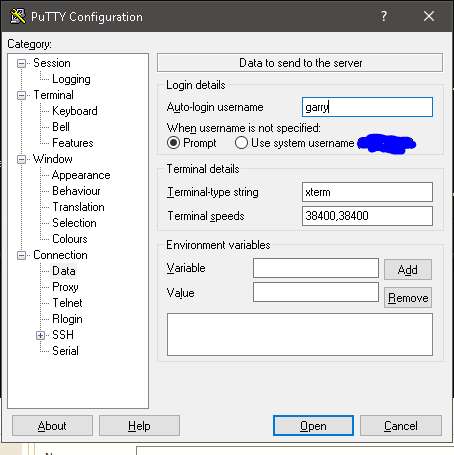
Sure! Here you go!
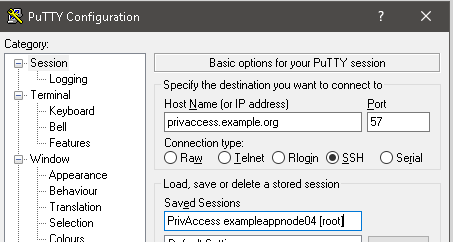
putty ssh example.PNG
putty data example.PNG
putty session example.PNG
Hello,
Thank you for the information.
I will transmit this information to the developer who has done our SSH Shell integration. However, he's currently in vacation so he will look at this when he will be back at the office.
Sorry for the delay.
Best regards,
Jeff Dagenais
Thank you. This feature working is by far my biggest sticking point with pulling the trigger on RDM, and I can't properly evaluate it without it.. Is there any way that my trial period could be paused or something? I'd be willing to fully uninstall the app.
Hello,
No problem to extend your trial. I will send you a new trial license via email.
Best regards,
Jeff Dagenais
Hello,
Luckily we didn't have to change anything to the terminal itself so I could make the change right away. This will be available in the next minor RDM update. The "Remote command" setting will be in the SSH entry under the "terminal" tab then in the "advanced" tab. If you encounter any issue with the feature we'll be happy to help :)
Regards,
Hubert Mireault
Thank you so much! Are minor updates released on any regular schedule(ex: One update each week with that weeks changes), or just as needed?
We expect a minor release in less than a week.
Regards
David Hervieux
2 quick questions:
1. Is there any update on when the next minor release is expected?
2. Is the license extension that I received active from the date it was sent or when I first received it? I ask because I am functionally unable to use the software until this feature is available.
Thank you for your time and help!
Hello,
For your questions;
1. A minor update will be available soon but I cannot provide an exact date.
2. The trial extension key that you received should be entered in Help -> Register Product to extend your trial time. Are you having issues with the registration?
Best regards,
Mark Beausejour
No issues, as I have not activated it yet. That is why I asked if the 30 days starts when I use the key, or when it was sent, because I want to make sure that I get at least the full 30 days to evaluate the software, which I can't really do before the feature lands.
Hello,
The trial license started the date that I have sent it to you.
If you need another one in approximately 20 days, just let us know here or send us an email at support@devolutions.net so that we can provide your a new key.
Best regards,
Jeff Dagenais
We found a problem in the release with ARD. We will not be able to release it this week but early next week.
Sorry about that.
David Hervieux
Hello,
The release of RDM 12.6.5 is now available. You can give it a try.
Regards
David Hervieux
It seems to be working great. Thanks for this new feature guys! :)