Feature disappeared

Hello,
Since the last upgrades the interface has been changed and I am no longer able to access the footer items that were very conveniently at the bottom of every session. Instead, I now have to navigate to the VIEW menu and click on individual items which pop up to obscure the view. This is terrible. Is it possible to restore the original functionality? I don't understand why this was changed!
I'm happy to raise this as an official support request. I have support and maintenance until 2010 :-)
Thank you in advance
All Comments (11)
Hi,
Do you have example of what you were using or maybe a print screen of the old version? I'm because this does not seem to be a recent change so maybe all you need is to use the option "Use classic dashboard".
Regards
David Hervieux
I used to be able to use the items in the footer section at the bottom like a status bar. I don't recall which version it was but I tried the Classic UI and it is not the one I had. I think the change was made since version 12. I'm not entirely sure.
Unfortunately, I don't have an older version to test.
RemoteDesktopManager_2017-08-09_12-29-12.png
I think the option you are looking for is in remotedesktopmanager.cfg. Just edit the xml
<ShowRibbonGalleries>true</ShowRibbonGalleries>
It will be exposed in the UI for the next version.
Regards
David Hervieux
I checked my cfg file and that option is already there. I'm not sure what it actually does. The items in the screenshot I attached are already there and visible but they used to be in the bottom status bar where I had easy access to them. They're no longer there since recent updates and I was wondering if it's possible to restore them. I've managed to get hold of 11.7 and took a screenshot of the status bar.
It was great as they would auto-hide and so I could take a quick look at the descriptions or any notes etc and navigate away without interruption. It seems like a backward step to remove it
vmware_2017-08-10_09-31-24.png
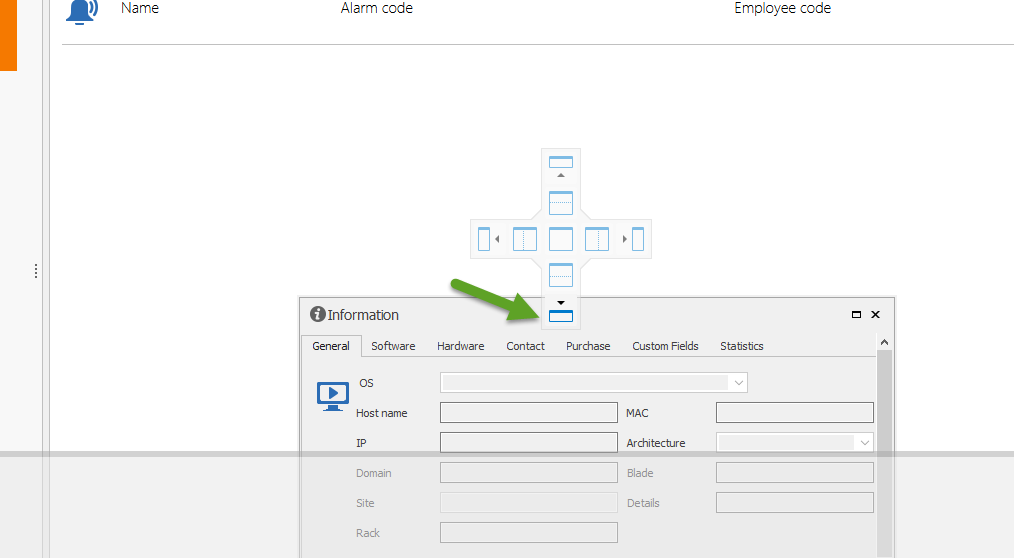
Could you try to go in View->Footer and click on the item that you want. A dockable window will appear and you will be able to dock it at the bottom. It's not exactly the same but I think it could help.
Just unpin the docked control.
Regards

David Hervieux
Footer2.png
Footer.png
Thank you. I've tried that but it takes up a lot of space and does not auto-hide. Would it be possible to request the return of this useful footer?
What do you mean by it does not auto hide? Have you clicked the pin button?
Regards
David Hervieux
No it's not there any more like it used to be. See the attached screenshot for the Descriptions window. You either close it or maximise it to fill the entire screen and it takes up a lot of space whereas before it would appear as you clicked on it and auto-hide when you click elsewhere in the application.
2017-08-10_14-49-21.png
I think that it's not docked at the right place. Take a look at my print screen. I think it's docked for you in the center content and not the statusbar.
Regards
David Hervieux
Thank you. That worked much better. Any chance you could bring back the old status bar in future releases?
I will try to find a way to bring this back for a future version.
Regards
David Hervieux