Using VPN entry as VPN on other entries
0 vote

Hi
I'm working as a consultant and RDM is a really big help for me when it comes to managing 50+ different connections to customers. Some customers have VPNs which is automated just fine. Some customer have IP blocking though which requires that I'm in-office. A have a VPN entry set up for being "in-office" when I'm at home.
It would be really nice if RDM could link my office VPN entry to all customers that have IP block. Like selecting "Existing"->"Gateway" and then selecting the VPN entry.
Since I have customers divided into groups already, it isn't easy to just group them all under the same folder and setting up VPN there and use "Inherit" as VPN on the entries.
Any other ideas how to set this up is welcome, otherwise this feature would be a big help!
All Comments (4)
Hello,
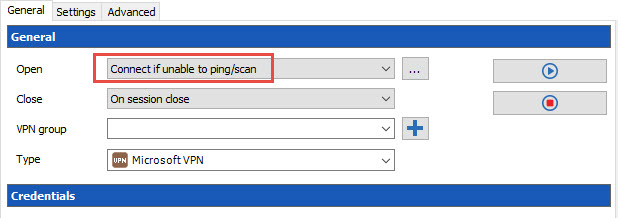
I don't know if this gonna help you, but we have an option called Connect if Unable to ping/scan that you can use in your VPN configuration.
Could you give it a try and see if this helps.
Best regards,
Jeff Dagenais
2017-08-01_20-57-37.jpg
Hi
I use that quite a lot for customers with more than one server where the VPN is set up on the group /customer and inherited on the rdp entries.
The problem here is: how do I tell RDM to use my VPN entry in another group /folder if it can't ping/connect so that I won't have to set up the "in-office" VPN on all 10 entries (in different groups) and then have to maintain all of them separately 😊
Hello,
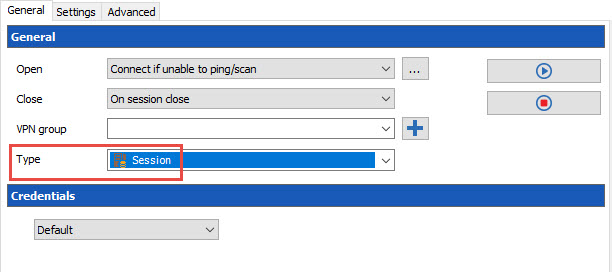
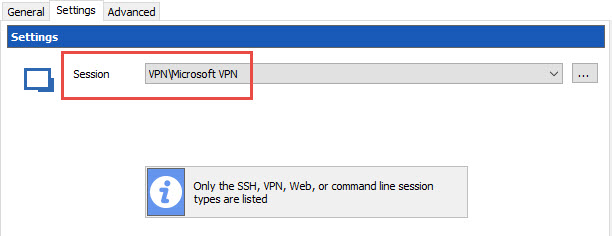
It possible to configure your RPD entries to use a specific VPN entry located in another folder.
In the RDP entry, go in the VPN section and select the General tab. In the Type field, select Session.
Now, click on the Settings tab and select your VPN entry in the dropdown list
Is this what you are looking for?
Best regards,
Jeff Dagenais
2017-08-02_11-38-08.jpg
2017-08-02_11-35-14.jpg
Yes thank you, that was exactly what I needed :)
This post can be moved to another subforum if need be :)