importing entries from Microsoft Remote Desktop Connection Manager v2.7
importing entries from Microsoft Remote Desktop Connection Manager v2.7

Has anyone tried to import entries from this application? It does save the connections to an XML file but the configuration of the XML for obvious reason it is not directly compatible with RDM.
Currently, some coworkers use this application and I am sure if I can show them how awesome RDM is I can get them to start using RDM. But I need to be able to show them with their remote connections. Here is an example of the format of the xml (they use an RDG extension)
<?xml version="1.0" encoding="utf-8"?>
<RDCMan programVersion="2.7" schemaVersion="3">
<file>
<credentialsProfiles />
<properties>
<expanded>True</expanded>
<name>test</name>
</properties>
<server>
<properties>
<displayName>Server 1</displayName>
<name>1.1.1.1</name>
</properties>
<logonCredentials inherit="None">
<profileName scope="Local">Custom</profileName>
<userName>username</userName>
<password>AQAAANCMnd8BFdERjHoAwE/Cl+sBAAAAU7TWsuxYnk+Oj4dbHZOR+wAAAAACAAAAAAADZgAAwAAAABAAAABKgCEPWPTnJVCAvFzmOQMYAAAAAASAAACgAAAAEAAAAHuLA+TXV3OIIYYiR4yCuUkgAAAAm+9S5igRPn5P99uH1+Y99YvJCCTJna3RrJd10ukcgacUAAAA+dphp4Aduj54N/CndK6bn6IA/AE=</password>
<domain>US</domain>
</logonCredentials>
</server>
<server>
<properties>
<displayName>Server 2</displayName>
<name>2.2.2.2</name>
</properties>
<logonCredentials inherit="None">
<profileName scope="Local">Custom</profileName>
<userName>user2</userName>
<password>AQAAANCMnd8BFdERjHoAwE/Cl+sBAAAAU7TWsuxYnk+Oj4dbHZOR+wAAAAACAAAAAAADZgAAwAAAABAAAAC8aSsnR5Eh2S3eMrWjuB3PAAAAAASAAACgAAAAEAAAADo4jjPVXBtCECL7mzCduZ8gAAAA7r69eiG8prNuPVpxcnuMBNDkt5ZuWu2+Xw+kM3g4LbYUAAAASnaMV9DClDp4RTCKw36wz25yrzo=</password>
<domain>US</domain>
</logonCredentials>
</server>
</file>
<connected />
<favorites />
<recentlyUsed />
</RDCMan>
All Comments (3)
Hello,
What version of RDM are you using?
Best regards,
Marc Beauséjour
Hello again,
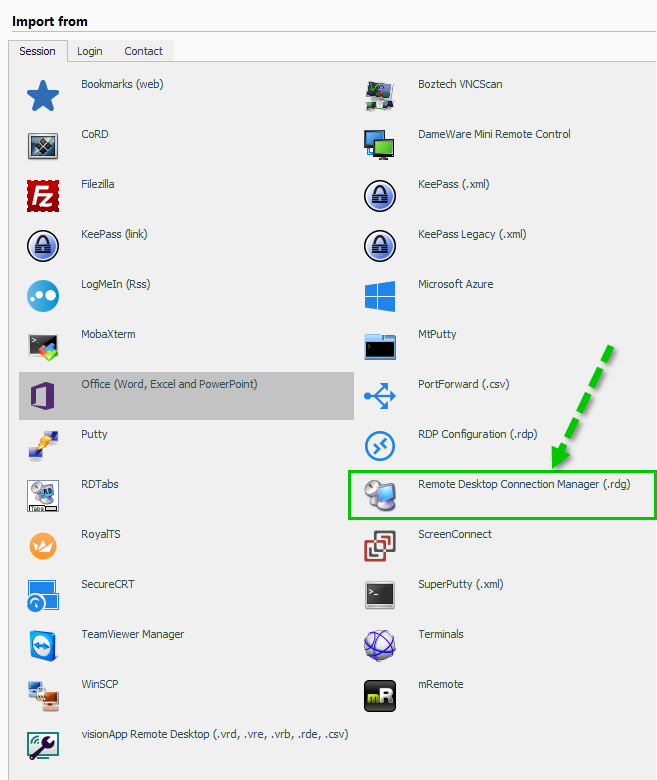
I forgot to mention that we have an import option for RDC Manager in File - Import. Have you tried it?
Best regards,
Marc Beauséjour
2017-07-23_0-58-37.png
Thanks,
If it was a spider it wooda bit me!! :)