Questions from new RDM user

Hi all,
Currently I'm testing RDM Free version to see if we can use this for our company to configure and maintain all our remote connections.
Background : I'm working for a company with about 150 customers. All these customers have their own specific remote connections (RDP, different VPN's, etc) which is a real pain to maintain at this moment. I'm looking for a decent solution to centralize all these remote connections.
- In the free version all VPN clients need to be installed locally (like Cisco AnyConnect and Windows Open VPN) in order to be able to use them. Is it possible in the Enterprise version to use the different VPN clients without local installations ?
- Currently when I connect to a customer using RDP and a colleague is also connected, his connection is taken over.
Is there a way in the Enterprise version to see who if a colleague is already connected to a customer, so that his session is not taken over ?
Thanks in advance for the replies
All Comments (2)
Hi,
VPN Client has anytime to be installed locally as you connect from your client to the remote network. It's by design of VPN.
Alternative: RDM Enterprise with RDM-Jump-Agent doesn't need VPN Client
RDM with DVLS-Database can inform you which colleague is connected to the session and you can choose to take over or cancel.
Kind Regards
Markus
======================
Hi Ron,
As Markus said, many VPN software need to be preinstall on your computer. But you can manage the automatic open VPN connection with RDM. In you RDP entry if you select the VPN/SSH/Gateway section you are able to configure the VPN Session to be open prior of your RDP. You could have more information about the VPN configuration here.
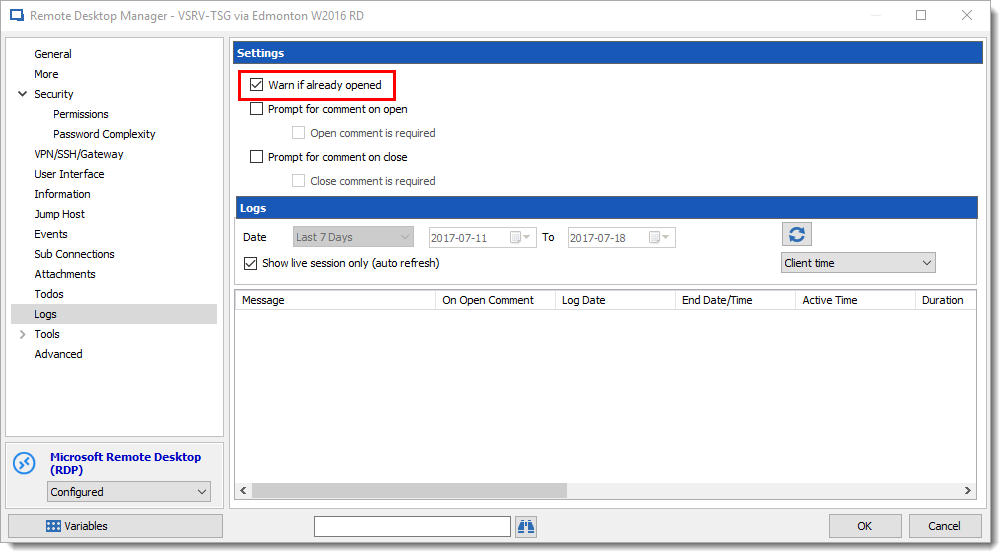
Also regarding the way to not bump your colleague with any advanced data source you can right click --> properties of the RDP session and select the Logs section and check the box Warn if alreadu opened.
Regards,
David Grandolfo
warn_if_opened.png