RDM stops responding after a USB thumb drive is inserted in workstation
RDM stops responding after a USB thumb drive is inserted in workstation

I'm using RDM Enterprise 12.5.4.0 and currently, every time I connect a USB thumb drive to my workstation, RDM will stop responding. It looks like RDM is trying to use the drive as a local resource in the RDP session.
All Comments (6)
Hi David,
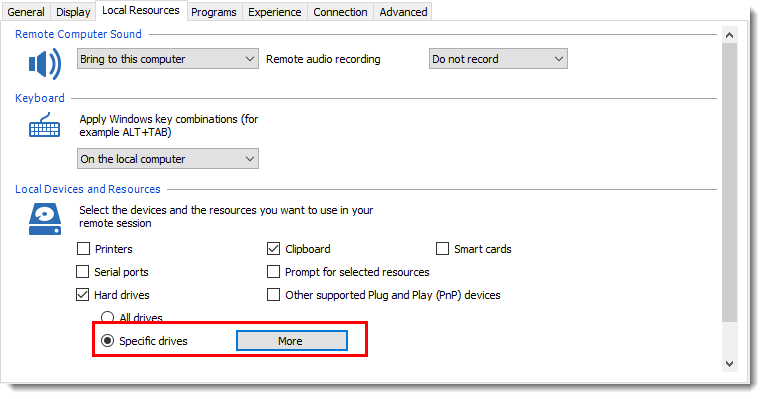
Could you have a look at your RDP session and be sure you selected the Specific drives and not all drive to be sure it's no taken by RDM. You can change it in the properties of your session as showed below.
If you have multiple entry to edit you can use the Batch Edits and select the Edit Sessions (Session Type Settings) as explain in this help topic.
Best regards,
David Grandolfo
rdp_drives.png
David,
I checked the two main sessions that I use and they were set to Specific Drives and only C:\ was checked. I went ahead and used batch edit to set all the sessions the same. I will test again.
Log Name: Application
Source: .NET Runtime
Date: 7/18/2017 1:12:01 PM
Event ID: 1026
Task Category: None
Level: Error
Keywords: Classic
User: N/A
Computer:
Description:
Application: RemoteDesktopManager64.exe
Framework Version: v4.0.30319
Description: The process was terminated due to an unhandled exception.
Exception Info: System.Runtime.InteropServices.COMException
at MS.Win32.Penimc.UnsafeNativeMethods.CoCreateInstance(System.Guid ByRef, System.Object, Int32, System.Guid ByRef)
at MS.Win32.Penimc.UnsafeNativeMethods.CreatePimcManager()
at MS.Win32.Penimc.UnsafeNativeMethods..cctor()
Exception Info: System.TypeInitializationException
at MS.Win32.Penimc.UnsafeNativeMethods.CreateResetEvent(IntPtr ByRef)
at System.Windows.Input.PenThreadWorker..ctor()
at System.Windows.Input.PenThreadPool.GetPenThreadForPenContextHelper(System.Windows.Input.PenContext)
at System.Windows.Input.StylusWisp.WispTabletDeviceCollection.UpdateTabletsImpl()
at System.Windows.Input.StylusWisp.WispTabletDeviceCollection.UpdateTablets()
at System.Windows.Input.StylusWisp.WispTabletDeviceCollection..ctor()
at System.Windows.Input.StylusWisp.WispLogic.get_WispTabletDevices()
at System.Windows.Input.StylusWisp.WispLogic.OnDeviceChange()
at System.Windows.Input.StylusWisp.WispLogic.HandleMessage(MS.Internal.Interop.WindowMessage, IntPtr, IntPtr)
at System.Windows.SystemResources.InvalidateTabletDevices(MS.Internal.Interop.WindowMessage, IntPtr, IntPtr)
at System.Windows.SystemResources.SystemThemeFilterMessage(IntPtr, Int32, IntPtr, IntPtr, Boolean ByRef)
at MS.Win32.HwndWrapper.WndProc(IntPtr, Int32, IntPtr, IntPtr, Boolean ByRef)
at MS.Win32.HwndSubclass.DispatcherCallbackOperation(System.Object)
at System.Windows.Threading.ExceptionWrapper.InternalRealCall(System.Delegate, System.Object, Int32)
at System.Windows.Threading.ExceptionWrapper.TryCatchWhen(System.Object, System.Delegate, System.Object, Int32, System.Delegate)
at System.Windows.Threading.Dispatcher.LegacyInvokeImpl(System.Windows.Threading.DispatcherPriority, System.TimeSpan, System.Delegate, System.Object, Int32)
at MS.Win32.HwndSubclass.SubclassWndProc(IntPtr, Int32, IntPtr, IntPtr)
Log Name: Application
Source: Application Error
Date: 7/18/2017 1:12:02 PM
Event ID: 1000
Task Category: (100)
Level: Error
Keywords: Classic
User: N/A
Computer:
Description:
Faulting application name: RemoteDesktopManager64.exe, version: 12.5.4.0, time stamp: 0x591f3ea2
Faulting module name: KERNELBASE.dll, version: 6.1.7601.23807, time stamp: 0x5915fe14
Exception code: 0xe0434352
Fault offset: 0x000000000001a06d
Faulting process id: 0x8cc
Faulting application start time: 0x01d2ffdcd6a0d144
Faulting application path: C:\Program Files (x86)\Devolutions\Remote Desktop Manager\RemoteDesktopManager64.exe
Faulting module path: C:\WINDOWS\system32\KERNELBASE.dll
Report Id: 5c13a55a-6bf5-11e7-b08c-94659c82b274
Hello,
I see that you run RDM in 64-bit.
Could you please open remotedesktopmanager.exe which is the default 32-bit launcher instead?
If this doesn't help, could you also try the repair tools offered here?
https://help.remotedesktopmanager.com/troubleshooting_csf.htm
Best regards,
Marc Beauséjour
Mark,
The 32-bit executable has not had the issue.
And does the entry is open with a External Display or embedded ?
Because if the entry is open External that's mean the rdp session is manage by the MSTSC.EXE application from windows. If it's embedded it's the active-X of Microsoft embedded in RDM, so we will be able to take a look if the active-x in 64 bits have a problem with the drive selection.
Best regards,
David Grandolfo