Unable to view credential of type Connection String

Hi,
In RDM I created a new credential of type "Connection String". I configure the data source as Oracle Database and specified the host, username and password. I can also test the connection and everything work fine.
When I go back to RDM navigation tree and select my credential and click on view password, the screen that appear is showing the fields Username, Domain and password but everything is blank.
Is this a bug or I am missing something?
Regards,
Martin
All Comments (9)
Hello,
What version of RDM are you using?
Best regards,
Mark Beausejour
I am using Remote Desktop Manager Enterprise Edition Version 12.0.8.0
Martin
Hello,
We have been able to reproduce your issue and a ticket has been submitted to our engineering department.
Thank you so much for reporting this!
Best regards,
Mark Beausejour
Hello,
Thank you again for sharing this with us.
You simply have to check the option Allow view credentials action in the properties of the entry;
Best regards,
Mark Beausejour
Hi,
This checkbox is missing when looking in the properties.
I will check with our RDM Administrator if it can be related to some missing privileges
Martin
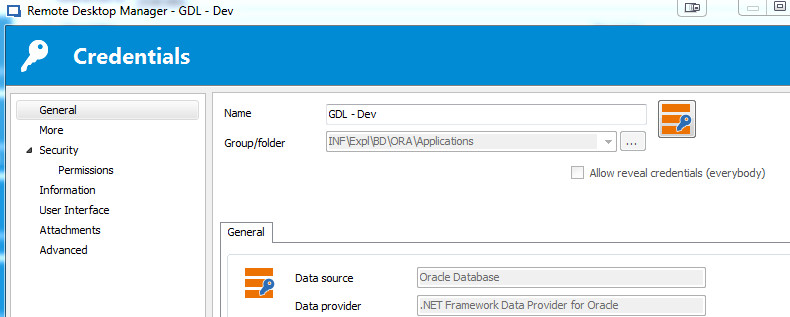
2017-07-18_075238.jpg
Hi,
I just check with our RDM Admin and even when we check the checkbox "Allow view Credential Action" we are not able to view the password.
Also, what kind of privileges is required for a user to have this checkbox available? The admin account have it but not me.
Martin
Hello,
Only an Administrator can enable this setting.
I've just tested with version 12.5.4.0 and I can confirm your findings.
It seems this was fixed in our latest beta version.
Could you please try it out? You can download the ZIP package here to not affect your local installation;
https://remotedesktopmanager.com/Home/Download#Beta
Best regards,
Mark Beausejour
Hi,
I confirm that the new beta version 12.5.12.0 is fixing the view credential problem.
I don't know if I should open a new thread or open a new one but I woul like to suggest some improvement with the view credential of the connection string.
When you click "View Password" button, the pop up that appear is showing 3 fields (username, domain and password). The username and password are now filled correctly but the domain is still empty. Maybe it could be a good idea that instead of the domain field it should be possible to view the Host or the server name referenced by the connect string.
Regards,
Martin
I will add a feature request for that.
Regards
David Hervieux