Java Web Start Add-on macro problem

I'm trying to use "after connect" event with macro to type in my credentials to a java app using the Java Web Start Add-on.
The parameters are $USERNAME$ and $PASSWORD$ and it does not type the details (The "@domain" text it types).
The line is:
{WAITFORWINDOW:VMware vRealize Orchestrator Login...;timeout:500000}{Delay}{TAB}{Delay}$USERNAME$@domain{Delay}{TAB}{Delay}$PASSWORD${Delay}{ENTER}
I'm using a credential entry to save the user and password.
Please assist in solving this...
Thanks
Snir
All Comments (8)
Hello,
There's two options to enable if you want to be able to send the password using the $PASSWORD$ variable.
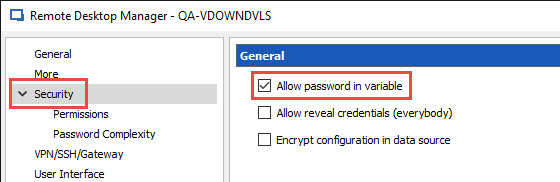
In your session, go in the Security section and check the Allow password in variable option.
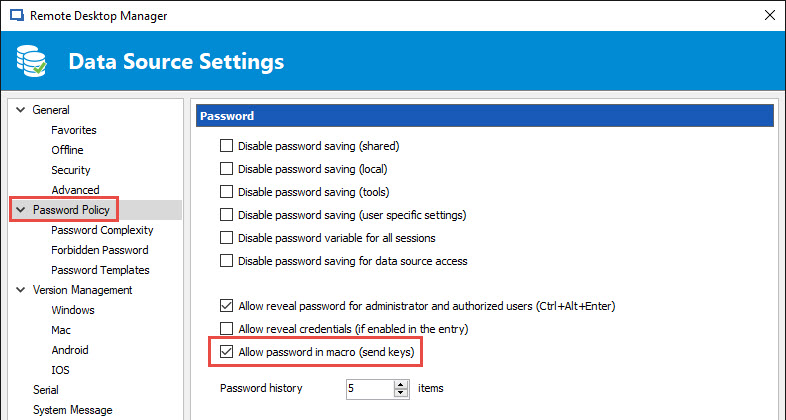
In Administration -> Data Source Settings -> Password Policy, enable the option Allow password in macro.
Best regards,
Jeff Dagenais
2017-07-13_09-02-56.jpg
2017-07-13_08-58-17.jpg
both are configured.
The macro works for web entry but not for Java.
Snir
Hello,
What is not sent exactly via the typing macro?
What type of web browser are you using? IE, Chrome or Firefox?
Are launching your session in embedded or external mode?
Best regards,
Jeff Dagenais
I'm using the java add on not a browser.
The items that are not written are the $username$ and $password$
Snir
Hello,
Sorry my bad, I was confused this morning :(
Let me verify this with our engineering department.
Best regards,
Jeff Dagenais
any news ?
JF is on vacation and I'm not sure what was the answer. I will ask another person to verify.
Regards
David Hervieux
Hello,
Could you make sure you have version 2.2.0.0 of the Java Web Start add-on? There was an issue fixed in that version of the add-on in regards to sending the username/password in macros. With that version, I'm unable to reproduce the issue on the latest stable version of RDM (12.6.0.0).
Regards,
Hubert Mireault