Shared favorites not displaying in list since upgrade.

For some reason I am not seeing my favorites (Shared) in the favorites list since upgrading.
I did go the one of the servers I had marked as a favorite, and it does show "Remove from favorites(shared)"
I tried to uncheck and recheck, but that didn't work.
If I add to Favorites(Local), then it will show up.
Can you help me resolve this issue.
I am currently on Windows 10 and have RDM 12.5.12.0
Thanks
Bill
All Comments (3)
Hello,
Firstly, go in File -> Options -> User Interface -> Favorites and make sure that the Show favorite icon in connection list option is checked.
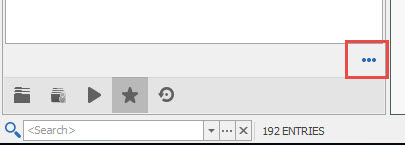
Secondly, click on the Favorites tab/icon at the botton of the navigation pane, press the ellipsis button and make sure that the Show Shared Favorites option is enabled.
In conclusion, you should now see your shared favorites has expected.
Best regards,
Jeff Dagenais
2017-07-10_13-58-12.jpg
Thanks,
I must have unchecked the "Show Shared Favorites option" It was not enabled.
Thanks!!!
Hi,
The shared favorites are no longer enabled by default for now. We plan to rework this feature this was the first step.
Regards
David Hervieux