Screen Connect not working with RDM...

We've updated our Screen Connect server a few days ago and looks like the RDM extension is grayed out (it's still enabled, but just grayed out):
On RDM, this is what I get (I'm on latest version btw):
--------------------------------------------------------------------------------------------------------------------
I'm always using the latest beta RDM x64 version.
Local data source.
All Comments (4)
Hello,
Since a few months now, ScreenConnect as limited (or I can say stop) providing us support regarding the extension and the integration of ScreenConnect in RDM because of our new product Wayk Now - https://wayk.devolutions.net/
You can follow this thread on their forum for more information
http://forum.screenconnect.com/yaf_postsm36613_RANT---You-guys-killed-integration-to-Devolutions-Remote-Desktop-Manager.aspx
That being said, if needed, you can download the extension from our Online help
https://help.remotedesktopmanager.com/sessions_screenconnect.htm
Please note that if your ScreenConnect server is now on the cloud, this is not supported in RDM.
Best regards,
Jeff Dagenais
Hello,
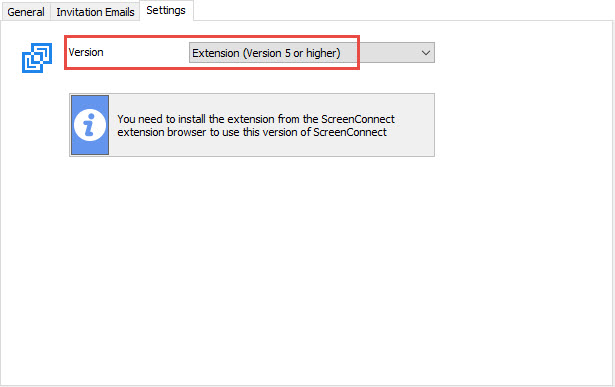
I forgot to mentioned in my previous that you can also try to go in the Settings tab of your ScreenConnect session and select Extension to see if that helps
Best regards,
Jeff Dagenais
2017-07-03_20-43-06.jpg
Hello,
after Update ScreenConnect to Version 6.3.13446.6374 the extension always get a "load Error".
I Installed it manually with your newest Version but it won´t work.
Since it is important that the RDM connection runs without problems we urgently need a solution.
Best regards,
Christoph Gast

@Christoph
Since a few months now, ScreenConnect as limited (or I can say stop) providing us support regarding the extension and the integration of ScreenConnect in RDM because of our new product Wayk Now - https://wayk.devolutions.net/
You can follow this thread on their forum for more information
http://forum.screenconnect.com/yaf_postsm36613_RANT---You-guys-killed-integration-to-Devolutions-Remote-Desktop-Manager.aspx
At this point, I recommend you to post on their forum and ask for support from their team because without their help, there's nothing much we can do.
Best regards,
Jeff Dagenais