Shared Templates end up in my private vault

I've been renaming the Shared Templates in order to gain a more logical sort order for my RDM users when they make use of the Quick Connect feature where the entire list of templates is presented. I employed a "QuickConnect - <Session Type>" naming scheme for such entries and "Sync - <Session Type>" for the templates I use for automated synchronization tasks. Besides the name, I didn't change anything on those templates.
Seemed fine at first but after restarting RDM, only the QuickConnect templates are still in the Shared Templates list. The others seemed lost until I stumbled upon them in my private vault as nameless session entries. Even though they lost their names, the settings still seem accurate though.
Question is: what happened and is there any way I can get them back to my Shared Templates?
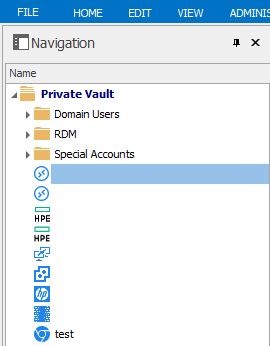
-------------------
Remote Desktop Manager Enterprise Edition 12.6.6.0 64 Bit - Data Source: SQL Server
Running on Windows Server 2012R2 VMs with Remote Desktop Services feature, serving as common work environment for 30 Windows Server administrators
1.JPG
All Comments (4)
Hello,
I am not able to reproduce your issue with RDM 12.5.12.0.
Strange that you see empty sessions with no names in your Private Vault. Could you try to do a CTRL + Refresh to refresh the local cache to see if that helps.
Best regards,
Jeff Dagenais
Indeed, a CTRL+Refresh brought back my Shared Template items with their previous name - even the deleted ones.
I'll do the same process again now and see about the outcome.
-------------------
Remote Desktop Manager Enterprise Edition 12.6.6.0 64 Bit - Data Source: SQL Server
Running on Windows Server 2012R2 VMs with Remote Desktop Services feature, serving as common work environment for 30 Windows Server administrators
Hello,
We've also identified the issue and a fix has been made internally. With the next beta of RDM this issue shouldn't happen again.
Regards,
Hubert Mireault
Hi Hubert,
that's good to hear. When I just redid those changes I didn't face that issue anymore. Must have been some special circumstances necessary for it to happen.
-------------------
Remote Desktop Manager Enterprise Edition 12.6.6.0 64 Bit - Data Source: SQL Server
Running on Windows Server 2012R2 VMs with Remote Desktop Services feature, serving as common work environment for 30 Windows Server administrators