Remote Desktop Manager Free Edition crashes whenever there is a network disconnection
Remote Desktop Manager Free Edition crashes whenever there is a network disconnection

Ever since around v2.6.0.0 right up to v3.5.5.0 Remote Desktop Manager crashes every time there is some sort of network disconnection. This happens on multiple computers and multiple operating systems versions. For example the WiFi may drop or a VPN drops, RDM will crash after a while. 4 of my friends who have RDM experience the exact same issue. I decided to stop being lazy after all these years and report the issue. I've included a screenshot of one of the many error messages that may appear.
crash.PNG
All Comments (22)
Hi,
What session type do you have opened when this happen?
Regards
David Hervieux
David thank you for the quick response. This happens when using Remote Desktop (RDP). If there is any other information you need I'm happy to provide.
Hello,
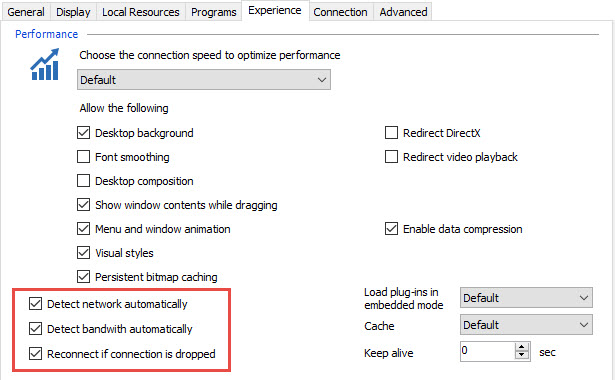
Could you make sure that the 3 options below are enabled in the Experience tab of your RDP session:
Other question: What type of data source are you using?
Best regards,
Jeff Dagenais
2017-07-03_10-33-17.jpg
Hi Jeff,
> Could you make sure that the 3 options below are enabled in the Experience tab of your RDP session:
All those settings are ticked except for 'Detect network automatically'. I'll tick that now and see if it makes a difference.
> Other question: What type of data source are you using?
The source is a XML file which lives locally in My Documents.
Hello,
Do you have something relevant in Help -> View Application Log?
Could you attach them in a text file to this thread please.
Best regards,
Jeff Dagenais
Another question. Could you try to verify if you have an SSH connection opened when this crash happen?
Regards
David Hervieux
The log is empty for the past 3 months. Weird.
I can confirm the only type of connection ever used is RDP.
Something else to note is the XML file has 461 RDP entries but I don't think that is causing the crash. I usually have roughly 3 to 6 sessions open at one time.
Do you use the Xml on a shared drive or with OneDrive or DropBox?
Regards
David Hervieux
The XML is not shared on any cloud system, neither is the location it sits redirected across the network (AD folder redirection). The XML file is literally on the local hard drive.
I've attached a screenshot of another type of crash I get. This usually is triggered when doing too many copy / paste (I perform a copy/paste maybe every 15min?) from the server to my local workstation via RDP session. The type of data in the clip board is just text being pasted into Notepad.
RDM_Crash2.png
Hello,
Do you have something relevant in Event Viewer regarding those crashes?
Best regards,
Jeff Dagenais
Apologies for the delay. I can't see any errors in Event Viewer relating to RDM.
Hello,
I am puzzled at this time.
Could you make sure that all the prerequisite software's are installed on your computer
https://help.remotedesktopmanager.com/installation_prerequisite.htm
Best regards,
Jeff Dagenais
@ Jeff, those packages are installed on the machine.
Apologies, there are actually event logs in Event Viewer. I was looking at the wrong machine at the time. Here are the entires.
Log Name: Application
Source: .NET Runtime
Date: 14/07/2017 12:41:48 PM
Event ID: 1026
Task Category: None
Level: Error
Keywords: Classic
User: N/A
Computer: laptop01
Description:
Application: RemoteDesktopManagerFree.exe
Framework Version: v4.0.30319
Description: The process was terminated due to an unhandled exception.
Exception Info: exception code c0000005, exception address 77DC1C76
Log Name: Application
Source: Application Error
Date: 14/07/2017 12:41:49 PM
Event ID: 1000
Task Category: (100)
Level: Error
Keywords: Classic
User: N/A
Computer: laptop01
Description:
Faulting application name: RemoteDesktopManagerFree.exe, version: 3.5.1.0, time stamp: 0x591cdf81
Faulting module name: ntdll.dll, version: 6.3.9600.18696, time stamp: 0x5915ecd6
Exception code: 0xc0000005
Fault offset: 0x00041c76
Faulting process id: 0x3a0
Faulting application start time: 0x01d2fc2df72d5b4a
Faulting application path: C:\Program Files (x86)\Devolutions\Remote Desktop Manager Free\RemoteDesktopManagerFree.exe
Faulting module path: C:\windows\SYSTEM32\ntdll.dll
Report Id: fb9548ae-683d-11e7-828a-d0df9a3e2edf
Faulting package full name:
Faulting package-relative application ID:
Log Name: Application
Source: Windows Error Reporting
Date: 14/07/2017 12:44:55 PM
Event ID: 1001
Task Category: None
Level: Information
Keywords: Classic
User: N/A
Computer: laptop01
Description:
Fault bucket 109032362991, type 1
Event Name: APPCRASH
Response: Not available
Cab Id: 0
Problem signature:
P1: RemoteDesktopManagerFree.exe
P2: 3.5.1.0
P3: 591cdf81
P4: ntdll.dll
P5: 6.3.9600.18696
P6: 5915ecd6
P7: c0000005
P8: 00041c76
P9:
P10:
Attached files:
C:\Users\testuser\AppData\Local\Temp\WERA373.tmp.WERInternalMetadata.xml
These files may be available here:
C:\Users\testuser\AppData\Local\Microsoft\Windows\WER\ReportArchive\AppCrash_RemoteDesktopMan_95f448abbe650553c7dc22d9e75af8ed82446ea_86d4ad15_23ff7a32
Analysis symbol:
Rechecking for solution: 0
Report Id: fb9548ae-683d-11e7-828a-d0df9a3e2edf
Report Status: 0
Hashed bucket: e98f68530960790bfbb705763512b643
Log Name: Application
Source: Application Error
Date: 14/07/2017 12:46:36 PM
Event ID: 1000
Task Category: (100)
Level: Error
Keywords: Classic
User: N/A
Computer: laptop01
Description:
Faulting application name: svchost.exe_WbioSrvc, version: 6.3.9600.17415, time stamp: 0x54504177
Faulting module name: unknown, version: 0.0.0.0, time stamp: 0x00000000
Exception code: 0xc0000005
Fault offset: 0x0000000000000000
Faulting process id: 0x22d0
Faulting application start time: 0x01d2fc4b68c28166
Faulting application path: C:\windows\system32\svchost.exe
Faulting module path: unknown
Report Id: a69809bb-683e-11e7-828a-d0df9a3e2edf
Faulting package full name:
Faulting package-relative application ID:
Log Name: Application
Source: Windows Error Reporting
Date: 14/07/2017 12:46:36 PM
Event ID: 1001
Task Category: None
Level: Information
Keywords: Classic
User: N/A
Computer: laptop01
Description:
Fault bucket , type 0
Event Name: BEX64
Response: Not available
Cab Id: 0
Problem signature:
P1: svchost.exe_WbioSrvc
P2: 6.3.9600.17415
P3: 54504177
P4: StackHash_5100
P5: 0.0.0.0
P6: 00000000
P7: PCH_84_FROM_BRCMSENSORADAPTER+0x0000000000006D58
P8: c0000005
P9: 0000000000000008
P10:
Attached files:
These files may be available here:
C:\ProgramData\Microsoft\Windows\WER\ReportQueue\AppCrash_svchost.exe_Wbio_de79fca3b934e8a462a974d458c4a9bbd71df5_06df9101_12650362
Analysis symbol:
Rechecking for solution: 0
Report Id: a69809bb-683e-11e7-828a-d0df9a3e2edf
Report Status: 4100
Hashed bucket:
Log Name: Application
Source: Application Error
Date: 14/07/2017 12:46:57 PM
Event ID: 1000
Task Category: (100)
Level: Error
Keywords: Classic
User: N/A
Computer: laptop01
Description:
Faulting application name: mstsc.exe, version: 6.3.9600.17415, time stamp: 0x5450434f
Faulting module name: ntdll.dll, version: 6.3.9600.18696, time stamp: 0x59153753
Exception code: 0xc0000374
Fault offset: 0x00000000000f1c00
Faulting process id: 0x1f8c
Faulting application start time: 0x01d2fc3f37ee96f5
Faulting application path: C:\windows\system32\mstsc.exe
Faulting module path: C:\windows\SYSTEM32\ntdll.dll
Report Id: b387bedc-683e-11e7-828a-d0df9a3e2edf
Faulting package full name:
Faulting package-relative application ID:
Report.wer
Report2.wer
Hello,
I don't know if this gonna help, but I would like you to use FreeRDP as your RDP engine in RDM.
To do so, go in File -> Options -> Types -> RDP and change the RDP field for FreeRDP.
In your RDP session, in the Advanced tab, make sure that Default is selected for the RDP version field.
Best regards,
Jeff Dagenais
Unfortunately when using FreeRDP I'm not able to connect to any server :(
Hi,
Are you connecting to hyper-v instances or using a gateway to connect to your rdp servers?
If this is the case, a new release of RDM Free will be released soon that might help solve some of your problems.
Since you mentioned AD, note that FreeRDP doesn't support the kerberos authentication protocol.
Regards,
Jonathan Lafontaine
All the servers are 2012 R2 with Kerberos enabled (this is the default in 2016) so I'm guessing that's why FreeRDP doesn't work. Are there any plans for FreeRDP to support Kerberos?
Hi,
I've talked with a FreeRDP dev and kerberos should be supported but on Windows only.
My initial tests seem to point in that direction.
I, however, came across some issues with RDP8, Media Founder and H264. Are you launching your remote connections from a 2012 R2 host?
Jonathan Lafontaine
I'm launching the remote connections from Windows 8.1 (essential the same OS as Windows 2012 R2). I tried 9 servers (6x 2012 R2 and 3x 2016) and all failed to connect when using FreeRDP.
Hi,
The next version, that will be released shortly, will have a potential fix for your issue.
In the RDP advanced tab, change the RDP Version to "RDP (FreeRDP 7.0)".
This will disable the Media Foundation H264 support and hopefully let you connect.
Jonathan Lafontaine