RDM on terminal server [roaming profiles]

The implementation in my company is on terminal services, to make sure that all the options, data sources etc' are replicated I created roaming profile and make sure that the APPDATA folder is synced no matter on which server you are.
I'm using a passphrase security to access the DB, each time I open the RDM on a different server I get promped for the password.
I assume that this is due to the APPDATA folder been replicated, what is the solution ?
Snir
All Comments (19)
Hello,
Have you configured RDM on your Terminal Server by following the steps in this help topic?
https://help.remotedesktopmanager.com/installation_terminalservices.htm
Best regards,
Jeff Dagenais
Yes.
Still the same problem...
Hello,
When you mean that you are prompted every time you open RDM on a different server, you mean on a different Terminal Server server right?
If you connect on the same server with the same account, are your prompted for the Shared Passphrase?
The shared passphrase information is saved in the RemoteDesktopManager.cfg file. The information is encrypted in that file like the data source configuration. Since you don't have the same GUI from one server to another, this is why you are prompted for the shared passphrase on a server that is the first time that you connect.
Best regards,
Jeff Dagenais
This is what I wrote in the start....
I need you to fix this....
The bug is:
Combination of roaming profile under terminal services and DB passphrase does not work - keep prompting for a password.
Maybe keep it in the HKLM registry or keep multiple entries for the passphrase in the config file.
Thanks
Snir
I will assign this to a dev. I think that the registry could be a good solution.
Regards
David Hervieux
Hi,
is this fixed in 12.6.0.0 ?
Hello,
Phillipe is still working on an updated Security Provider and unfortunately is not done yet.
Regards
David Hervieux
Hi,
I've found that it was already possible to save the shared passphrase in the registry. You need to save it in the HKEY_LOCAL_MACHINE
It needs to use the ID (GUID) of your data source configuration.
Sorry for the delay.
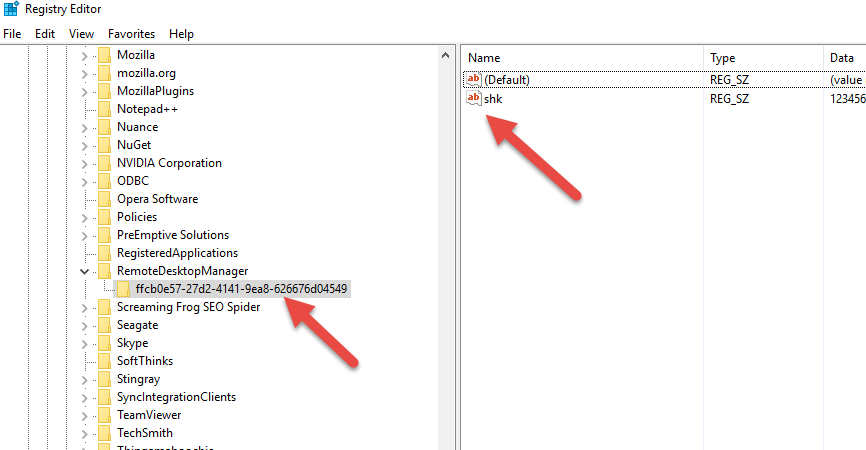
David Hervieux
SharedKey.png
unencrypted ?
Will not pass our security policy.
I understand. As I mentioned this is a workaround. Philippe is working on another provider, what do you suggest?
Regards
David Hervieux
what do you mean by "another provider"?
I mean the security provider. In our case we are talking about Shared passphrase v2. This version will have the passphrase encrypted in the registry.
Regards
David Hervieux
ok, please update me when it is released
thanks
snir
I will. Thank you for your patience.
Regards
David Hervieux
Hi,
Is my problem fixed in ver 13 ?
It supposed to. I will double check with Philippe our Security dev.
Regards
David Hervieux
I see that there is pass-phrase v2, how do I move from ver 1 to ver 2 ?
just change the combo ?
I have 20 users using this with SQL, will they work after the change to ver 2 ?
Please make sure to backup your database first. They will need to re-enter the passphrase. You can give it a try on an empty database to see if it has all the features that you want.
Regards
David Hervieux
Hi,
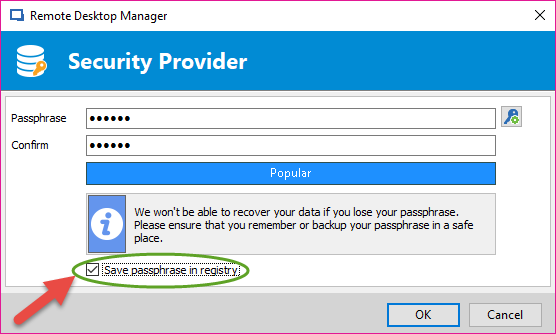
Since RDM 13, we released a new Shared Passphrase Security Provider v2 which offer the option to save the encrypted passphrase in the registry for use on terminal server:
Since it uses a new Security Provider, just make sure that you re-enter the passphrase on each computer using the security provider. Also, every user that require access to the database must user the newest version of RDM.
Philippe Dugré
2017-11-10_10-47-57.png