Get-RDMTemplate clears SubConnections from Get-RDMSession result
Get-RDMTemplate clears SubConnections from Get-RDMSession result

Steps to reproduce:
$session = Get-RDMSession -Name Session_with_SubConnections
$session.SubConnections.Count # returns the number of sub connections
Get-RDMTemplate
$session.SubConnections.Count # returns zero
I think you are using shared variables for caching. Instead of waiting for garbage collections to free unreferenced objects you dispose theme. In this case the reference get lost and the sub connections disappear from existing PSConnection objects.
So using Get-RDMSession, Get-RDMTemplate and Set-RDMSession in this order may result in data loss of sub connections.
Regards,
Thomas Kritzinger
All Comments (5)
Hi Thomas,
I tested the same command as you in the same order and the last command $session.SubConnections.Count, return me the right number of sub connection. What version of RDM are you using ?
And do you run the command in Tools --> PowerShell (RDM CmdLet) ?
Best regards,
David Grandolfo
I have installed RDM 12.5.4.0.
I am Using Import-Module "C:\Program Files (x86)\Devolutions\Remote Desktop Manager\RemoteDesktopManager.PowerShellModule.dll" in Powershell ISE.
But i get the same Result starting RDM CmdLet from RDM.
I am running RDM on Server 2016 with PowerShell 5.1. Datasource Caching is disabled.
Regards,
Thomas Kritzinger
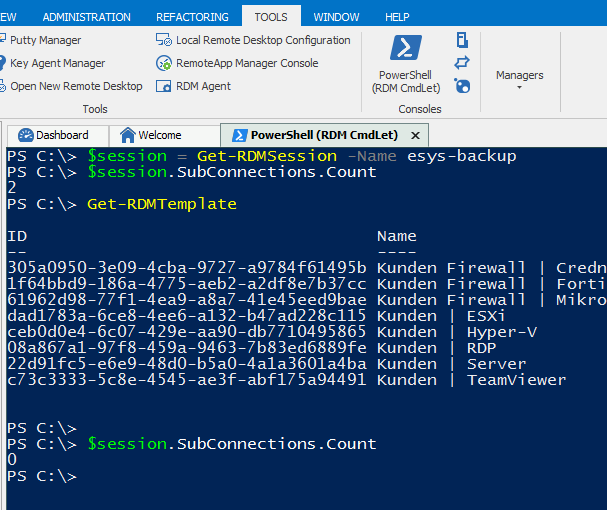
2017-06-26 22_01_23-Remote Desktop Manager [eSYS Internal _ DVLS].png
I get the same issue when using Get-RDMSessionPassword Cmdlet after Get-RDMSession.
Hello,
We have been able to reproduce your issue and a engineer will reply shortly to you.
Best regards,
David Grandolfo
Hi,
A fix for the issues will be available in the next beta version.
Best regards,
Olivier Désalliers