DISABLE scaling on RDP session

Hi everybody,
we started using RDM some days ago and I was wondering if it is possible to DISABLE scaling on an RDP session as I only found solutions to enable it again. My problem is that on my 4K screen I use RDM in one quarter of the screen in 1920x1080, so with scaling enabled I get very little screen estate, plus my eye sight is still OK so I don't mind the small text. I have tried virtually every possible setting but have not succeeded, so if you could point me in the right direction that would be great.
Regards, JK
All Comments (27)
Oh, and this only applies to RDP settings to Windows Server 2012 and higher of course, as Server 2008 doesn't support this feature anyway. Changing the RDP version in the options didn't help as well though.
Hello,
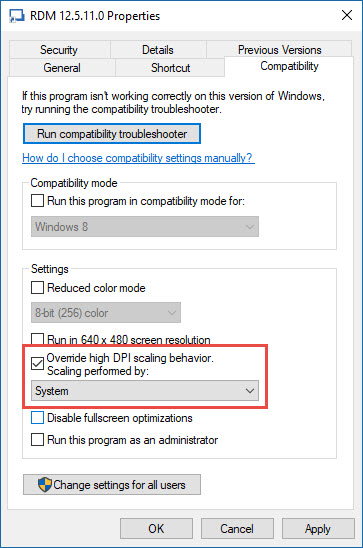
Could you try to close RDM, do a right-click on your RDM shortcut and click on the Compatibility tab. In that section, enable the Override high DPI scaling behavior option. In the dropdow menu of that option, select System. Then, press OK and restart your computer.
Best regards,
Jeff Dagenais
2017-06-26_08-07-24.jpg
Hi Jeff,
thanks for your reply. This only makes it worse as fonts and icons are still huge, but also become blurry. ;-) We did use a different RDP session management app before that somehow ignored scaling (see screenshots).
Regards, JK
RDM.PNG
other.PNG
Hello,
Could you try to go in File -> Options -> User Interface and check the option Disable display scaling on high DPI settings. If the option is already checked, could you try to uncheck it.
You may need to restart RDM after enabling/disabling that option.
Best regards,
Jeff Dagenais
I did that as well to no avail. There's one difference when connecting to a 2012 R2 server from RDM or from our other app, with RDM "Let me choose one scaling level for all my displays" is greyed out whereas with our other solution I could tick a checkbox. It's unticked either way so I don't know if that makes a difference.
Otherwise I did try out every possible combination of screen resolution, display mode and scaling settings but could not get the same results. Is there no way to simply tell the RDP session to ignore my local scaling settings?
Regards, JK
Unfortunately there is no way to do that. Sorry about that.
Regards
David Hervieux
I just tried something else with an interesting result: when I start the RDP session from mstsc.exe directly there's no scaling as well, so this has to do something with RDM. I would like to show you remotely if this is possible. I use Windows 10 1703 by the way, forgot to mention that. This could be relevant as Microsoft added/changed DPI scaling features.
Regards, JK
To further comment on this: with mstsc.exe on Windows 1703 you get scaling only with "fullscreen" or your displays native resolution enabled, when selecting any other resolution scaling is disabled. I would love to see this reflected in RDM as right now for me it is unusable. :-(
Regards, JK
Hello,
In embedded mode, RDM use a Microsoft ActiveX to establish the RDP connection. In fact, it's the same ActiveX that is used in Microsoft RDC Manager.
In external mode, we use the native Microsoft RDP client (mstsc.exe).
That being said, do you encounter the same issue in Microsoft RDC Manager? Could you give it a try please.
https://www.microsoft.com/en-ca/download/details.aspx?id=44989
Best regards,
Jeff Dagenais
Hi Jeff!
No, in RDC Manager scaling is disabled as well. As I said, feel free to contact me and we can start a TeamViewer session or something if that helps.
Regards, JK
Hello,
This is very strange, because since we are using the same ActiveX, RDM should react the same way as RDC Manager.
Could you post a small video of the issue displaying the issue in RDM and the results in RDC Manager so that we can compare both and see if something can be done regarding this.
Best regards,
Jeff Dagenais
Hello,
Thank you for your video in Private Message.
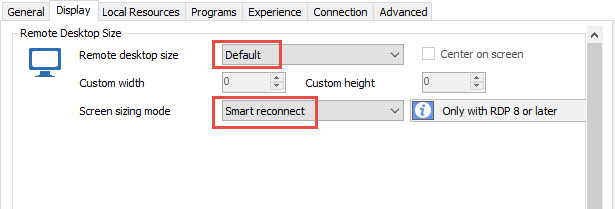
In RDM, could you try to change the display settings to Default and Smart Reconnect to see if that helps
Best regards,
Jeff Dagenais
2017-07-03_13-42-17.jpg
No problem. I just tried that (again, I guess), but unfortunately it's still the same.
Regards, JK
Hello,
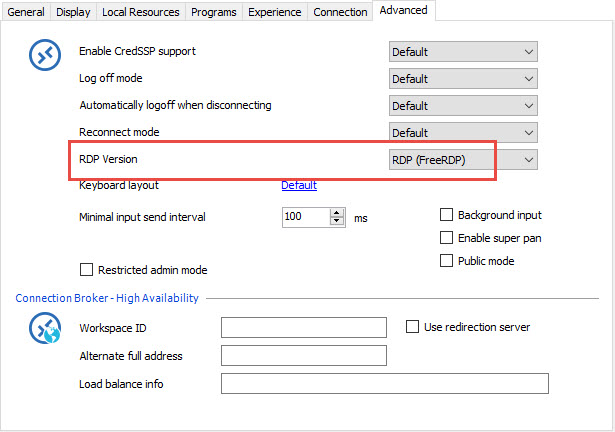
Could you edit your RDP session, go in the Advanced tab and change the RDP version for FreeRDP.
Best regards,
Jeff Dagenais
2017-07-05_16-07-19.jpg
I think I have tried that before as well, anyway: when I change the version to FreeRDP the screen stays black for a couple of seconds and the connection attempt stops with an error message. Does noone else have this problem? It should affect anyone with scaling enabled and RDP sessions opened in an embedded windows session, right?
Hello,
What is the error message that you receive with FreeRDP?
Usually, the scaling option on the shortcut or in the application resolves this kind of situation.
Do you encounter the same issue on other computers as well?
Best regards,
Jeff Dagenais
Sorry for the late reply, I have been out of my home office the last few days. The error message simply says "Unable to connect to host ...!".
Unfortunately I don't have another Windows 10 machine that I could connect to my 4K monitor. I will try to get my colleagues to test as well. Is there no way you could recreate the problem?
Regards, JK
I just tried to recreate the problem with one of my colleagues, and when changing the dpi scaling to 175% RDM shows the same behavior. What I just realized though was that RDCM and the old RDP management app that we used also forwarded the scaling settings to the remote session UNLESS "Override high DPI scaling behavior" was checked. Unfortunately this doesn't change anything with RDM.
Regards, JK
I just set scaling to 150% but this didn't change anything as well unfortunately.
Hello,
Thank you for the details.
I will discuss this situation with our engineering department to see if something can be done regarding this.
Best regards,
Jeff Dagenais
Hello,
We are currently in the process of setting up an environment for testing.
We will follow-up with you next week on this.
Thank you for reporting this.
Best regards,
Marc Beauséjour
Sure, no problem, thanks for the update! Looking forward to the fix.
Regards, JK
Hello,
I apologize for the late reply and thank you for your patience.
We are making progress on isolating this issue.
We believe it might be related to the version of Windows 10. Do you have the Creators Update (Build 15063)?
Best regards,
Marc Beauséjour
Hello,
In the next version of RDM, there will be an option called Disable RDP scale factor (HDPI)
By enabling this option, everything will look smaller just like in RDC Manager from Microsoft.
If you want to try it now, it is available in the latest release of the Free edition here;
https://remotedesktopmanager.com/Home/Download
Best regards,
Marc Beauséjour
Awesome, thanks! I'll give it a try as soon as it's available in the Enterprise Edition. Any idea when that might be? :-)
Regards, JK
Soon like today or tomorrow. We are in the final phase of QA.
Regards
David Hervieux
Thanks, just gave it a try and everything is working as expected now! :-) Looking forward to giving everything else a test run now! ;-)