Performance Issues

I've been troubleshooting performance issues with RDM with a MSSQL backend. After running the profile, I've discovered it's taking upwards of 2s to deseralize the data.
Is there something that can be done to speed this up? What is involved in this process?
Thanks,
Chris
PS. Below is the trace:
Main thread (UI)
----------------------------------------
TreeView.LoadConnectionList...
GetGroupInfos : 5 ms
BeginUpdate...
ApplyGroupCustomImages : 0 ms
LoadConnectionInTreeNode : 3 ms
PreCreateGroups : 2 ms - Count : 1
BeginUpdate : 9 ms
TreeView.LoadConnectionList : 14 ms
SelectionChanged : 154 ms
LoadConnections [Microsoft SQL Server : Customers]...
DisposeAndClearConnections : 2 ms
reload: False hasSecurityChanged: True hasChanged: True
HasOfflineChanges : 0 ms
LoadConnectionsFromDataSource...
LoadDataSourceSettingsFromDataSource...
GetDataSourceSettings : 3 ms
LoadDataSourceSettingsFromDataSource : 3 ms
GetConnections...
Database.GetConnections...
Reading connections from database : 201 ms
DecryptData : 72 ms - Count : 2405
DeserializeData : 1787 ms - Count : 2405
Database.GetConnections : 2064 ms
GetConnections : 2064 ms
DoSetConnections...
DisposeAndClearConnections : 0 ms
DoSetConnections : 211 ms
LoadConnectionsFromDataSource : 2285 ms
DisposeAndClearConnections : 0 ms
LoadConnections [Microsoft SQL Server : Customers] : 3494 ms
TreeView.LoadConnectionList...
GetGroupInfos : 5 ms
BeginUpdate...
ApplyGroupCustomImages : 0 ms
LoadConnectionInTreeNode : 1273 ms
PreCreateGroups : 361 ms - Count : 1
BeginUpdate : 1648 ms
TreeView.LoadConnectionList : 1653 ms
TreeView.LoadConnectionList...
GetGroupInfos : 5 ms
BeginUpdate...
ApplyGroupCustomImages : 0 ms
LoadConnectionInTreeNode : 1240 ms
PreCreateGroups : 349 ms - Count : 1
BeginUpdate : 1602 ms
TreeView.LoadConnectionList : 1608 ms
SelectionChanged...
LoadConnectionList : 2234 ms
SelectionChanged : 3272 ms
All Comments (15)
Hello,
As per the Profiler, the time to load of the connections is appropriate.
What are the performance issue?
Could you post a print screen of your Help -> Diagnostic -> Data Source tab please.
Best regards,
Jeff Dagenais
Managing the connections is slow. Sometimes connecting can be slow. Switching between the connection group and favorites and back is slow (this is what I profiled).
Here is the data requested. I've been trying to eliminate the virtual folders, but I'm not sure where they're coming from.
Data source type: Microsoft SQL Server
Data source size: 2.1 MB
Data source settings size: 1.7 KB
User specific settings size: 0 Bytes
Offline: False
Entries/Items: 2121/2121
Sessions: 794
Data entries: 29
Credentials: 534
Sub connections: 35
Documents: 5
Contacts: 0
-->Sub total: 1397
Session tools: 44
Groups/folders: 715
--> Total: 2121
Virtual groups/folders: 101
Custom images: 437
RTF notes: 0
Connection client version: 0x0000000000000000
Connection server version: 0x000000000429CC58
Connection history version: 0x000000000429C195
Hello,
I suspected that performance issue are related to the custom images. We have a theme system that you may give a try to override most images.
https://help.remotedesktopmanager.com/howto_theme.htm
I would also recommend to do a cleanup on the database. Please refer you to this blog for more information
https://blog.devolutions.net/2015/09/clean-up-time.html
Best regards,
Jeff Dagenais
Removing the bulk of the custom icons seems to have helped a bit. I'll go through and run the db cleanup later and see if it improves.
When it comes to the deserialization time, is that just a matter of client system resources?
Hello,
A lot of things can impact the deserialization time. In your case, the deserialization time is about 2 seconds, which is pretty quick.
I am pretty sure that the cleanup will help in your situation as well.
Best regards,
Jeff Dagenais
I logged into the data source as 'sa' and those options are disabled. Is there some other level of access I need to run those?
Thanks,
Chris
Hello,
The "SA" user should have enough priviliges to execute the cleanup.
Could you go in Administration -> Data Source Settings -> General and make sure that the Allow database clean up is check.
Best regards,
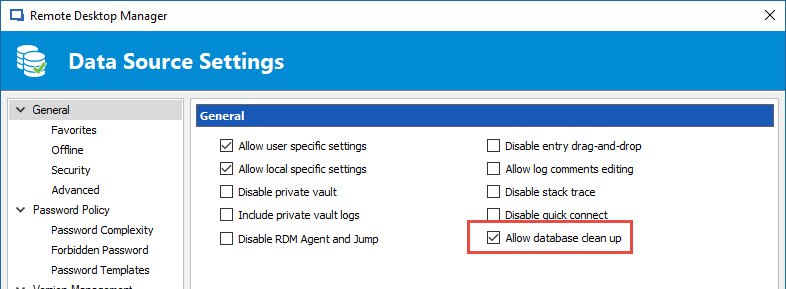
Jeff Dagenais
2017-06-22_13-58-39.jpg
Hello,
I forget to mentioned, don't forget to do a backup of your database prior to perform the clean up.
Best regards,
Jeff Dagenais
While removing the icons helped with the navigation, management is still painfully slow. It takes upwards of 15 seconds to open the properties of an item. The profiler doesn't seem to capture this, so I'm not sure where the underlying performance problem is.
The database cleanup didn't seem to make much of a difference. Everything before the last 3 months was purged.
Any more suggestions on how to tune this better?
Thanks,
Chris
Hello,
What version of RDM are you running?
Best regards,
Jeff Dagenais
Version 12.5.0.0
Thanks,
Chris
Hello,
Firstly, I would like you to install RDM 12.5.4.0 or our latest beta RDM 12.5.11.0
https://remotedesktopmanager.com/Home/Download
Secondly, I would like you to do a CTRL + Refresh to refresh the local cache.
In conclusion, if you still encounter slowness issue, I would like you to try another offline engine. By default, it's MCDFv2. I would like you to try MCDF or SQLite. To change your offline engine, please go in File -> Options -> Advanced -> Offline Engine. After that you have made this change, please to a CTRL + Refresh to create the local cache properly.
Best regards,
Jeff Dagenais
OK, I'll give that a shot.
Thanks,
Chris
The updated seemed to resolve the UI unresponsiveness and the offline engine was already set to sqlite. I didn't have to refresh the local cache, but will keep that in mind moving forward.
Is there any way to speed up the filling of passwords? Most of the time it is considerably faster to type them in then to wait. Mostly seeing this issue with Chrome. Plugin version is 5.1.1 . Not noticing it with the limited Firefox usage.
Thanks,
Chris
Hello,
There's no setting to speed up the way the username and password is sent to the external website.
Could you send us a small video of the issue, I would like to see what is going on exactly and verify with our engineering department if something can be done regarding this.
Best regards,
Jeff Dagenais