RDP monitor selection not working

RDM Free 3.5.4
Windows 10 Build 16199
All my RDP sessions are opening on my primary monitor, even though I have them configured to open Undocked on Monitor #2. I only have the two monitors and that one is indeed #2 (both in RDM and Windows). I can't recall exactly when this started happening, but it was working flawlessly until a few weeks ago.
Thanks.
Eric
All Comments (15)
Hello,
We have tested on Windows 10 Creators Update (Build 15063) and we do not have this issue.
The latest Preview Build is 16215. We will have a look.
Did this behavior start when you upgraded to a Preview Build?
Best regards,
Marc Beauséjour
I had to rebuild my machine anyway, so I figured I'd see if that resolved this issue too. It has not.
I'm running the most recent Insider Preview (16237) and it's doing the exact same thing.
To answer your question, it had been working perfectly on previous Insider Preview versions...up until 1-2 months ago. Aside from that, everything else in RDM is working fine. I was going to try the beta version of RDM to see if there was any difference, but apparently it's just for people who already have an enterprise license?
Let me know if there's any other info I can provide.
Eric
Hello,
I see that you have RDM Free 3.5.4.0
Our latest version is 3.5.5.0 which contains the fix. Could you please try it?
You can download it here;
https://remotedesktopmanager.com/Home/Download
Best regards,
Marc Beauséjour
Oops. I should have mentioned that since rebuilding my PC I'm actually using 3.5.5.0. I did try re-installing, just because, but it still does the same thing.
Hello,
I'm still unable to reproduce your issue.
What are the Display settings for your RDP session?
Are they set like the screenshot below?
Also, just for a quick look, could you please try downloading the ZIP package for the Enterprise edition to see if it makes a difference?
https://remotedesktopmanager.com/Home/Download
Best regards,
Marc Beauséjour
Yep, your screenshot is exactly how I have the entry configured (and always have). In the essence of testing, I also tried every other combination of settings I could come up with and the session always opens up on the same incorrect monitor.
I downloaded the enterprise trial and that handled the monitor selection perfectly, so I guess it's something in the difference between the two versions.
Hi,
Could you make sure you have the latest Free edition installed (3.5.5)?
Regards
David Hervieux
I triple checked. :) 3.5.5.0
I will ask our Dev to verify if we have an unwanted validation with the Free edition.
Regards
David Hervieux
Hello,
We checked and while there isn't any restriction on the Free edition specifically, there is a fix we've made in the Enterprise edition that we think is not yet available in the Free edition. This could be why you're encountering the issue. We would like you to try the next version of RDM Free when it comes out to see if you are still able to reproduce the issue.
Regards,
Hubert Mireault
Will do, Thanks. :)
I wanted to report that it's still doing the same thing in 3.6.0.0. It's not a huge big deal, just a minor annoyance. :)
Hi eric,
Would it be possible for you to export the RDP entry without the credentials and IP and send it to me in a private message ?
It would help up to reproduce the issue.
While you are at it could you verify what is the option for the default monitor is in File > Option > Type ?
Best regards,
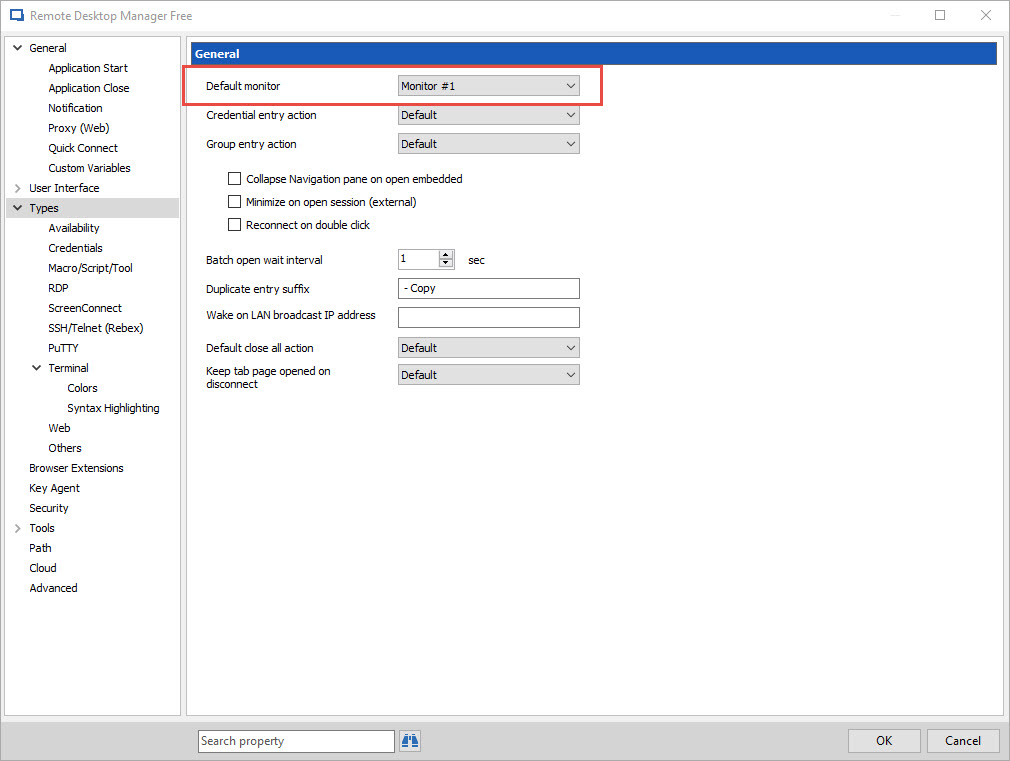
Alexandre Roy
Default monitor.jpg
'Default' is the selected monitor in Option > Type and Option > Type > RDP. Now interestingly, if I set the monitor to Undocked/Monitor #3 (I've added a 3rd monitor to my arsenal) in Option > Type > RDP, it works for me! It completely ignores whatever I may configure in the individual RDP entries differently, which I suppose technically defeats the purpose, but that's fine with me as I was wanting all my RDP sessions to open on my #3 monitor.
PM'ing you the RDP now.
Hi,
Thanks for the entry,
Even with your session, I cannot reproduce the issue. I am mystified to know why giving specifics display settings to your RDP session won't take the change but actually taking the changed from the RDM options in *Type*.
Glad that you have a workaround for the time being, I will keep an eye on this issue and let you know if we find something.
Best regards,
Alexandre Roy