Rightclick in RDP Session - mouse cursur jumps
We got two monitors on our desktop. When we rightclick on the Windows button in the start menu in a RDP Session on 2012 r2 machine. The mouse cursor jumps a few hundred pixels to the right. This is very annoying.
All Comments (40)
Do you open the connection in embedded or external mode?
Regards
David Hervieux
I experience the issue in both modes.
When I start an RDP from the RDP/mstsc client itself I don't experience the issue.
This is strange since we use mstsc.exe in external mode. Perhaps it's a setting missing. Could you try to export one of you entry to an .rdp file and try it in mstsc.exe?
Regards
David Hervieux
Hi Robert,
did you mean this jumps?
Regards,
Min
Idd thats what I mean. The mouse cursor jumps to the right and doesn't stay on the same location as where you right clicked.
@David, i dont have the issue when i exported the session to an RDP file and open it with the regular mstsc client.
Hi Robert,
thats weird - i tried it also to connect with the native mstsc client and the same behaviour is present (no matter whether 2 or 1 monitor in the session) - I tried it with windows 2012 R2 and 2016 - the mouse jump some pixels to the right- but only on the start icon - a right click on the desktop works perfect...
Interesting that on your side with the native mstsc works.. :\:
Regards,
Min
@Robert,
Sorry to jump in, but I would like to know the following:
If you create a .rdp that is working fine outside RDM and import that session inside RDM, is it working has expected?
Best regards,
Jeff Dagenais
@Jeff
I got the same issue when importing a with mstsc build RDP file. imported using the rdp file. It doesn't matter if i choose 'import RDP content' or 'Link to the RDP file'.
Hello,
In embedded mode, by default, we use the same ActiveX that is used in RDC Manager from Microsoft. Could you try this application to see if you encounter the same issue using that software - https://www.microsoft.com/en-ca/download/details.aspx?id=44989
You can also try to use FreeRDP as the RDP engine for that session to see if that help. To do so, edit your session, go in the Advanced tab and change the RDP engine for FreeRDP. Then, reconnect your session.
Best regards,
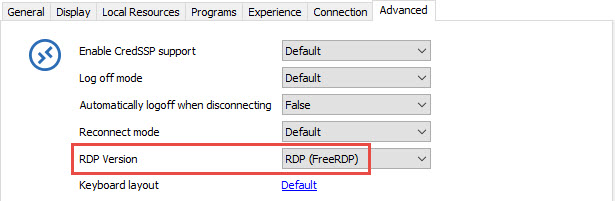
Jeff Dagenais
2017-06-15_21-10-30.jpg
I tried both Microsoft's Remote Desktop Connection Manager and the FreeRDP in RDM with both methods I can confirm I don't have the issue. Now we know this, what is wrong with the RDP Version "RDP FreeRDP) that it isn't used by default?
FreeRDP is the open source version of the Microsoft RDP ActiveX. It's not developed by Microsoft. It might not have all the features of the ActiveX (some smart cards are not supported) but it's a mature project. Could you try another to set RDP 6.0 also?
Regards
David Hervieux
I got the issue also with RDP 6.0
This is strange that you don't have the issue with RDCMan. Could you try to import one entry from RDCMan into RDM and retry? Perhaps we just don't have the same default settings.
Regards
David Hervieux
Nopes, issue still applies with the imported the RDG.
David, does the devolutions team already discussed this matter? Do you have a resolution for this issue?
Honestly we have no idea why you get that. The only workaround is FreeRDP for now. I don't remember if I asked but could try both 32 bit and 64 bit version of RDM?
Regards
David Hervieux

So was anything ever discovered as to the source of this problem? I never had an issue until I upgraded to 3.0.1.18 and then I ran into it. I've just been putting up with it as I love the product, and today I upgraded to 4.0.1 hoping that the issue would be resolved. No luck, it still happens.
@Demar Beck,
In embedded mode, by default, we use the same ActiveX that is used in RDC Manager from Microsoft.
Could you try this application to see if you encounter the same issue using that software
https://www.microsoft.com/en-ca/download/details.aspx?id=44989
Best regards,
Jeff Dagenais
Ok, I downloaded the Microsoft Remote Desktop Connection Manager version 2.7, used it to log into the exact same server and I do not experience the same problem. The same server opened through Remote Desktop Manager has the problem where a right click on the Start button, but only on the start button, causes the cursor to jump to the bottom middle of the screen.
If I use the built in Remote Desktop Connection and log into the server again it is fine.
The problem only occurs if I log into Server 2016, 2012 R2 and 2012. 2008 and 2003 work fine. I haven't tested desktop OS's as I only deal with servers.
@Demar,
Thank you for testing with RDC Manager.
Do you encounter the same issue using FreeRDP as your RDP engine? If you want to give it a try, go in File -> Options -> Types -> RDP and change the RDP engine for FreeRDP (7.0).
Best regards,
Jeff Dagenais
If I switch the engine to FreeRDP 7.0 then it works fine. However, that changes how the login works and I have to get used to it again :) I just have to figure out how to make it save the domain name and user name and then I can deal with the differences and get used to them.
So what is the difference between the default (not sure which version it uses) and FreeRDP 7.0?
What do you mean by login works? Is there anything we can do? FreeRDP is a different RDP engine than the ActiveX.
Regards
David Hervieux
I mean it isn't saving domain and user name like it was before. I've searched through the options and haven't figure out how to make FreeRDP 7.0 save the domain and username. If I can get that to work the same as the default, where all I have to do is input my password, then I'm ok with switching it over to FreeRDP 7.0 and using that.
And you don't want to save it directly in the session?
David Hervieux
Wait, I think you mean saving that info in server entry? I don't create entries for every server as they change quite a bit, but I launch the quick connect all the time. I would like any new connection to default to my username and my domain without me having to create entries for every server.
I see. You mentioned that with the ActiveX it's what happened? You have the default set? Have you try to use the default settings(File->Templates) for that?
Regards
David Hervieux
When using the ActiveX (that is the default, correct?) the right click on the start menu jumps. I hadn't changed any settings, everything was the default.
As for the templates you mention, File->Templates, there is no such menu item.
Hi,
For a test, could you try to disable the settings in the RDP Experience tab?
Could you also verify these settings File->Options
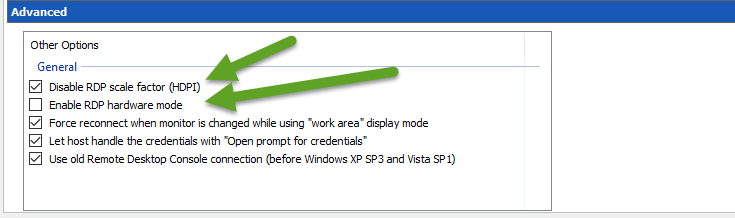
David Hervieux
RDPSettings.png
Ok, under advanced options I didn't have the RDP scale factor disabled, so I checked that.
That seems to have done the trick. I have tested out a couple of servers and am no longer having the cursor jump when I right click the start menu.
Thank you SOOO much for the help. That was driving me crazy and now I can get back to just enjoying remote desktop manager as my RDP app.
Nice,
I'm glad this works now. Indeed the HDPI scaling is not supported by RDCMan and this explains why it was not in it.
Regards
David Hervieux
Hi,
linked to my separate post https://forum.devolutions.net/topic28732--free-mouse-flickering-not-able-to-click-on-rdp-screen.aspx?MessageID=110775#post110775 I have problems with mouse cursor in RDP, too. The symptoms:
Any idea?
@Guest,
Have you tried to check/uncheck the Disable RDP scale factor (HDPI) option in File -> Options -> Types -> RDP?
Best regards,
Jeff Dagenais
Hi Jeff,
Yes, I've tried disable HDPI scale factor under File --> Options --> Types --> RDP --> Advanced --> "Disable RDP scale factor (HDPI)", but there is no change.
Also, I am NOT using zoom or fit to window, just plain 1:1 pixel to pixel ratio.
BTW... I am the "Guest" from one post above. Obviously I was not logged in or something went wrong when I posted.
Here VIDEO screenshot of how it looks like: https://youtu.be/wJndds2hQkc
@labsy,
This is a very strange issue.
Do you encounter the same issue using Microsoft RDC Manager?
https://www.microsoft.com/en-ca/download/details.aspx?id=44989
You can also try FreeRDP (7.0) for the RDP engine?
To do so, go in File -> Options -> Types -> RDP and change the RDP Engine to Free RDP (7.0).
Best regards,
Jeff Dagenais
Hi Jeff,
here's my diag:
Maybe related - within latest Devolutions RDM versions I notice that I can hardly hit double-click on ANY connection in left-hand tree in order to start the connection. I mean, I do double-click on connection, but it does not lounch, but rather just opens properties window on right part of the screen, so I need to click "Open Session" to lounch it.
Like my mouse would had a lag on double click... but I notice this only within Devolutions RDM, nowhere else.
Is it only on your machine? Do you see that if you create a new data source?
Regards
David Hervieux
Hmmm...just did a test on another machine and unfortunately (for me) it's the issue only on my PC. For new and old data sources. :(
Could you try to update your display drivers?
Regards
David Hervieux
Hi David,
YES, your tip about graphics drivers were in place. In fact, we've had several issues on multiple computers with random graphics problems, all caused by one of two latest Windows 10 updates 1703 and 1709. Seems like many computers with integrated Intel HD graphics (on chip...actually having graphics processor in CPU) have problems with drivers from Windows 10 repository.
The final solution was to manually install INTEL HD graphics drivers, downloaded directly from Intel's support page. Those from Windows 10 repository and also from OEM repository were not OK.
@previous post as Guest - that's me, Labsy. Forum logs me out too quick and I did not notice being just a guest :)