Devolutions Cloud Account Login Prompt after Standby

Hi There,
we're using the paid Devolutions Cloud Database, and enforce for security purposes a Windows Login Prompt after 30min away time.
Since a few weeks (don't know which update it was) RDM ask for the Devolutions Cloud Login Password after Application Lock / Standby.
Because we have really complex devolutions cloud account passwords, we didn't want that, it is really ugly for us. How can we stop RDM from request this devolutions cloud password? We only want the Windows Account Password prompt, not the second one for the devolutions cloud account.
And btw sometimes after we provide the credentials the RDM Window is not maximized and when we click on icon in the taskbar it prompts for the credentials again, than taskmanger is the only way to solve the problem.
Kind Regards
Philipp
2017-06-11_23-25-12.png
2017-06-11_23-23-42.png
2017-06-11_23-16-03.png
2017-06-11_23-15-49.png
2017-06-11_23-15-34.png
2017-06-11_23-15-25.png
All Comments (2)
Hello,
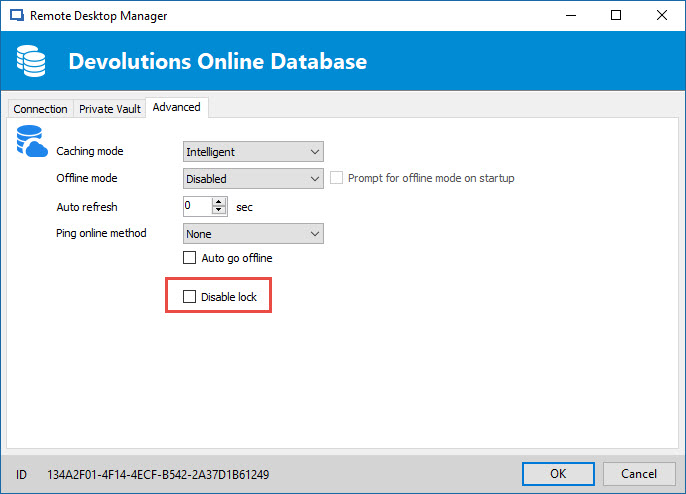
In RDM Beta 12.5.8.0, a new option called Disable Lock has been added for Devolutions Online Database.
Enabling that setting should do what you are looking for.
To do so, go in File -> Data Sources -> Edit data source -> Advanced tab -> check Disable lock option
Best regards,
Jeff Dagenais
2017-06-11_20-05-04.jpg
Hello,
Sorry, I forgot to include the download link of RDM Beta 12.5.8.0
https://remotedesktopmanager.com/Home/Download/#Beta
Best regards,
Jeff Dagenais