SSH Connection to Cisco Switch

I have not been able to get the SSH functionality on RDM for Mac to work no matter what settings I try. I always get "Error: Unable to establish the connection. Please make sure your connection settings are valid." I have configured the Entry as SSH Shell (Native) and put the IP address of the switch in the Host field and completed my username and password. I am able to SSH to the switch from Terminal using the same credentials without any issues. Any help would be appreciated. I have a colleague using Putty on Windows and he is able to connect.
All Comments (14)
Hello Jeff,
I will assign this to Xavier and he will be able to help you Monday.
Regards
David Hervieux
Hi Jeff,
This is weird. Could you give me some info on the server you're attempting to connect to? Running the SSH command while enabling the verbose mode (ssh -v username@host) in the Terminal.app and then sending me the output (via private message) could provide me with relevant info.
Could you also try opening your session in external mode and tell me if it works? You can do this by right clicking on your session and then Open with Parameters -> Open (External).
Best regards,
Xavier Fortin
Hello
I am now getting this reply. The I am able to connect to nexus switches but not to catalyst switches. I have tried changing everything but no joy. someone else in teh office using windows has no issues connecting to the switches.
Was there any fix to this?
Cheers
Gareth
Hi Gareth,
Could you follow the instructions I've mentioned in my previous post?
Could you provide me with more details on your session? Are you using a private key to authenticate? If so what type of key is it?
Can you connect through the the Terminal.app (ssh command)?
If you had any old or test Catalyst switches to which you could grant us access, this could help us reproduce the issue and ultimately fix it.
Best regards,
Xavier Fortin
Same Problem, seem still not fixed ? Cisco Nexus works fine..
How can i setup rdm to open it external from rdm with terminal or putty for example ?
MacOS Sierra 10.12.6 (16G1114)
Device is a Cisco Catalyst 6513
Cisco IOS Software, s72033_rp Software (s72033_rp-ADVENTERPRISEK9_WAN-M), Version 12.2(33)SXH8a, RELEASE SOFTWARE (fc1)
Output from rdm:
Initiating connection
Connecting to 10.30.230.1 : 22
ssh_connect: libssh 0.7.5 (c) 2003-2014 Aris Adamantiadis, Andreas Schneider, and libssh contributors. Distributed under the LGPL, please
refer to COPYING file for information about your rights, using threading threads_noop
ssh_connect: Socket connecting, now waiting for the callbacks to work
ssh_connect: Actual timeout : 10000
ssh_socket_pollcallback: Received POLLOUT in connecting state
socket_callback_connected: Socket connection callback: 1 (0)
ssh_socket_unbuffered_write: Enabling POLLOUT for socket
callback_receive_banner: Received banner: SSH-2.0-Cisco-1.25
ssh_client_connection_callback: SSH server banner: SSH-2.0-Cisco-1.25
ssh_analyze_banner: Analyzing banner: SSH-2.0-Cisco-1.25
and then stucks with:
Error: Unable to establish the connection. Please make sure your connection settings are valid.
Hi Max,
Thanks for the information.
The SSH Shell session does not support opening via an external client. The deprecated SSH Shell (native) did though. This would open a Terminal.app window and feed it with the relevant command and parameters. You'd than have to set the Display mode to external:
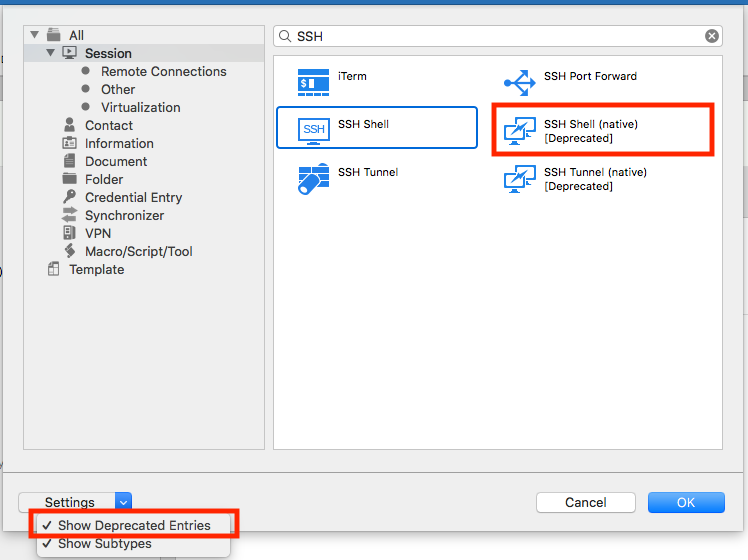
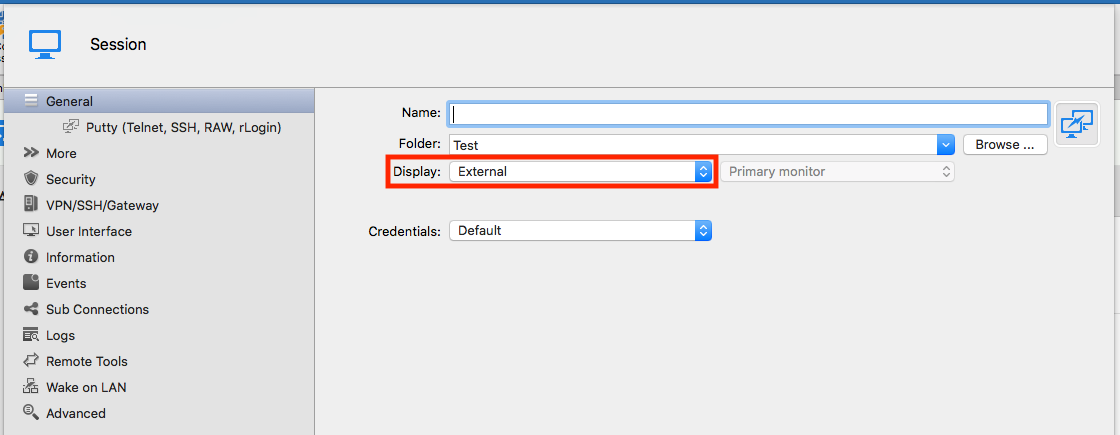
I'll look into porting the external mode behavior from the deprecated session to the newest one.
If you'd like to use an external client of your choosing and if it supports command line or has AppleScript integration, you can always use the Command Line session to launch any app.
Best regards,
Xavier Fortin
Hi Xavier,
thank you for this superfast response. Do you have a idea why/when it will be fixed in rdm ? I can provide any logs if you need !
Kind regards,
max