Ability to select specific monitors to display/span the RDP sessions across
Ability to select specific monitors to display/span the RDP sessions across
0 vote

I would like the ability to specify which monitors I want to span my RDP session across. For example, I have two external monitors plus my laptop, I would like the capability to display and span my RDP sessions on the two external monitors, but leave my laptop as the location machine. This may not be super helpful as an IT person, but as a consultant it would be pretty awesome that I could have my RDP on my externals, while doing documentation from my local machine.
Thank you!
Robert
All Comments (14)
Hello,
Do you know if it's possible to achieve this with the native Microsoft RDP (mstc.exe)?
I am asking this because this is the technology that we use when a RDP session is launched in external mode.
Best regards,
Jeff Dagenais
yes it can, Click display and there is a check box for "use all my Monitors..."
I know this post is 2 years old but I too am looking for this feature. I would also like the ability to select "use 2 of my 3 Monitors"
monitors.png
Hello,
It's also possible to use all monitors in RDM, like in RDP.
To do so, you would need to change the settings inside your session to match the one below
Best regards,
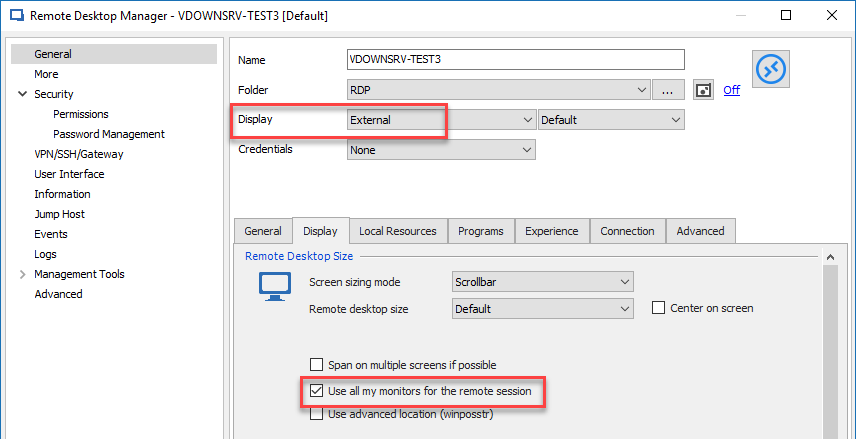
Jeff Dagenais
2019-01-13_19-12-09.png
I guess my feature request would add this to the "Per User" setting.
I'd like to second the request to add this to user specific settings - It causes an especially awkward behaviour when using the external + all my monitors in conjunction with user specific settings to set it to embedded display.
Currently we have to duplicate the sessions in our company datasource to support users who want to have the session in a tab, and those who want to work fullscreen across multiple monitors.
Hello,
We will add this to our todo list. I will let you know when this is done, it shouldn't take too long.
Regards,
Hubert Mireault
That's great Hubert - I look forward to it :)
Hello,
The checkboxes "span on multiple screens if possible" and "use all my monitors for the remote session" have been added to user and machine specific settings. This will be available starting with RDM 2019.2.12.0.
If it doesn't work as expected or you need something else to be added for it to work as you wish, please let us know.
Regards,
Hubert Mireault
Thank you Hubert! I think this is the first time a software company has actually put code to one of my requests/suggestions! Well, other than the software companies I've worked for, but that doesn't really count. :) I'll have to update my maintenance agreement so I can download this update!
Thank you again for adding this feature!
Best regards,
Robert
Say whaaaat?....
That was like super fast @Hubert.... :)
BR
Rein
Is there a way to configure devolutions using the mstsc rdp file config so that you can choose which monitors devolutions uses?
selectedmonitors:s:1,6
Full list of settings that lets me use two of my 7 monitors both of which have diff resolutions.
smart sizing:i:0
administrative session:i:1
screen mode id:i:2
span monitors:i:1
use multimon:i:1
selectedmonitors:s:1,6
Thank you,
Jeff
@jcolter,
What version of RDM are you running?
Would you like to launch your RDP session in external mode or link your session to a .rdp file?
Best regards,
Jeff Dagenais
Hi Jeff,
Using version 2020.1.20.0 64 bit.
Ideally I was hoping to use Devolutions. Devolutions seems to manage maintaining the desired resolution and font scaling better then regular mstsc. I didn't however try embeded rdp file mode in Devolutions. Let me give it a go and get back to you to see if it could do what I am looking for.
What I have is a multimonitor setup where I have 4 displays, one display emulator being the right most. On my host machine with the monitors and emulator I have vmware workstation running, I am trying to us the rightmost two monitors (one a 32" and one emulator that supports 4k). The idea is to force the vm to see both monitors at 3840x2160 and be able to flip between the two monitors of the VM in Devolutions. Devolutions would be running on the host machine on the 32".
Cheers,
Jeff
Hello,
Let us know if the embedded mode is what you are looking for in RDM. Most of our community is using this feature to open their RDP sessions.
Best regards,
Jeff Dagenais