Load from inventory

How does Load from Inventory work? What are the requirements to get this to work? WinRM? WMI? Remote Registry?
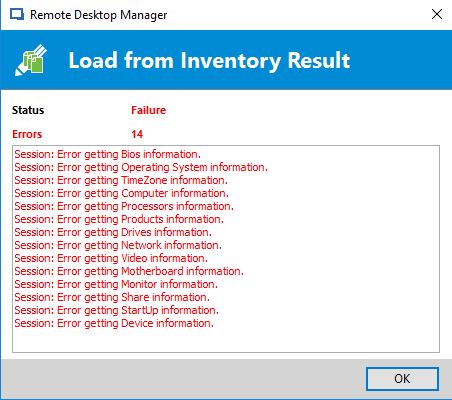
I get different error dialogs depening on the way Load from inventory is started. If I hit the button from the session properties I get a whole bunch of errors, while with Load from inventory from Batch Edit only returns one... The funny things is, the error returned from the batch edit action is not listed in the error list of the properties load action :) (see attached screenshots)
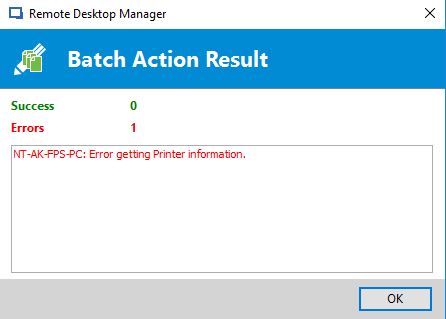
inverrorbatch.jpg
inverrorprops.jpg
All Comments (11)
Hello,
Could you please have a look at this troubleshooting article?
https://help.remotedesktopmanager.com/troubleshooting_wmi.htm
Best regards,
Mark Beausejour
I enabled WinRM on a server and validated that is was accessible externally using wmic from the same machine RDM is on. However Load from inventory in RDM still fails.
Hello,
What version of RDM are you using?
Best regards,
Mark Beausejour
I get the same errors.
The only way i am able to get load from inventory to work is to edit entry (normal) type in my credentials.
I have already went through the process of changing my credentials on user specific & local specific.
This is not a good way to load from inventory as other team members would have access to my credentials until i was finished loading from inventory and resetting the credentials. This can be lengthy process if i batch populate.
Load from inventory should also pull from any credential override a user has in place.
Using version 12.5.3.0
I can confirm what Keith says. You have to enter your credentials in the General tab of a session to have the Load from Inventory working.
Actually, I only needed to enter part of the credential... filling in just the domain was enough for me to have Load from Inventory working :\:
as a side note.... timeout when inventory cannot be done is way to long. My RDM session is has been 'retreiving' for 5+ minutes allready, completely locking the application :(
Hi,
We use multiple WMI calls for the inventory report. I have entered a todo to use the credential overrides.
Regards
David Hervieux
I forgot. I will check what we can do for the timeout but I'm not sure how simple it is to improve since it's multiple WMI calls. We would have to find a way to cancel the other calls if the timeout is reached.
Regards
David Hervieux
Hi,
@Michel Vissers - regarding the timeout - can you please check if you have the setting "ping before load from inventory" enabled?
Regards,
Min
2017-05-21 23_02_28.png
Thx, but unfortunately most recent Windows servers block ICMP echo replies in default configuration.