Load from Inventory Error
Hi,
anyone get the same error when trying to update the inventory information? (RDM 12.5.2.0)
Thanks!
Regards,
Min
2017-05-17 15_16_57.png
All Comments (14)
Hello,
Do you have a debug level enabled in File -> Options -> Advanced?
Best regards,
Jeff Dagenais
Hi Jeff,
not purposely, but indeed - it was enabled - I set it back to 0 and now the inventory works flawless as before!
Thanks for the hint!
Regards,
Min
Hi Jeff,
for the most Servers the Inventory finished succesfully - but for some servers (Which have worked with the betas in the past) the scan hang up and RDM isn`t responding anymore - I waited half an hour for the scan, but unfortunately without change.
Kill the RDM process with the task-manger was the only way to close the application.
I activated the debug level and reproduce the issue - attached the output.. (Tested also with 12.5.3.0 - it`s the same behaviour..)
Thanks!
Regards,
Min
2017-05-18 10_51_47.png
2017-05-18 09_55_20-Remote Desktop Manager (Keine Rückmeldung).png
Could you try to use generate the inventory report with the minimal options checked? For example without the Hot fixes and the software?
Regards
David Hervieux
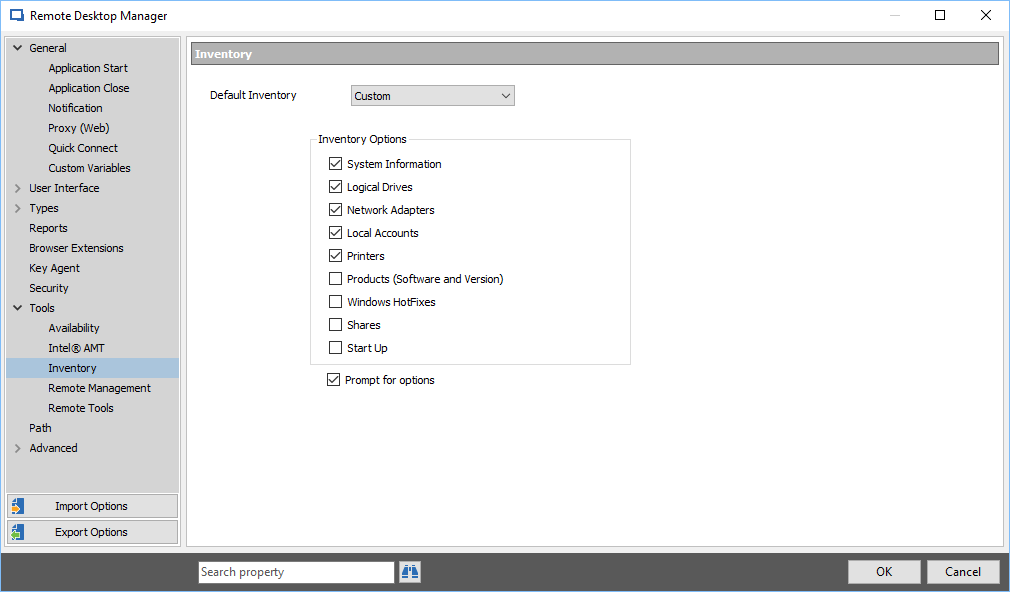
For the test I set up following settings in the inventory options:
I restarted RDM and tried again the Load from Inventory.. but same behaviour.. RDM does not respond and high cpu use... (The prompt for options window also not appears..)
Regards,
Min
2017-05-18 16_49_52.png

Hello colleagues,
I have Error when trying to load from inventory:
The session is Windows 2016 server which is our domain member
session: Error getting Bios information.
When I using domain account for session connection then get the error above.
When using local account for sessions connection then no errors.
WMIC test is OK with both accounts
I checked in Profiler with debug level 1
Here is the results:
Retrieving System Information with for 192.168.x.x with the user Administrator
BatchRemoteCommand (LOCAL): Mode=Local Username=Administrator
\192.168.x.x\root\CIMV2
\192.168.x.x\root\CIMV2
Retrieving System Information with for 192.168.x.x with the user dpl.crmt
BatchRemoteCommand (LOCAL): Mode=Local Username=dpl.crmt
\192.168.x.x\root\CIMV2
Previously we used RDM version 13.0.2 - all works fine, but after updating to 13.5.2 error occurs and after update to 13.5.4 error still exists.
Could anyone give a hint ho to resolve the issue[/quote]
@Ashot Vanyan,
The Load from Inventory feature use WMI queries to populate those fields in RDM.
In this help article, you will find two queries at the bottom so that you can test WMI requests on your workstation.
https://help.remotedesktopmanager.com/troubleshooting_wmi.htm
Best regards,
Jeff Dagenais
Thanks Jeff,
But as I say All WMI requests completing without errors.
It seams that Load from Inventory does not provide domain name for user connecting to WMI. I do not see domain name in Profiler debug
Here is the results from WMI requests
Domain user - direct from domain user's session
C:\Windows\System32>wmic /NODE:"192.168.x.x" bios get serialnumber
SerialNumber
4340-5995-7902-4708-8855-5368-36
Domain user - form other domain user's session
C:\Windows\System32>wmic /NODE:"192.168.x.x" /user:"Mydomain\dpl.crmt" /password:"MyPassword" bios get serialnumber
SerialNumber
4340-5995-7902-4708-8855-5368-36
Local Account - from domain user's session
C:\Windows\System32>wmic /NODE:"192.168.x.x" /user:".\Administrator" /password:"LocalAdminPassword" bios get serialnumber
SerialNumber
4340-5995-7902-4708-8855-5368-36
Hello,
The WMI queries need to be run from your local computer, not through a RDP session. Is this what you have done?
Best regards,
Jeff Dagenais
Yes of course - WMI queries run from my PC on which installed RDM.
I tested 3 scenarios - default using my credentials, using other domain user's credentials and remote hosts local administrators credentials.
Hello,
Great! Thank you for the precision.
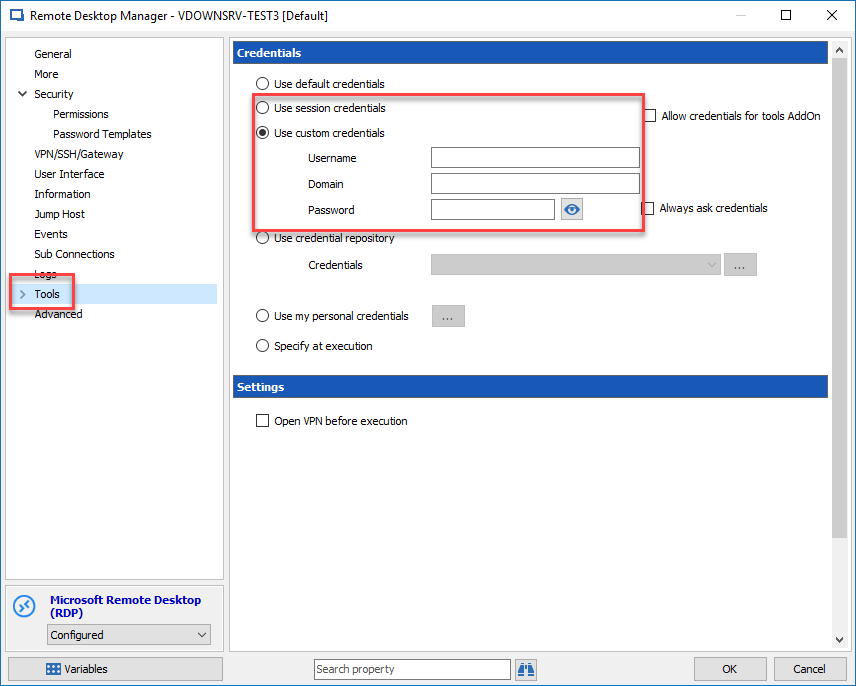
Could you go in the properties of your RDP session, click on Tools and select Use Session Credentials or Custom Credentials to see if that help.
Best regards,
Jeff Dagenais
2018-04-04_13-41-51.png
Thank you Jeff,
It does not help, but I think that found main reason in other issue - I discovered that WMI requests have different results when used IP address or host name.
So, I think problem not in RDM or it's configuration, but outside of RDM
Hi Ashton,
I just received the BIOS issue as you wrote in the previous post.
I solved it by enabling (allow) following firewall rules on the remote system:
Windows Management Instrumentation (DCOM-In)
Windows Management Instrumentation (WMI-In)
After a new inventory all fields are filled without any error.
Regards,
Min