RDM Free - enable Hyper-V connection on local W10 host
RDM Free - enable Hyper-V connection on local W10 host
0 vote

Hi,
Please can you add the ability to connect to a Hyper-V host machine on the same machine as RDM (Free Edition) is running on. So allowing connection to machines that are hosted in Hyper-V, but running on a local W10 laptop. This would be preferable to using regular RDP to connect, and I'd like to connect using the Hyper-V internal connection method to the hosted machines (instead of via RDP to them).
Hope this makes sense?
Many thanks,
Greg
All Comments (15)
Hello,
In an RDP session you can configure the entry to open a Hyper-V virtual machine directly with the following setting:
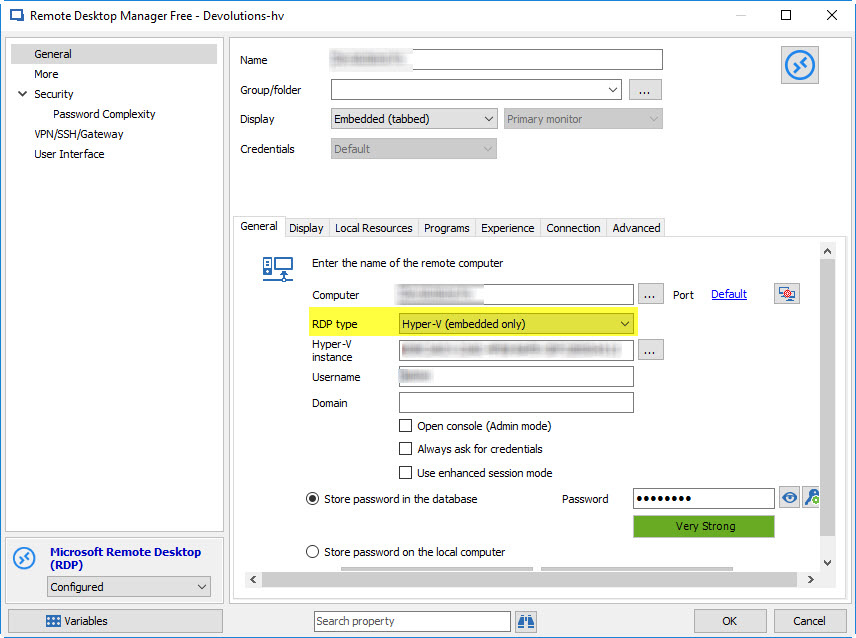
If this isn't what you're talking about, could you maybe give us an example outside of RDM?
Regards,
Hubert Mireault
Hi,
I believe that option only works when you are connecting from a remote machine (running RDM) to another computer running Hyper-V.
I'm talking about that option being enabled where RDM and Hyper-V are all running on the same (Windows 10) computer.
Thanks,
Greg
Hi,
We need more detail on how this is done with the other products like vmconnect. Perhaps you could show us the option for that. For now I have no idea what we have to do for that.
Regards
David Hervieux
I'd guess he's trying to connect to a NAT'd connection, and the name resolution is outside the NAT..
My suggestion would be to try connecting by IP address, assuming your local system has a route to get to it.. (do a route print to see it).
David F.
Hi guys,
Maybe if I explain my setup, you could understand what I mean a bit better: I built my laptop using Windows 10 and then installed the Hyper-V components on it. Then I created some VMs running inside Hyper-V on my laptop.
I know I can use RDP inside RDM to connect to the VMs running inside Hyper-V on my laptop, but the VMs are in their own private network which is not currently routed from the NIC on my laptop. I can connect to them fine using Hyper-V's VMConnect.exe - but this ends up with loads of additional Virtual Machine Connection windows open. I'd much prefer to achieve this all inside RDM, using the 'Open Embedded' option - but using a VMConnect.exe style of connection not Microsoft Remote Desktop connection (in RDM).
Is this possible with the RDM Free edition? If so how, if not - please can you work on adding this to a future release.
Many thanks,
Greg.
Could you post what configuration you need to set in vmconnect to achieve this. We both use the same ActiveX from Microsoft and I would like to know what they do to make it work.
Regards
David Hervieux
Have you tried the Use enhanced session mode by the way?
Regards
David Hervieux