Use a master password/key to all connections?

Disabled
hey,
i have allot of ssh connections (using the free version of RDM).
i use the same password to most of them, but i need to change the password every now and then.
is there a way to set "master password" or anything similar so i would't have to manually change the password to every connection i have when ever i update my password?
All Comments (9)
Disabled
Not sure if this is available in the free version but you can set up 'inheritence'.
If you have all your connections in one or various folders, you can set the credentials up in that/those top level folders and then configure each host to inherit their credentials from the properties.
You do have to configure that in each host though which can be a pain if you have hundreds.
Hello,
The Free version does not support inheritance. Sorry about that.
Best regards,
Maurice
and @Matthew, have you seen our Batch Edit mode?
Commands > Edit > Batch Edit
Maurice
Disabled
Hi Maurice,
Yes you're right, you can actually configure the credential inheritance in Batch Edit.
It's quite limiting though, this Batch Edit thing, as there are things that would be useful to do.
E.g. Setting up "Tab Page Category" in "User Interface" in the Properties of each host. That doesn't seem to be available under Batch Edit, unless I'm not looking in the correct place. I've attached a screenshot for reference.
TabPageCat.JPG
@Matthew,
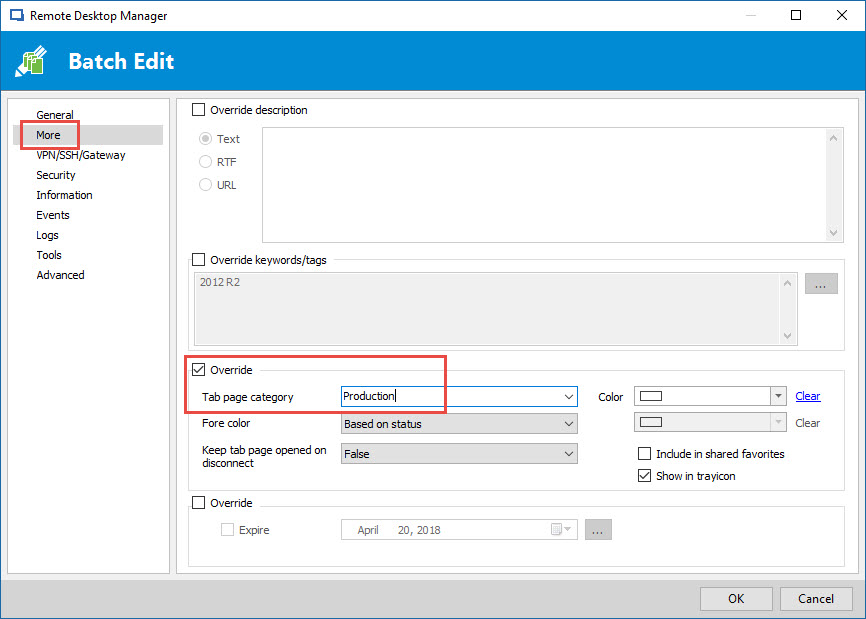
It's possible to update the Tab Page Category via the Batch Edit.
Select your sessions in the Navigation Pane, then go in Edit -> Batch Edit -> Edit Sessions (General Settings) -> More
Best regards,
Jeff Dagenais
2017-04-20_09-49-46.jpg
Disabled
Ah hah! Yes, so you can. That's a big relief as we have so many connections to edit it's unreal! lol
Thanks for your help Jeff.
Hello,
Well, we have something much better than the UI flavor of the batch edit, namely "Batch Actions - Custom PowerShell Command"
The Batch edit has become a nightmare when we need to add new properties of our entries, we have so many, and in so many categories, it becomes hard to find what is present and where it is. I honestly dont know how we can keep on adding to it.
But the Custom Powershell Command grants you access to almost every property, granted you need to be comfortable with a Shell type interface...
In our example, the command is$connection.GroupTab = "The tab caption"$RDM.Save();
Again, not for everybody, but much better IMHO
Maurice
forgot the help link : https://help.remotedesktopmanager.com/powershell_batchactionssamples.htm
Maurice
Disabled
That's great, thanks Maurice. It'll come in very handy.