ssh shell screen problems

I have a mac RDM version 4.2.1.0. Sierra 10.12.3
While you are looking through text files via cat, vim, less and etc. screen starts jumping and part of the text disappearing. If I'm using visual file manager like Midnight Commander, this is also happening. You can check it with the text which has more then one page. It's a horrible.
In combination with this issue https://forum.devolutions.net/messages.aspx?TopicID=27652 , it becomes unbearable.
I hope, you will fix it. Thanks.
All Comments (14)
I have also mac book with the same versions of OS and RDM. And the issue is reproduced as well.
Hi,
Could you provide us with print screen or video capture of your issue?
Best regards,
Xavier Fortin
Hi,
I'm seeing a couple of issues, I just want to be sure with you that I've seen everything I should and know exactly what you're doing.
1) There seem to be a couple of issues with the MC file viewer, especially with when trying to scroll with up/down arrows. I did reproduce it myself, it's actually not quite usable.
2) While navigating in the folders in MC, sometime, a large portion of the UI is covered by a black rectangle. When testing myself, passing over with the cursor with up/down arrows, made the content draw itself.
3) You enter the less command and when you exit it, the result of each command entered afterward is written above over what's already written. This one I wasn't able to reproduce it. We'll have to investigate it further.
Is that pretty much your issues?
Best regards,
Xavier Fortin
Yes, that is correct. But I want to add that this issue is happening while I'm using UP and DOWN keys in MC also.
It the same time when I'm using native ssh client in mac, it goes without any issues.
Maybe there is away to switch to native ssh client? That might solve a lot of problems...
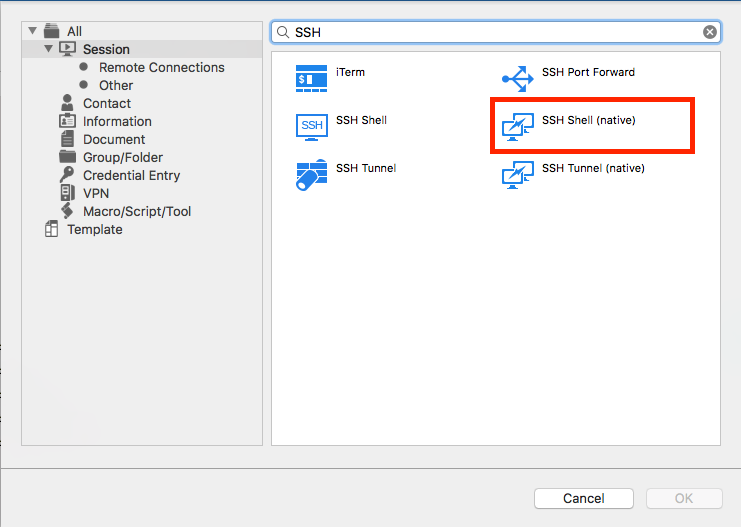
Well, in the case of the SSH Shell (native) session, if you set the Display mode (under the General tab) to external, it will attempt to open the SSH session through a Terminal.app window. It's not as reliable when it come to passing the password (I've been having issue with this personally), but it might fits your needs.
Best regards,
Xavier Fortin
I've changed Display Mode to external, but that didn't help.
My guess is you've tried it with the SSH Shell connection. I was referring to this session:
The two are doing the same thing in embedded mode, but only the SSH Shell (native) open a Terminal window in external mode.
Best regards,
Xavier Fortin
SSH Shell (native).png
That didn't help at all. Also, I've tried to use iTerm, but I couldn't start a session, didn't understand how it works...
When I was using native SSH, I couldn't start session.
This is weird, were you having any particular message popping to explain the failure to launch?
There's nothing really special about it, we just open a Terminal window and feed it information via AppleScript.
In the mean time, I've informed the developer responsible for the SSH Terminal control. We'll see what can be done.
Best regards,
Xavier Fortin
Hi...Maybe I'm doing something wrong...
https://drive.google.com/open?id=0B_NTEonwie7_VXRqY3R0OFVqTjQ
At first glance, nothing seems to be wrong with your session.
This is curious, I'll have to investigate.
Best regards,
Xavier Fortin