SSH Port Forwards not working all of a sudden

Howdy,
Just got back from vacation and had a few updates to RDM which I applied. Currently on 12.4.7.0. I was on 12.4.3.0 before I upgraded.
I have four Port Forwards setup but only one works and I'm at a loss as to why. All for use the same Private Key from my Private Vault. They are all set to Override Private key under Edit User Specific Settings. One goes right through and the others give unknown SSH errors with No supported Authentication methods available.
Anyone have any idea anything changed or can help point me where I can start looking? I have someone who's still on 12.4.3.0 and it works fine. I have another brave soul who is upgrading to the latest one to see if he then has problems as well but until he gets around to doing that, I figured I'd check here first.
Thanks,
RDM VAN.jpg
RDM TOR.jpg
RDM NEW.jpg
RDM AZA.jpg
All Comments (25)
Hi,
Our offices are closed today but I will make sure that Hubert look into it tomorrow.
Regards
David Hervieux
Just had the other person upgrade and he also has the SSH errors like I was getting but he gets them on all 4 of our connections. We had a similar problem when 12.4.4.0 came out and had to go back to 12.4.3.0 so I'm going back to 12.4.3.0 again.
Thanks.
Hello,
Unfortunately I haven't been able to reproduce your issue in our environment. Could you answer and try a few things:
We'll be checking on our end if we can find anything that differed between 12.4.3.0 and the more recent versions of RDM.
Regards,
Hubert Mireault
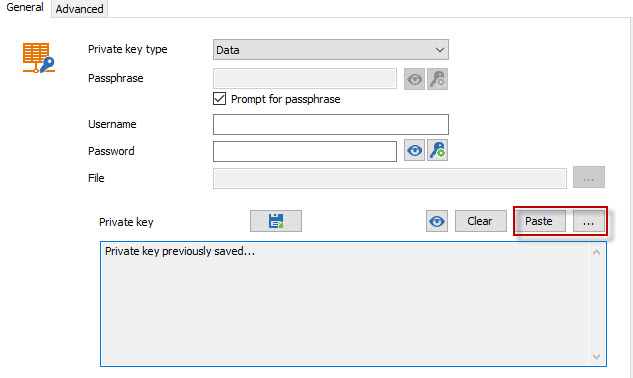
To store the private key as data you have to select the "data" option in the key entry's settings like so:
You can then use the "paste" or "browse" buttons to store the private key's data directly inside RDM.
All of these things I asked you to try would only be as tests to pinpoint the issue more easily, you wouldn't have to do it on your production datasource if you wanted an isolated environment just in case.
On another note, we've looked at the error that happens and were able to reproduce a similar issue, though we aren't sure if it is the exact same as you had. We've made a fix internally and it will be available in the next version of RDM.
For your information, if you want to try out a version of RDM without doing a full install, you can download the ZIP file instead of the installer.
Regards,
Hubert Mireault
2017-04-18 9-55-24 AM.jpg
I tried storing the Key as Data instead of File but it didn't make any difference.
I also tried putting the key into the session it self and that also had no effect.
Just installed the new 12.4.8.0 version and have the same SSH crashes that we've had since 12.4.4.0.
Can I turn on any sort of Debug logging or anything to help figure out the problem?
I have some straight Putty (SSH Shell (Rebex) connections that use the exact same key and they work just fine. The ones that don't are all "SSH Port Forward" sessions that we've had setup for over a year with no issues.
Thanks.
Good timing, I was just about to reply to this thread.
It's unfortunate that this isn't working. We currently don't have a clue what's happening. We'll work on adding additional logs and look further into the issue.
Is it possible you could either help us setup a server where the issue could be reproduced or giving us access to a test server so we can try it on our end? It would help us a lot in fixing the issue.
Regards,
Hubert Mireault
Would you want to remote into my machine and see what it's doing and poke around? I could probably arrange that.
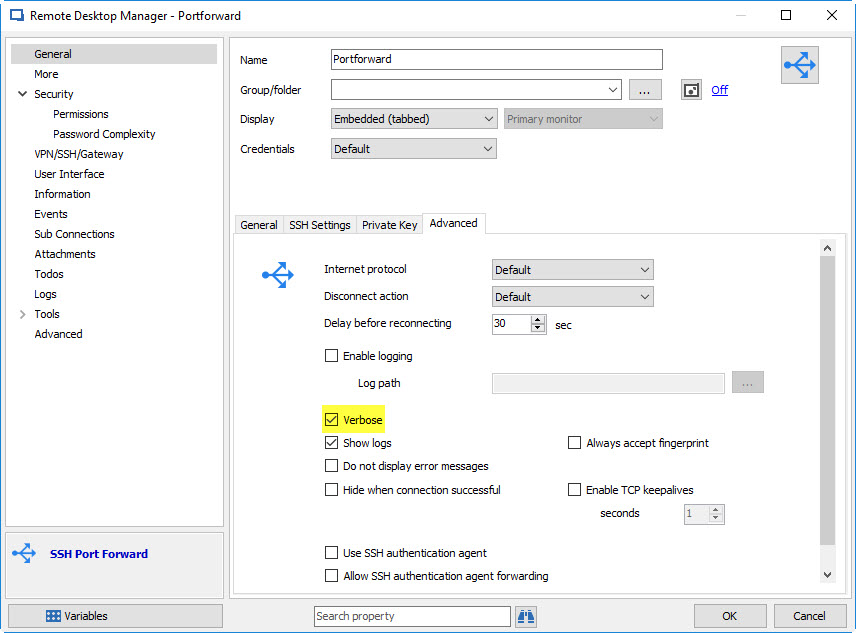
We'll see if that could be useful after the next beta is out which will contain more logging. You'll have to enable the "verbose" option in the settings:
Regards,
Hubert Mireault
2017-04-21 11-51-50 AM.jpg
OK. I'll watch for the update prompt.
Howdy,
I installed 12.4.9.0 today and have the same continuing issue. I checked the boxes for Enable Logging and Verbose and the resulting file didn't seem to have much in it. The error box still says An unknown SSH error was encountered. DisconnectedL No supported authentication methods available (server sent: publickey).
Log file below.
[5/2/2017 12:31:44 PM] Looking up host "##.##.##.##"
[5/2/2017 12:31:44 PM] Connecting to ##.##.##.## port ####
[5/2/2017 12:31:44 PM] We claim version: SSH-2.0-PuTTY_Release_0.67
[5/2/2017 12:31:44 PM] Server version: SSH-2.0-OpenSSH_5.3
[5/2/2017 12:31:44 PM] We believe remote version has SSH-2 channel request bug
[5/2/2017 12:31:44 PM] Using SSH protocol version 2
[5/2/2017 12:31:44 PM] Doing Diffie-Hellman group exchange
[5/2/2017 12:31:44 PM] Doing Diffie-Hellman key exchange with hash SHA-256
[5/2/2017 12:31:44 PM] Host key fingerprint is:
[5/2/2017 12:31:44 PM] ssh-rsa 2048 <removed>
[5/2/2017 12:31:44 PM] Initialised AES-256 SDCTR client->server encryption
[5/2/2017 12:31:44 PM] Initialised HMAC-SHA-256 client->server MAC algorithm
[5/2/2017 12:31:44 PM] Initialised AES-256 SDCTR server->client encryption
[5/2/2017 12:31:44 PM] Initialised HMAC-SHA-256 server->client MAC algorithm
[5/2/2017 12:31:44 PM] Beginning authentication
[5/2/2017 12:31:45 PM] Authentication: looking for public key
[5/2/2017 12:31:45 PM] Authentication: starting iteration
[5/2/2017 12:31:45 PM] Disconnected: No supported authentication methods available (server sent: publickey)
Thank you for the logs, we'll take a look at them.
Regards,
Hubert Mireault
Have any of the latest versions implemented any fixes for this? I didn't see anything mentioned in the Change History to haven't bothered to test them
Hello,
Sadly we have yet to reproduce the issue. This is just as frustrating for us as it is for you. :(
Would it be possible to either help us setup an SSH server with the same configuration as one that fails or allow us to connect to a test machine so we can test in our environment? Denis who did the new terminal currently has no clue what could be the issue in this scenario. Having a test environment where the issue can be reproduced would be a big step in the right direction.
Regards,
Hubert Mireault
We SSH into our production environments so I can't grant access to that. Would it help to have someone remote into one of my machines and do any testing that way? I can definitely arrange that.
Just installed v 12.5.0.0... Same problem as with every version since 12.4.4.0. Still waiting for someone to reach out for a remote session or something to try to get to the bottom of this...
:(
Hello,
I don't think doing a remote session would provide us more information to pinpoint the issue.
Good news, though, I might have found the issue! I was able to get errors connecting if I set the portforward entry's credentials to something other than "default" while also using specific settings to override the private key. Could you confirm the entry is setup this way?
As a workaround you could set the portforward entry's credentials to "default" and make sure to specify the username in the private key entry itself, if it wasn't already done.
We'll work on a fix for this issue, I hope it's the same that you've encountered.
Regards,
Hubert Mireault
Can you tell me which tab/box I need to type "default" in? Each person uses their own ID so we don't have any usernames or passwords stored in the session entry itself. Each person has their own credentials and key in their own private vault.
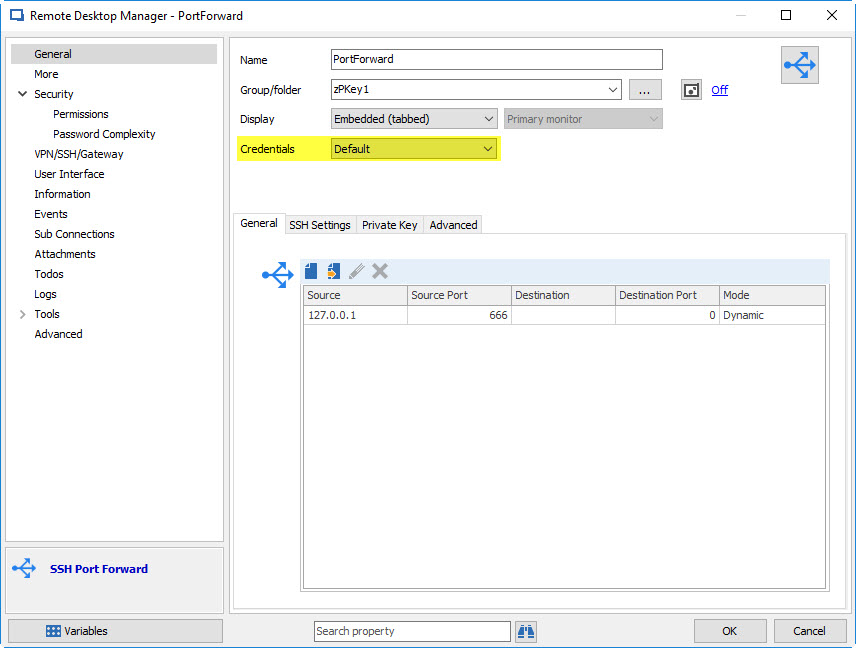
It's the "credentials" option in the Portforward entry itself (not the user specific settings or the private key entry). If it is set to something other than "default" it fails for me ever since 12.4.4.0 just like you.
Regards,
Hubert Mireault
2017-05-15 10-19-22 AM.jpg
Oh OK. We had it set to Inherited. I'll make the change and try it on my test machine in a little bit.
OK. That seems to be our issue. I will change our port forwards to Default and we should be good to go.
Nice find.
Thanks,
Mike
That's great to hear. I'll work on fixing this issue as a priority.
Regards,
Hubert Mireault
Hello,
Letting you know that the bug has been for the most part fixed internally but there are still a few issues that need ironing out. Still, with a setup using "inherited" (or anything else for that matter) it should work with the next patch of RDM (12.5.2.0). Thank you for your patience.
Regards,
Hubert Mireault
I'm totally fine running with Default instead of Inherited as we don't actually use anything inherited for our Port Forward sessions anyway. Thanks for the update.