SQL Server Data Source with Integrated Security and Domain Groups (AD Security Groups)
SQL Server Data Source with Integrated Security and Domain Groups (AD Security Groups)

We are beginning to design our RDM Enterprise configuration and are wondering about SQL Logins and RDM User mapping. According to the snippet below, from https://help.remotedesktopmanager.com/index.html?tipsandtricks_sqlserverdatasourcewithintegratedsecurity.htm, we should be able to give an domain group (AD Security Group) login rights to the SQL Instance/Database and then create users in RDM with integrated security leaving "Create SQL Server Login" unchecked. Thereby avoiding having individual user logins created/mapped within SQL. If that's the case, what rights does the domain group (AD Security Group) require for the SQL Instance and Database?
Our end goal is to keep individual SQL login/rights to a minimum.
"You can uncheck this in the case where you've already added a login for the domain group for example. Since the user is part of the group in question they would be granted login privileges through the groups access, not through a user specific account. This would help minimize support tasks in SQL Server."
Remote Desktop Manager Enterprise Edition
12.0.8.0
SQL Server 2012
All Comments (3)
Hello,
We offer a product called Devolutions Server and this application does exactly what you want. In Devolutions Server, we have an auto-create user feature and the roles management is supported via AD groups.
Devolutions Server is a middle layer between RDM and your SQL Server database.
You can try this product for free for a period of 30 days.
You can consult https://server.devolutions.net/ for more information.
Best regards,
Jeff Dagenais
Hey Jeff,
Thanks for the prompt response. I am familiar with the Devolutions Server product but only purchased the Global Site License for Enterprise. My main question is concerning this particular note in your "Remote Desktop Server" documentation. Could you further explain what it's saying? I interpret it to do exactly what I'm asking if the AD Security Group has the correct login rights. 
Hello,
Thank you for your explanation.
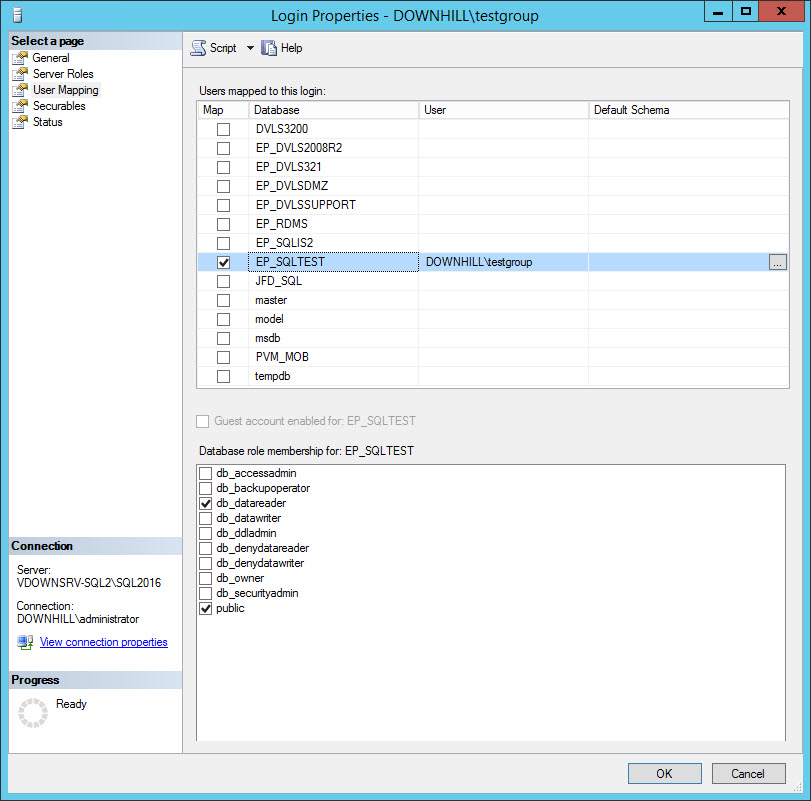
It will be possible to accomplish what you want by providing the db_datareader role on your AD Group for your database in SSMS.
After this, it will be possible for you to create your users without the option Create SQL Server Login and User checked.
Best regards,
Jeff Dagenais
2017-04-13_11-29-59.jpg