Dashlane integration

Hi,
I'm currently testing a Dashlane Business trial subscription.
I create a new entry as described on this page -> https://blog.devolutions.net/2016/05/dashlane-now-integrated-in-remote-desktop-manager.html
Everything seems okay, all the Dashlane logins are shown within RDM.
I cannot figure out how to open the new created item which takes me to the selected webpage. There is no action button for opening the item...
Am i missing something ?
Thx !
All Comments (4)
Hello,
What version of RDM are you using?
Could you please attach some screen shots of what you are trying to do?
Thank you!
Best regards,
Mark Beausejour
Hi Mark,
We are using v 12.0.8.0 , this should be the latest version.
I added the new credential entry as described on the webpage.
There seems to be no action / execute function for this entry.
I assume i can open this entry and it would take me to the Dashlane entry i entered.
1.JPG
Hello,
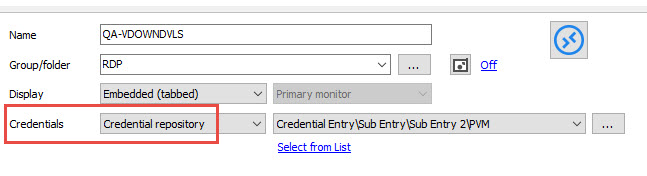
After that you have created your Dashlane Credential entry in RDM, you need to associate this credential entry to an entry in RDM so that RDM can use the credential entry to establish the connection.
As example, in a RDP session, you will select Credential Repository and select your dashlane credential entry
Best regards,
Jeff Dagenais
2017-03-28_08-29-25.jpg
Thank you Jeff.
That worked for me !
Regards Albert