Possible to duplicate connection, but force prompt for credentials?
Possible to duplicate connection, but force prompt for credentials?

I recently moved from RoyalTS to using RDM. One feature RTS had I cant seem to find an equivalent of is the ability to duplicate a connection and force to prompt for credentials, even if credentials are stored in the connection.
I'm aware you can do this with a new connection via Open with Parameters, but this doesnt seem to work if you already have a connection open.
Before I toss this in the feature request, I thought I'd check here as to whether this is possible, but I just missed it.
Thanks!
All Comments (11)
Hello,
We are testing out a solution by enabling our "multiple sessions" setting, we'll get back to you shortly.
Best regards,
Maurice
Hello,
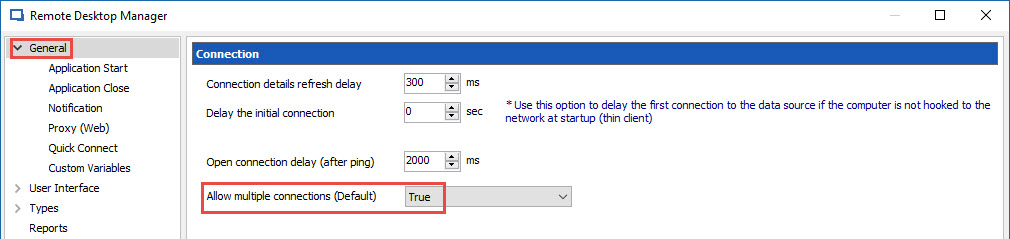
Enabling the Allow multiple connections (Default) feature in File -> Options -> General will allow you to do this.
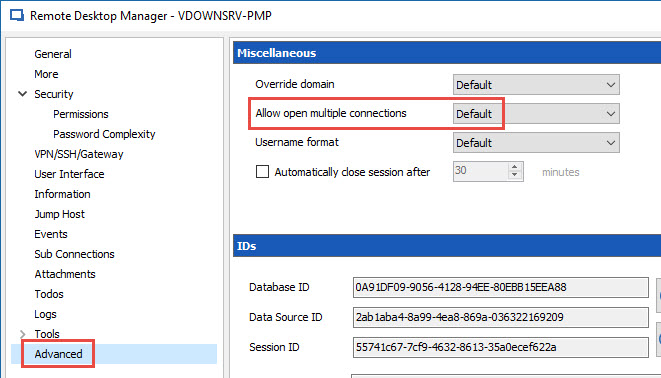
In your session, make sure that Default is selected in the Allow open multiple connections field.
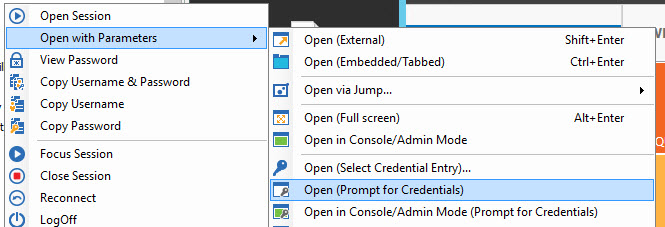
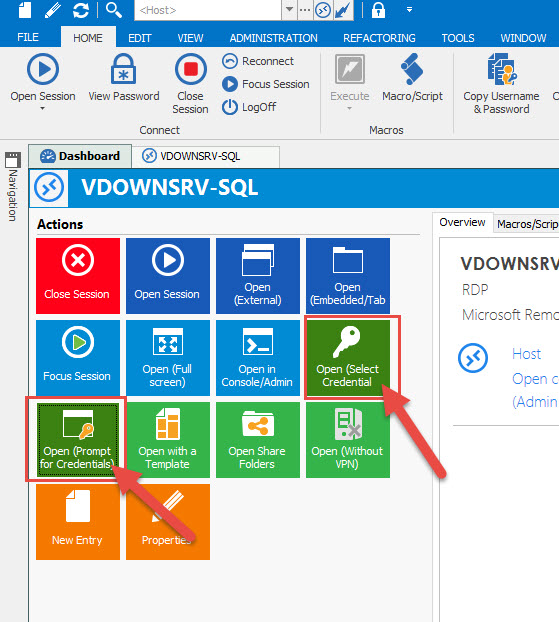
With this setting enable, it will be possible for you to go in the context menu and select Open with Parameters -> Open (Prompt for Credentials) to connect on the same machine using 2 different username.
Best regards,
Jeff Dagenais
2017-03-24_14-13-13.jpg
2017-03-24_14-11-18.jpg
Hi there
I can confirm I have the setting as mentioned, but using any of the Open options does nothing when I already have a connection opened already.
Hello,
What version of RDM are you running?
What type of session are you trying to open with different credential?
Best regards,
Jeff Dagenais
12.4.2.0
Microsoft Remote Desktop (RDP)
Hello,
Could you post a small video of the issue. There's a recorder in RDM in Help -> Record.
Best regards,
Jeff Dagenais
I couldn't get the RDM recorder to work properly. The resulting video resolution was all out of whack and also did not record the context menus.
I created a video via another tool, which can be viewed here, though this also had the issue in which the context menus did not get captured. After opening the initial connection, I right-clicked the same connection > Open with Parameters > and first tried Open (Prompt for Credentials), then tried again with Open (Select Credential Entry) as shown in the screenshot here. As you can see, neither opened up another connection.
Hello,
Thank you for the video.
I am not able to reproduce your issue using the same version as you.
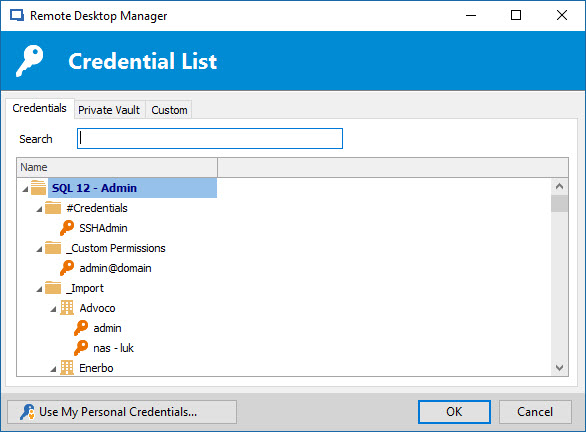
Selecting the Open (Select Credential Entry) option should open you this window
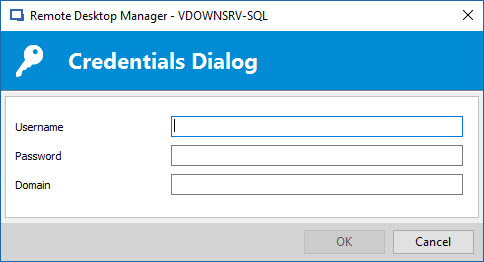
Selecting the Open (Prompt for Credentials) option should open you this window
As I can see in your video, nothing is happening, which is strange. Is it possible that the window open on a second monitor?
If you select the Dashboard tab and press the Open (Select Credential) or Open (Prompt for Credentials) button, what is happening?
Best regards,
Jeff Dagenais
2017-03-29_12-49-42.jpg
2017-03-29_12-48-25.jpg
2017-03-29_12-47-02.jpg
Sorry if I wasn't clear in my last response, but both video capture solutions I tried (built in RDM and a third party solution) did not capture modular pop-ups. This included the navigation bar and the credential prompts. I've since created another recording using RDM recorder, but with different options and that seemed to work - though I had to use VLC to view the video; Windows Media Player and the Win10 "Movies & TV" app would not play it. You can download it here.
As you'll see, the select credential option does prompt to choose an existing credential, but choosing one doesnt seem to do anything. Attempting to use the prompt for credentials option does nothing at all.
Hello,
I was able to reproduce your issue.
In my first post, I mentioned to enable an option, however, after looking at my post again, it was really not clear, sorry about that.
Go in File -> Options -> General and select True for the Allow multiple connections (Default) option. This should do the trick.
Sorry again about this situation.
Best regards,
Jeff Dagenais
2017-03-30_10-14-18.jpg
Excellent! That did it! Thanks for the clarification!