Copy the content of "Description" in Clipboard
0 vote

Hi,
it would be nice if we could copy the content of the description field in the clipboard
Thanks for your great support.
Best Regards
Adriano
All Comments (11)
Hi,
Where do you see the description exactly? Could you post a print screen?
Regards
David Hervieux
Hi David,
I mean the description field in the settings of an entry ("More" / see screenshot).
Best Regards
Adriano
RDM_FR_Description.jpg
But where do you want us to add a button or make the text selectable?
Regards
David Hervieux
I think it would be optimal to integrate it with the others. See attached.
Best Regards
Adriano
RDM_FR_Description2.jpg
Thank you. I will add this to our todo list.
Regards
David Hervieux
By the way, what do you have in the description? What content or what usage do you do with it? Perhaps we could do a better feature than just a basic copy.
Regards
David Hervieux
In the description we have several information. Primary, each Client in our Active Directory has the Name/User in the AD Description field.
When we use the RDM "Import Computer Wizard" feature (Active Directory), the description (= Name) will directly apply in the RDM description field.
Furthermore we save various information, e.g. the serial number, warranty or other important things.
This field is particularly interesting for us, because it is displayed when you go with the mouse over an entry.
Best Regards
Adriano
Do you think it could be usefull if we add it to the overview html?
Regards
David Hervieux
Where I can find the "overview html" ? Could you post a print screen?
Best Regards
Adriano
Here is the overview
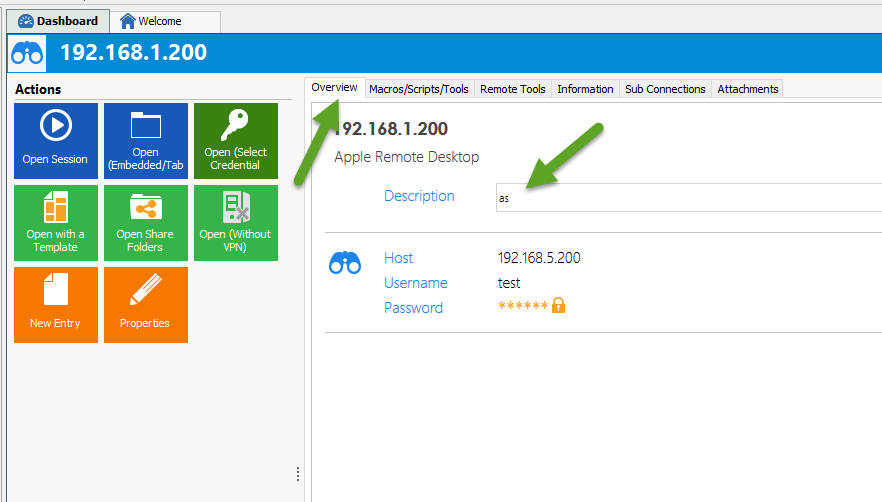
David Hervieux
description.png
Thanks for your suggestion.
I think it would be helpful.
Best Regards
Adriano