RDM and offline security - no cache on a machine

Disabled
Heloo,
We start using your solution with mysql datasource.
Every user have offline RDM on his computer, for security purpose
Each user have specific rights.
We also install RDM on some servers, on which every tech can connect.
If someone log on RDM on a server, the next time if someone use RDM in cache mode, He gets every password of the last user logued in
I think the only solution is to remove cache mode on these servers.
I found on the GUI how to do it, but i would want to manage it by GPO. (lot of servers)
Have you another solution for my problem?
Where can I configure (registry, file..) the offline state of the computer?
Regards
All Comments (4)
Hello,
What version of RDM are you running?
Could you provide us the exact steps that you made to get the offline file of your colleague.
Best regards,
Jeff Dagenais
Great idea to support disabling caching using GPO. It has been added to our to-do list. Should not be difficult to add.
For now you have a few options.
First on any of your servers, configure it like you want (see image) then follow one of:
1 - Custom installer service. Follow the steps outline to generate a custom installer that you can use to install on all servers. https://help.remotedesktopmanager.com/index.html?installation_custominstallerservice.htm
2 - Copy the RemoteDesktopManager.cfg file from the properly configured machine and paste it into the proper directory on each server. https://help.remotedesktopmanager.com/index.html?installation_configurationfilelocation.htm
Note: you can lock the data source so that no one can then change the caching on any of the servers. https://help.remotedesktopmanager.com/index.html?datasource_lock.htm
Stéfane Lavergne
DisableCaching.JPG
The feature has been implemented and will be available in the next beta release.
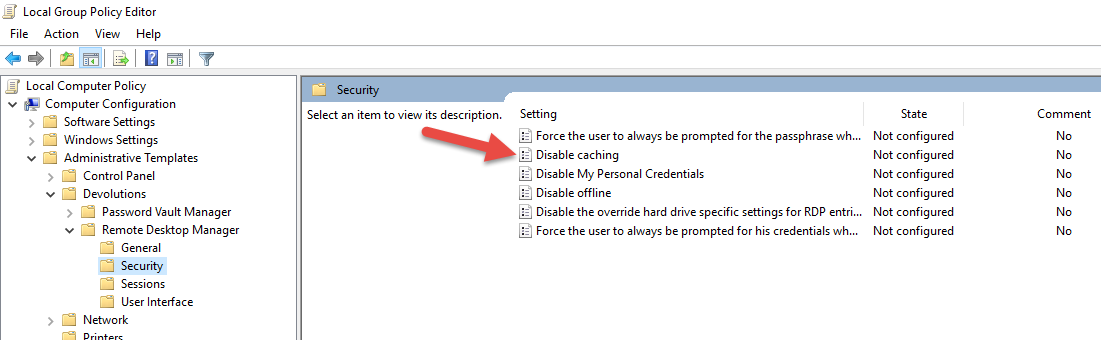
Stéfane Lavergne
2017-03-27_13-21-33.png
Disabled
Thanks a lot.