Simple procedure for changing font in Terminal Sessions

Hey all, this is likely a simple procedure. I'm trying to change the font, color, and size for built-in terminal sessions. If I right click in a terminal session when it's active, I can display font color, and the panel to change the font and size. However, selecting different options leaves the font unchanged in the terminal window. Is this a bug or am I attempting this change in the wrong place?
All Comments (15)
Hello Mike,
Are you using the SSH Shell entry type? If so, you can change the default color and font through Remote Desktop Manager's options. You can access it by going in File > Options > Types > Terminal for the font settings, and File > Options > Types > Terminal > Colors for the color settings.
If you're using the rebex shells you can go in File > Options > Types > SSH/Telnet (Rebex) for the same options.
Regards,
Hubert Mireault
Thanks, but this is actually on a mac, so there is no File>Options menu.
Hello,
This is not possible on mac for the moment.
Please consult https://forum.devolutions.net/topic27479-ssh-background-color.aspx for more information.
Best regards,
Jeff Dagenais
Hi,
Which session type are you referring to? The SSH Shell or the iTerm session?
In the case of the iTerm sessions those settings are set in the connection properties before launching it (iTerm -> Console).
If you're referring to the SSH Shell connection, this is not a supported feature yet, though it is on our Todo list.
As for the options you're referring to, this is a bug. Those are the standard menu items you would find on Text View in macOS. I though we removed them, but it seems we didn't.
I'll keep you inform on our progress.
Best regards,
Xavier Fortin
Hi,
Though the post is a bit old now, thought this may be useful for someone still looking for it.
Go to your connection -> Edit Entry -> Terminal -> Font. And there you go.
Screenshot at Feb 11 15-43-53.png
Hi,
Though the post is a bit old now, thought this may be useful for someone still looking for it.
Go to your connection -> Edit Entry -> Terminal -> Font. And there you go.
Thats nice but only per session, not real good if you want to change it permanent and for all. Is there any ETA on a default feature for this?
@gertjan,
Are you running RDM Windows or RDM Mac?
Best regards,
Jeff Dagenais
@gertjan,
Are you running RDM Windows or RDM Mac?
Best regards,
On MAC.
Hello,
Unfortunately, a generic feature for all the sessions at the same time is not available for now, but we have a ticket already opened regarding this.
The ticket is RDMM-1789.
Best regards,
Jeff Dagenais
Hello,
The general Setting to change the font in SSH Shell will be in the next release of RDM Mac (2020.2.4.0).
The option will be located in Preferences > Session Type > SSH Shell.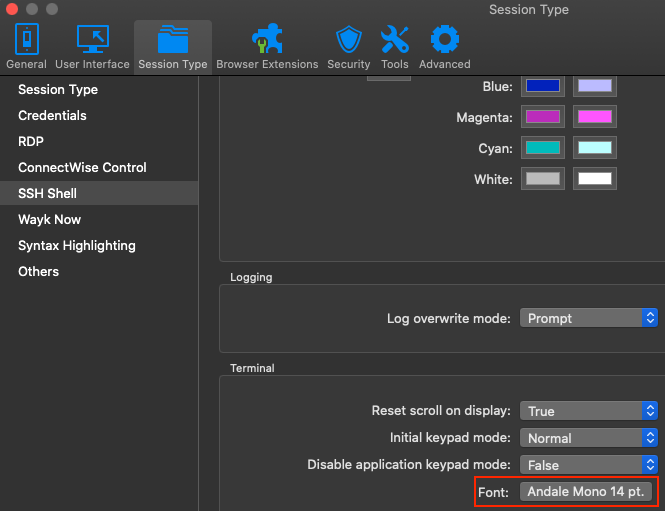
Antoine Mauger
SSHShellGeneralSetting.png
Great, good work!
Will this option be available on the Linux version of RDM Free?
Hi,
I will forward your request to the Linux team.
Best regards,
Xavier Fortin
In RDM Linux, this feature is not yet supported by our SSH terminal control.
I've dispatched this to our engineer in charge of SSH.
Jonathan Lafontaine
@xbloodworkx
The upcoming 2020.3.2.0 release of RDM Linux will have support SSH Font.
Jonathan Lafontaine