Session > Edit > Status > Default/Locked/Disabled/Warning/Expired - Grayed Out
Session > Edit > Status > Default/Locked/Disabled/Warning/Expired - Grayed Out

This appears to be a permissions issue with my end user, but I'm not sure what's wrong. I've given the User a Role with View and Edit permissions on the RDM folder. What else might be needed? I can't find anything in the forums or manual that speaks to the req'd permissions. Thanks!!
rdm1.JPG
All Comments (12)
Hello,
Your user needs the edit permissions to be able to change the status of a session.
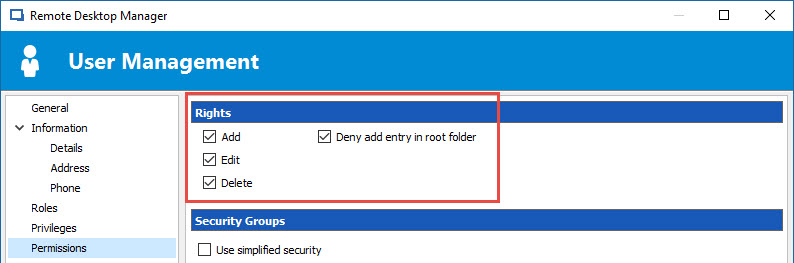
What type of data source are you using? If you are using SQL Server, make sure that the Add, Edit, Delete options are checked in the Rights section of your user.
Best regards,
Jeff Dagenais
2017-03-08_11-29-46.jpg
That was the issue... The AD account used for those session logons didn't have the RDM perm's... The AD accounts of the end users did... need both. Thanks!
I take it back... the end user and the backend user both have edit perm's. To be clear, I've created a role for that class of user... that role has the perm's. Outside of the role, the user has no explicit perms.
Hello,
As I understand, you still have the issue.
Could you post a print screen of the Privileges and Permissions section for that user please.
Best regards,
Jeff Dagenais
Word doc with images attached. The rdp sessions to be flagged are in the Viewpoint folder and the VPProcess credential is used by RDM to log into those resources.
rdm_troubleshooting.docx
Hello,
You need to enable the options in the Rights section of your user to make this work properly even if you are using a role to manage the user access.
Here's a screen shot of what needs to be enabled at the user level.
Best regards,

Jeff Dagenais
2017-03-15_21-14-57.jpg
Is there a way to do that globally with Powershell? I have quite a few users.
Hello,
Yes it is possible to change the Rights for each user with PowerShell. Here is an example :$users = Get-RDMUserforeach ($user in $users) { $user.CanAdd = $true $user.CanEdit = $true $user.CanDelete = $true Set-RDMUser $user}
Best regards,
Érica Poirier
Thank you Erica!!
To help me wrap my head around this... Does this seem correct? These perm's live on the user level... and without further perms in sessions, or the like, these perm's in and of themselves do not allow anything. They simply set the baseline for further access.
I'm also not having any luck getting that powershell to work. Is that going to work with a MS SQL backend?
#Load things
Import-Module 'C:\Program Files (x86)\Devolutions\Remote Desktop Manager\RemoteDesktopManager.PowerShellModule.psd1'
Import-Module ActiveDirectory
#Get users
$adGroup = "Testgroup"
$users = Get-RDMUser
$domainName = Get-ADDomain -Current LocalComputer
# Connect to the SQL Data Source
$DS = Set-RDMCurrentDataSource -ID "31231231231-1231-1322-1233-1231231231231231"
#Change perms
foreach ($user in $users) {
$user.CanAdd = $true
$user.CanEdit = $true
$user.CanDelete = $false
Set-RDMUser $user
}
Hello,
This is correct that enabling the Add, Edit and Delete rights do not allow anything for the users.
About your script, the only problem I see is that the line $users = Get-RDMUser is not at the right place. You should use this cmdlet just after connecting to the data source with Set-RDMCurrentDataSource. This way you will get the RDM users when connected to the SQL data source.
So, this script should works :#Load thingsImport-Module 'C:\Program Files (x86)\Devolutions\Remote Desktop Manager\RemoteDesktopManager.PowerShellModule.psd1'Import-Module ActiveDirectory#Get AD users$adGroup = "Testgroup"$domainName = Get-ADDomain -Current LocalComputer# Connect to the SQL Data Source$DS = Set-RDMCurrentDataSource -ID "31231231231-1231-1322-1233-1231231231231231"#Get all RDM users$users = Get-RDMUser#Change permsforeach ($user in $users) {$user.CanAdd = $true$user.CanEdit = $true$user.CanDelete = $falseSet-RDMUser $user}
Best regards,
Érica Poirier
Thanks! I'll give that a try. Have a great weekend Erica!
After giving it a shot, I noticed that it was still digging in AD... really only needs to be this... and the first import lines can probably go as well... I did test this way and things were fine.
#Purpose - Config every RDM MS SQL Login User in the database with
# add/edit/whatever perms on the root of their user account.
# This builds a platform so sessions can be config'd for add/edit/etc.
# Otherwise, a user would never be able to do those things.
#Load things
Import-Module 'C:\Program Files (x86)\Devolutions\Remote Desktop Manager\RemoteDesktopManager.PowerShellModule.psd1'
Import-Module ActiveDirectory
#Connect to the SQL Data Source
$DS = Set-RDMCurrentDataSource -ID "123123123-1231-1231-1231-123123123123"
#Get all RDM users
$users = Get-RDMUser
#Change perms
foreach ($user in $users) {
$user.CanAdd = $true
$user.CanEdit = $true
$user.CanDelete = $false
Set-RDMUser $user
}