RDM Crashing/Hanging on Log off or Disconnect

Good Morning,
We just rolled out RDM across our company to all of our technical staff. It looks like one of our employees is having issues 50/50 of the time when he is logging off or disconnecting from a client server.
RDM will appear to freeze or hang until he has to terminate the process to close RDM, after restarting it will work for a little while then the same thing will happen again. It will log an error in the event viewer in the form as below:
***********************
The program RemoteDesktopManager.exe version 12.0.8.0 stopped interacting with Windows and was closed. To see if more information about the problem is available, check the problem history in the Security and Maintenance control panel.
Process ID: 22e4
Start Time: 01d2929203d3a95d
Termination Time: 28
Application Path: C:\Program Files (x86)\Devolutions\Remote Desktop Manager\RemoteDesktopManager.exe
Report Id: 87db2ce3-fe92-11e6-9be8-64006a5bd474
Faulting package full name:
Faulting package-relative application ID:
***********************
or when it errors out he will receive this error:
***********************
Faulting application name: RemoteDesktopManager.exe, version: 12.0.8.0, time stamp: 0x58643506
Faulting module name: ntdll.dll, version: 10.0.10586.672, time stamp: 0x580efaf8
Exception code: 0xc0000374
Fault offset: 0x000dc799
Faulting process id: 0x3aa8
Faulting application start time: 0x01d28de290a16c37
Faulting application path: C:\Program Files (x86)\Devolutions\Remote Desktop Manager\RemoteDesktopManager.exe
Faulting module path: C:\WINDOWS\SYSTEM32\ntdll.dll
Report Id: c7c1ce3a-457a-4a72-8a76-b452344cbfc5
Faulting package full name:
Faulting package-relative application ID:
**********************
The tech is using a Dell Optiplex 9020 with Windows 10 OS installed.
Thanks,
Colton
All Comments (24)
Hello,
Could you ask to your employee to try the solutions proposed in this help topic
https://help.remotedesktopmanager.com/troubleshooting_rdphanglogoff.htm
Best regards,
Jeff Dagenais
Hey Jeff,
So I went through all three items as described and it looks like the tech's configuration has all three set already (including the registry key change).
Thanks,
Colton
Hello,
In embedded mode, RDM use a Microsoft ActiveX to establish the RDP connections. It's the same ActiveX that is used in Microsoft RDC Manager.
In external mode, RDM lauched Microsoft RDP (mstsc.exe) directly.
When RDM crash or hang, it's usually because of the Microsoft ActiveX. Unfortunately, other users has encountered the same issue as you, as you can see in the topics below:
https://forum.devolutions.net/topic24137-rdm-hangs-not-responding-at-least-once-a-week-for-me.aspx
https://forum.devolutions.net/topic26827--crashing-a-lot.aspx
https://forum.devolutions.net/topic26781-rdm--crashing.aspx
Our engineering department has started the integration of FreeRDP as an alternative on Windows to avoid issues caused by the Microsoft ActiveX.
That being said, could you launch RDM 64bit to see if there is any change? Open the folder containing RDM, by default C:\Program Files (x86)\Devolutions\RemoteDesktopManager, and launch RemoteDesktopManager64.exe.
Best regards,
Jeff Dagenais
Hey Jeff,
So I have had the technician using the 64 bit version the last few business days here and so far he has not experienced any further crashing when disconnecting from client servers.
For now, I will assume this is the official workaround until something has been patched with the main version. Do you know when they were thinking of implementing that FreeRDP into RDM?
Thanks,
Colton
Hello,
Regrettably, the Support Department cannot provide an exact release date as the full process (Build – Quality Assurance – Release) is out of our control.
The Engineering Department is working diligently and they will publish the build as soon as they deem it acceptable for public release.
Best regards,
Jeff Dagenais
Hey Jeff,
So apparently I jinxed myself by saying the issue was gone, looks like another crash occurred again with the same event log where the application froze.
The program RemoteDesktopManager.exe version 12.0.8.0 stopped interacting with Windows and was closed. To see if more information about the problem is available, check the problem history in the Security and Maintenance control panel.
Process ID: 2ec4
Start Time: 01d2967e9fc3bbf7
Termination Time: 33
Application Path: C:\Program Files (x86)\Devolutions\Remote Desktop Manager\RemoteDesktopManager.exe
Report Id: e98345ad-0294-11e7-9be8-64006a5bd474
Faulting package full name:
Faulting package-relative application ID:
Any ideas? It could be a one off, but I got a feeling its going to start up again.
Thanks,
Yep, looks like he crashed again just now. So the issue went away for a little, but back now.
Thanks,
Hello,
Could you try to run SFC Scannow on your computer to see if that helps
https://support.microsoft.com/en-us/kb/929833
Best regards,
Jeff Dagenais
Hey Jeff,
Ran the sfc /scannow, no issues reported. This computer was freshly imaged less then a month ago for this technician so nothing has really been played with a whole lot so far.
Thanks,
Colton
Having the same problem. However it seems to only happen when disconnecting/logging off from a Windows 2016 Server.
@Gavin and Colton,
I would like you to test something for us if possible.
Firstly, could you install RDM 12.4.2.0 located at the bottom of this page - https://remotedesktopmanager.com/Home/Download
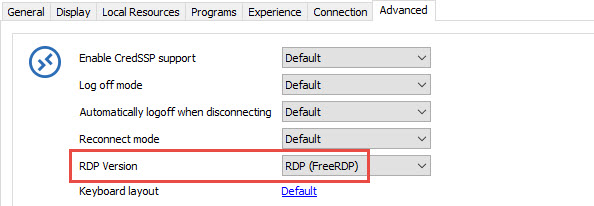
Secondly, edit one or two RDP sessions, click on the Advanced tab and in the RDP version dropdown, please select RDP (FreeRDP).
In conclusion, let us know if you still encounter logoff issue with this RDP version.
Best regards,
Jeff Dagenais
2017-03-21_09-10-11.jpg
Get an error trying to connect ...
rdm.PNG
Could you post the details?
David Hervieux
Hey Jeff/David,
I performed the update on the technicians machine and was able to connect to our database no problem.
However, looks like if I switch the RDP version to the FreeRDP it seems to lag for a few moment when attempting to a connection then gives an error as per the screenshot.
It's working so far if I keep the default settings, told the technician to tell me if it crashes again.
Thanks,
Colton
RDMError.png
@Gavin and Colton,
Could you try to enable/disable the NLA option in the Connection tab of your RDP session to see if it helps.
I also like to ask you if it's possible to provide us access to the Windows Server 2016 that you are not able to connect so that we can reproduce your issue internally. I am asking this because we are not able to reproduce your issue in our lab environment. Feel free to say no if it's not possible.
Best regards,
Jeff Dagenais
After changing the setting back to the default I tried the disconnect and logout and I am not having a problem with the freezing anymore. Seems like this version is working fine?
Hey Jeff,
No matter which server I make the adjustment on for the RDP Service to be using FreeRDP, the same thing happens where the server errors out and I am unable to connect. But like I mentioned before, if I leave it on the default it seems to be working and stable so far.
I also tried changing the NLA option in the connection options, but that made no difference in making the FreeRDP work.
Thanks,
Colton
Hello,
Thank you for your feedback.
After several tests, we have been able to reproduce your issue with freeRDP. Our engineering department is currently looking at it.
Best regards,
Jeff Dagenais
Hey Jeff,
Also to let you know the same crashing that was happening before is also happening now on the new version where on disconnect of a server, RDM hangs and crashes.
Just wanted to let you know.
Thanks,
Hey Jeff,
So it looks like more technicians are starting to report the exact same thing, including myself. Same thing where if we disconnect from a server (either using the logoff within the server or just hitting the "X" to close the session via RDM) will cause the software to hang and crash. Doesn't matter the client were connected to, seems to be happening across any of them.
Thanks,
Colton
Morning,
Is there any update with this? I am starting to hear more reports of techs in the our company that are having the same issues now.
Just a little worrisome as we just switched to the RDM and if were having this many issues this soon, we just might have to swap back to our original product.
Thanks,
Colton
Hi,
Have you retried FreeRDP with the latest beta?
Regards
David Hervieux
Hey David,
That was one of the first requested things we try in the forum chat here and when we switched it the servers would not load at all.
Just to confirm the same thing is happening I got one of the techs to switch it to FreeRDP this morning and the same thing where the server doesn't load at all. Wouldn't call it a crash, the service itself just doesn't work.
Thanks,
Hello,
Which version of RDM are you running? Is it RDM 12.4.4.0, which is the latest beta?
Do you have something relevant in Help -> View Application Log?
Best regards,
Jeff Dagenais