[SOLVED] SSH Shell: do not disconnect while idle
Hi,
Using SSH Shell connection, my tabs are disconnected after some time when I'm not active. I'm trying to keep them open even when I'm idle. I believe that the "KeepAlive interval" setting (shown below) is what I'm looking for, but this is for SSH Shell Rebex. Is there an equivalent for the basic SSH Shell connection?
All Comments (24)
Hello,
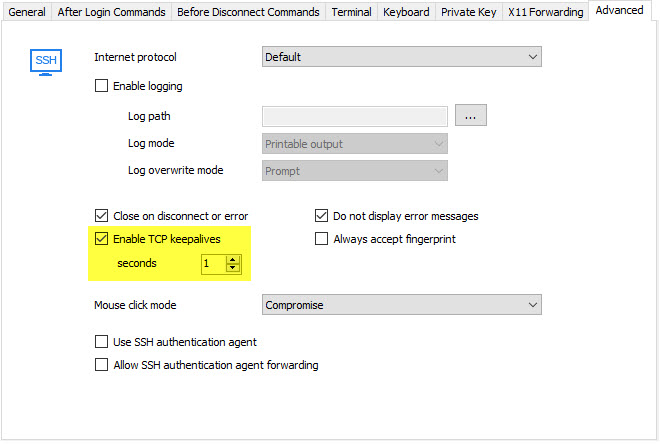
In the advanced tab of the SSH Shell entry, you should have the following option:
Just check the "enable tcp keepalives" and set a delay, and it should work.
Regards,
Hubert Mireault
2017-02-23 3-57-36 PM.jpg

Disabled
How come the Advanced tab on my SSH Shell doesn't have the "Enable TCP keepalives"? Please see attached screenshot. Thanks.
Screen Shot 2017-02-27 at 7.16.58 PM.png
@M Lim,
You are using RDM Mac Free Edition, not RDM Windows edition.
I will forward your request to our mac developpers and see what ca be done.
Best regards,
Jeff Dagenais
Disabled
Hi Jeff, I just need the "keepalive" option for my SSH sessions so my connections can stay active. Do you know if RDM (Mac) Enterprise edition has it? Thanks.
@M Lim,
The option is not present in the Enterprise Edition as well. This is why I would need to verify this with our engineering department.
Best regards,
Jeff Dagenais
Disabled
Thanks, Jeff. I hope they will add the "keepalive" option for Mac soon.
Hi,
Just wanted to give a feedback after I had the time to test the "TCP keepalive" option: it works very fine, all good for me!
Thanks Hubert and Jeff.
Disabled
Hi Jeff, any update from your Engineering department? I would like to know if they plan to include the keepalive option in future release for Mac, if yes, how soon. Thanks.
Hi,
We're working on it. It won't be in the next release (since it's being deployed soon), but I think you can expect it for the upcoming releases after this.
Best regards,
Xavier Fortin
Disabled
Hi Xavier, any update on the TCP keepalives feature for Mac? Thanks.
Yes, I have news.
This has been done. Sorry on missing to inform you.
This will be available in the next release.
Best regards,
Xavier Fortin
Hi, is it possible to set this globally?
I have 200+ SSH connections, and I'd save some time if I don't have to edit every single entry.
@limone,
Which setting would you like to set globally?
What version of RDM are you running?
Best regards,
Jeff Dagenais
Well, the TCP-Keepalive, which is discussed in this topic.
Version 2019.2.12.0
@limone,
I suspect that you are running RDM Mac 2019.2.2.0 and not 2019.2.12.0.
Let me know if I'm wrong.
That being said, in RDM Mac, it's not possible to perform a bulk change on several SSH sessions at the same time. This would be possible via PowerShell in RDM Windows.
Do you have access to a workstation where RDM Windows is installed and that you have access to your data?
If yes, please let me know so that I can provide you the proper script to run on your SSH sessions.
Best regards,
Jeff Dagenais
I don't run Mac, I use it on windows.
But nevermind, TCP Keepalive doesn't work for me, inactive SSH connections still die after some time.
I'll try to test it with putty, maybe the firewall is the problem.
Looks like a RDM problem, if I let putty sit for a couple of hours the ssh connection is not closed.
I've upgraded to 2019.2.21.0 (64-Bit) and will test this again.
PS: the SSH connections don't die visually, like I have the tabs opened in RDM but I'm woking in other connections, when I switch back to and "old" ssh tab and press something, nothing happens, but after a couple of seconds the connection dies without a error notice from RDM.
My Database is XML and encrypted, if that information is any useful.
Hello,
Do you have something relevant in Help -> Application Logs?
Best regards,
Jeff Dagenais
Looks like the log was cleared after updating the software, so I'll have to wait until it happens next.
The application log keeps being empty if the connection dies.
Hello,
Could you try enabling the Ping Interval option located under the Advanced tab of your SSH Shell session?
Best regards,
Jeff Dagenais
Sure, I've set it to 10 seconds now, I guess that should be enough.
I also enabled "advanced logging" (I don't know if thats the correct translation, but it's the first checkbox in advanced settings)
Looks like that's the solution.
So, ealier you said there is a way to do this change via script for all sessions.. How to do that? :)
Hello,
It's indeed possible to update several SSH sessions at the same time using PowerShell.
Please consult this article for more details on how you can accomplish this
https://help.remotedesktopmanager.com/powershell_batchactionssamples.htm
Best regards,
Jeff Dagenais