Open session with select credential triggers credentials box RD Gateway
Open session with select credential triggers credentials box RD Gateway

Dear Devolutions,
We use RDM mostly with RDP sessions, which all go via a RD gateway server to the customers network.
We use 1 RD Gateway user for all sessions. We have made a RD Gateway user credential for that account in RDM which is configured as the used credential on the RD gateway configuration on each RDP session.
Recently we started creating other credentials in RDM. The following issue appears then:
When i start a RDP session via right click ->Open with parameters -> Open (Select credential entry) and i select for example the local admin credential for that server, i am always presented with a windows credential popup of the RD gateway server where i have to fill in the RD Gateway user+credential. But i configured that user in the Connection settings of the RDP session.
Any idea what is causing this?
Thanks in advance.
All Comments (35)
Hello,
We have seen issue with RD Gateway in the past because of Windows 10 Anniversary. The solution was to use RDM 64bit to be able to establish the connection properly with the RD Gateway configured.
That being said, could you launch RDM 64bit to see if there is any change?
Open the folder containing RDM, by default C:\Program Files (x86)\Devolutions\RemoteDesktopManager, and launch RemoteDesktopManager64.exe.
Best regards,
Jeff Dagenais
Hi Jean-Francois,
The majority of our users already use RDM 64bit. To speak for myself as RDM administrator, i always work with RDM 64bit.
I can confirm that the issue also occurs in RDM 64 bit.
Any logging or debugging i can do to help gather information?
ow i see that your name and signature do not match :)
Hello,
We have been able to reproduce your issue.
A ticket has been submitted to our engineering department.
Best regards,
David Grandolfo
Hello,
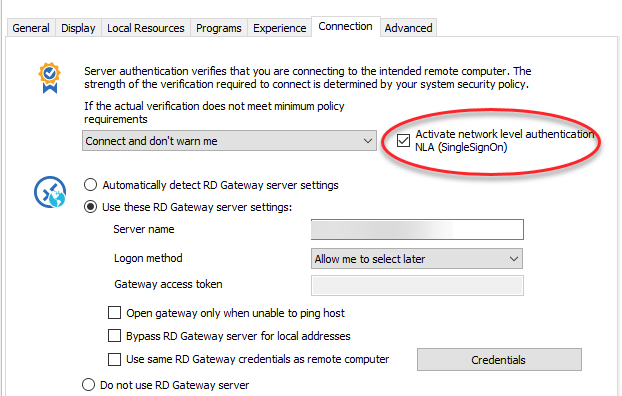
After testing that problem in our side, we discover that the problem appears if theActivate network level authentication isn't checked.
Could you check that box and let us know if it solve your problem?
Best regards,
David Grandolfo
nla.png
Hi David,
Thanks for your response. All our RDP sessions use NLA by default. I've double tested this, and the issue occurs both with NLA on and off.
Hi,
Thanks for your test.
Could you export one of your session with the problem and send it to support@devolutions.net
If you prefer you could also do a Right Click --> Clipboard --> Copy and send us the XML by email.
Best regards,
David Grandolfo
Hi,
I have send the XML file of the session to the support mail address.
Just to mention some more details which i discovered:
1. It happens with most of our RDP sessions, not only the one i send the XML from.
2. When i test this from our unmanaged RDM environment (RemoteApp (RDM v11.7.6.0) to a TS which is in the same domain as the RD gateway) it does not happen.
3. It seems only to happen from our managed clients which are in a separate domain and have RDM locally installed (i have v12.0.5.0).
Hi,
Thanks for your XML, I test it with your configuration and I wasn't able to reproduce the issues (except when I forget the NLA) and in your case the NLA is activated.
Perhaps they have a problem with the RDP activeX in the version 12 of RDM and your server configuration. To be sure about this point, could you try to connect to your server "the same that you have a problem in the RDM 12.x" with Microsoft RDCMan. You could download it from here.
And it's not related to the problem, but if your Remoteapps and managed clients are connected to the same datasource. I would recommend you not to mix RDM 11.X and RDM 12.X. RDM 12 made a change in the datasource and the users with RDM 11.X could have some problem.
Best regards,
David Grandolfo
Hi David,
Thanks for your response. Our unmanaged and managed RDM clients use the same datasource, which is DLVS.
When the new DLVS build is released, i will first update our remote app to the latest RDM client. After that there will be some weeks in which the employees self have to update RDM to the latest package.
I will test with RDCMan and report the results back.
Thanks for your follow up.
If you update your DVLS server please be sure to follow these step or you could contact our support team at support@devolutions.net to help you with the update.
Best regards,
David Grandolfo
Hi David,
I tested with RDCman, but no credential box pops up with RDCman. Little detail: In RDCman i cannot say if wether i want to use NLA or not.
Thanks for your test, I will transfer the results directly to our engineering department.
Best regards,
David Grandolfo
Hi,
Did you received any feedback already from the engineering department?
Thanks in advance.
With kind regards,
Valid Operations
Hi,
I just talked with the engineering department and the tickets is still open the engineer are still trying to reproduce the issue. As soon as they are able to reproduce the error it will be easier to solve the problem.
Sorry about this inconvenience.
Best regards,
David Grandolfo
Hello
We're having the same issue. Did you get to the bottom of this?
Thanks
Hi Roger,
Does the NLA option is check?
And with which version of RDM do you have the problem?
Best regards,
David Grandolfo
@David,
I have the same issue. 80% of my RDP sessions prompt for the credentials box each time i click on them. Some don't do it as i've seen, Some have NLA on and some dont and it happends in either 32bit and 64bit exe. running 12.6.8.0 64 bit.
credential box.JPG
Hi David
It happens with NLA ticked or unticked. Similar to OP, it happens when selecting from the Credentials List.
Version is 12.6.8.0 64-bit
Thanks
@Jeremy, @Roger,
Could you change the password you have configured for a false password and export the session with credentials. I do not need to have a connection to the server, you can change the IP of the gateway. But we need to see the full RDP session configured with the credentials.
If you can send us the RDM entry at support@devolutions.net we will be able to investigate the problem.
Thanks,
David Grandolfo
@David,
sent.
Hi Jeremy,
I received the email and the document but their is no RD Gateway configuration in the entry.
Do you have something configured in the Connection tab of the RDP session?
Best regards,
David Grandolfo
------------------
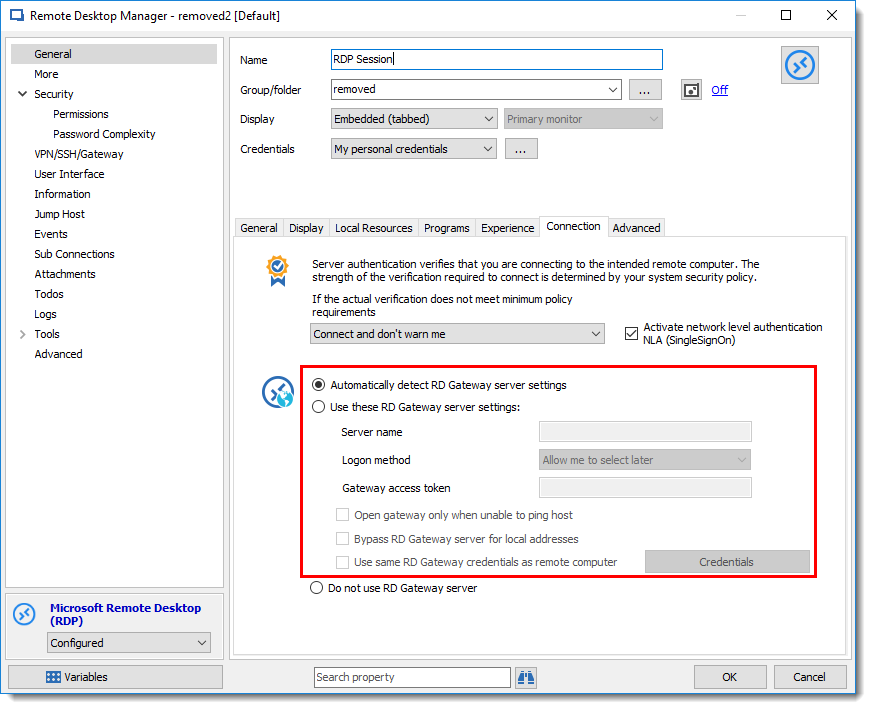
Under Connections the only things selected are "Activate NLA", "connect and don't warn me", and automatically detect rd gateway server settings".
Hi Jeremy,
Sorry I might didn't explain correctly. When I looked at your session I didn't see any RD Gateway configure in the Use These RD Gateway Server as below. If nothing is selected, the problem isn't Open Session with select credential triggers credentials box RD Gateway. But we can look at the problem anyway. Please let me know if it's with or without gateway.
Regards
David Grandolfo
RDP_Gateway.png
what you have in the image is exactly what i have for connection settings.
Hi Jeremy,
Ok, thanks, so the problem isn't related to a RD Gateway. You probably have a problem with your RDP connection.
Could you try creating a MSTSC (RDP) entry in windows with saved credentials. Does it keep the credentials?
Most of the time your problem is related to a server that do not permit to save the password to connect to it.
Best regards,
David Grandolfo
it doesn't look like it keep credentials. i click to box to keep credentials but when i edit it again it is unchecked. To make sure were on the same page. if i cancel the RDM box for password credentials options i get the normal login which i expect.
Hi,
Could you have a touch with the Server administrator, it's look like the server do not accept that you save the password. So the problem looks to be server side.
David Grandolfo
I am the admin. It didn't start doing this until we upgraded RDM to 15.5 ot 12.6, somewhere around there it started doing it. We have some other servers with same policies applied and they don't ask for it. In RDM i am not saving any passwords, it is suppose to ask me for my password each time. Its the attached image that i keep getting when i launch the connection. i recreated the connection from scratch and it works fine. it seems that alot of our connections are corrupt but don't see a setting that differs from the new one that would cause it. also confirmed that co worker has 12.0.8.0 and they don't get the popup like i do.
creds.PNG
Hi Jeremy,
The last information you sent me is very useful, could you export in .rdm type one old entry with the problem and one new entry without the problem. We could probably compare both of them and see where the problem could be.
Best regards,
David Grandolfo
@Roger
I just answered your email following the problem. We will post the solution as soon as we identify the culprit.
Regards,
David Grandolfo
David, These have been emailed to the previously requested email address.
@Jeremy,
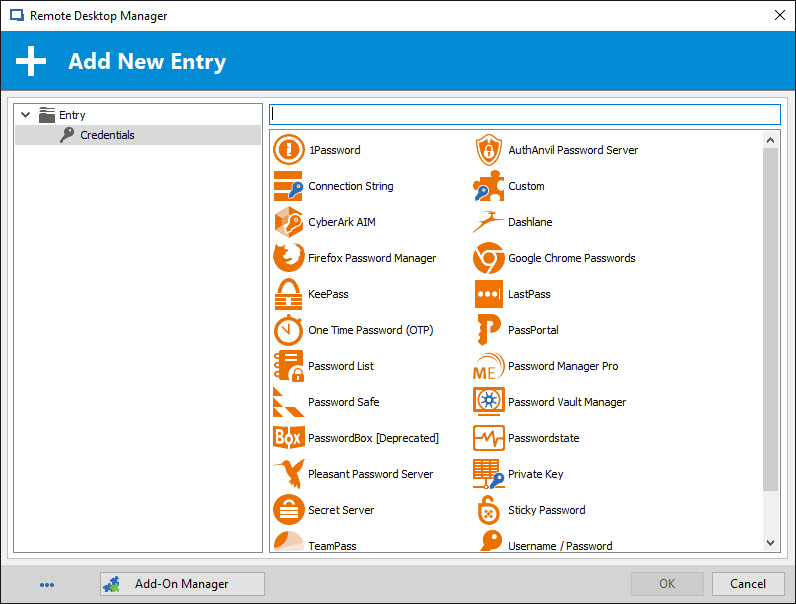
The Add New Entry window that you see when you try to connect usually appear when your session is configured to use My Personal Credentials, but that no personal credential has been configured in RDM.
I would like you to verify three sections in RDM to make sure that a My Personal Credentials is not configured on your session.
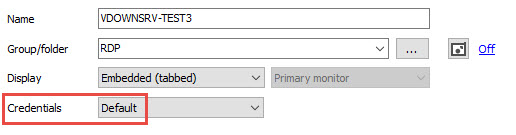
Firstly, edit your RDP entry and make sure that Default is selected in the Credentials dropdown
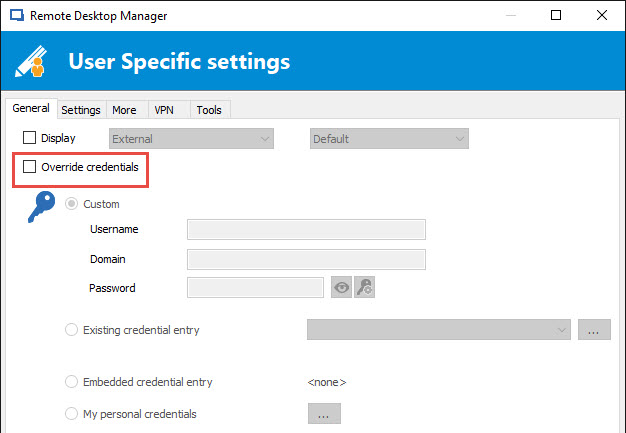
Secondly, right-click on the RDP entry and select Edit -> Edit Entry (User Specific Settings). Make sure that the Override credentials option is unchecked.
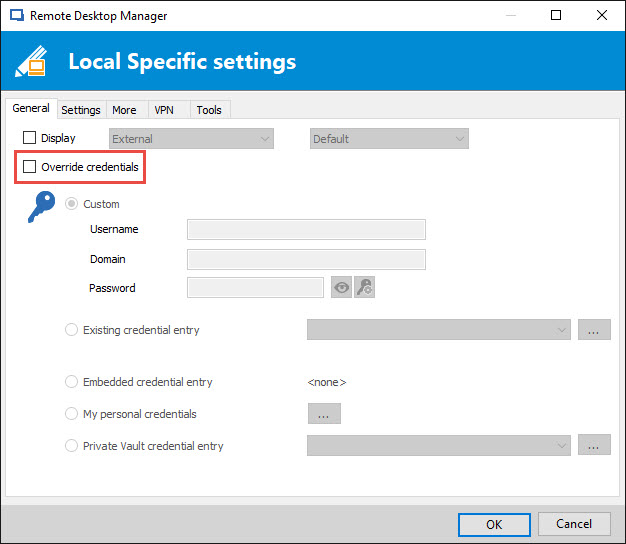
In conclusion, right-click on the RDP entry and select Edit -> Edit Entry (Local Specific Settings). Make sure that the Override credentials option is unchecked.
Let us know how that work.
Best regards,
Jeff Dagenais
2017-09-22_15-20-37.jpg
2017-09-22_15-19-16.jpg
2017-09-22_15-17-16.jpg
2017-09-22_15-04-31.jpg
yep that was it. any way to change that for all connections at once? looks like some are set that way but with 400+ connect not sure which ones.
@Jeremy,
You can update the User Specific Settings or Local Specific Settings in bulk by using our Batch Edit feature. Select your RDP sessions and then go in Edit -> Batch Edit -> Edit User Specific Setting or Local Specific Settings.
For more information, please consult https://help.remotedesktopmanager.com/edit_batch.htm
Best regards,
Jeff Dagenais