Auto Login form for HPE BladeSystem Onboard Administrator websites
Auto Login form for HPE BladeSystem Onboard Administrator websites

I've been quite successful with RDM's auto login function for most of the website sessions that require login using a form, referencing the respective fields.
However, I'm stuck with the Onboard Administrator web interface for HP Blade Enclosure administration. Nothing get's filled in automatically after the website has loaded fully though I'm sure I identified the username/password fields correctly. Even clicking manually on the Auto Login button after the website has loaded doen't result in any field getting filled.
As we've got a lot of Blade Enclosures to administrate, login in manually to them is a tiring act. I've also been experimenting with Events - After Connect - Macro and an initital wait time but results are not that satisfying as load time varies hugely depending on the location of the Blade Enclosure in the world.
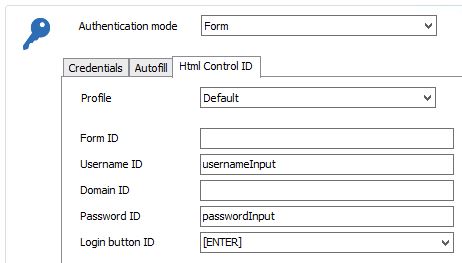
These are the settings:
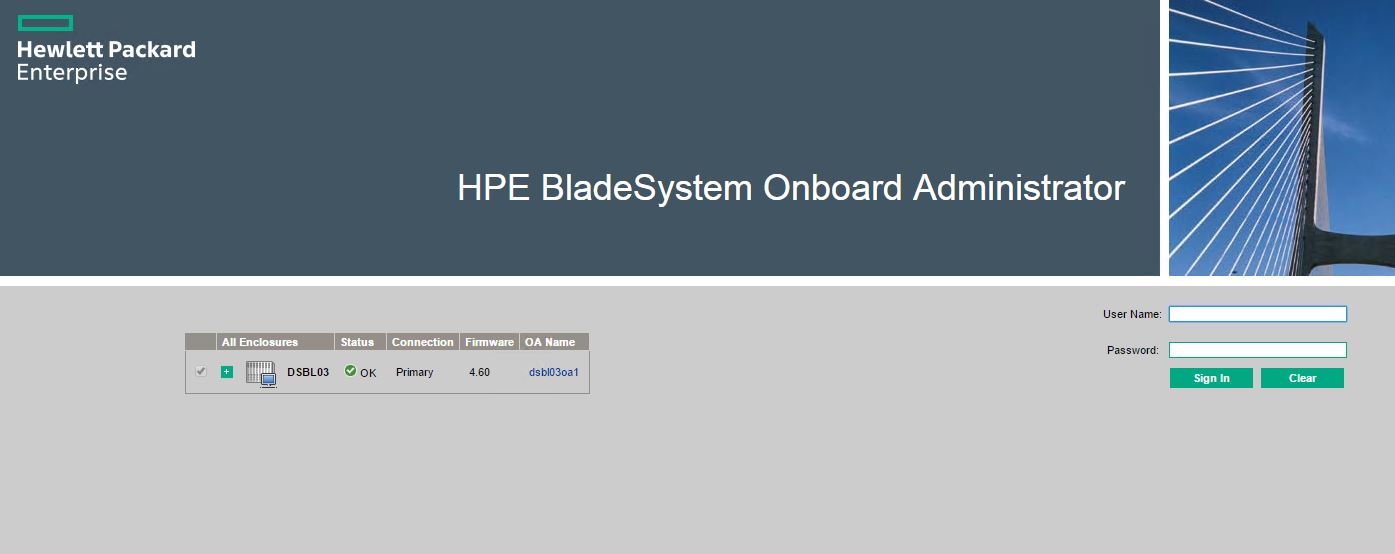
and what the website looks like:
And I've attached the HTML code zip archive of the website too. The relevant part is in the blank(1).html file
Maybe you can figure out why it's not working?
Thanks a lot in advance!
-------------------
Remote Desktop Manager Enterprise Edition 12.6.6.0 64 Bit - Data Source: SQL Server
Running on Windows Server 2012R2 VMs with Remote Desktop Services feature, serving as common work environment for 30 Windows Server administrators
HPE BladeSystem Onboard Administrator.zip
2.JPG
1.JPG
All Comments (6)
Hi,
Do you use Chrome, Internet Explorer or Firefox in your Web Browser session?
Do you have the same problem with the three types?
Best regards,
Olivier Désalliers
Hi I'm using Chrome. I also tried the other two but unfortunately HPE BladeSystem Onboard Administrator only loads correctly in Chrome. It fails loading to the login interface in Internet Explorer and only shows RDMs "loading" popup bar forever (probably due to self signed certificates of all the Blade Admin websites)
-------------------
Remote Desktop Manager Enterprise Edition 12.6.6.0 64 Bit - Data Source: SQL Server
Running on Windows Server 2012R2 VMs with Remote Desktop Services feature, serving as common work environment for 30 Windows Server administrators
Hi,
Olivier did a fix yesterday for Chrome and this should be in the next beta.
Regards
David Hervieux
David, Olivier - awesome support, as usual :)
Is there any time schedule when this beta will be available? I'd be happy to test it on a testing environment.
-------------------
Remote Desktop Manager Enterprise Edition 12.6.6.0 64 Bit - Data Source: SQL Server
Running on Windows Server 2012R2 VMs with Remote Desktop Services feature, serving as common work environment for 30 Windows Server administrators
Hi,
We have a new beta planned for later today.
Regards
David Hervieux
Thanks, it's confirmed working now :)
-------------------
Remote Desktop Manager Enterprise Edition 12.6.6.0 64 Bit - Data Source: SQL Server
Running on Windows Server 2012R2 VMs with Remote Desktop Services feature, serving as common work environment for 30 Windows Server administrators