Unique credential based on the users role - How To?

Use case:
You have a support team, call them:
Tier 1 - Answer phones basic stuff
Tier 2 - A little more privilege
Tier 3 - Admin
You have an SSH session to a Cisco device. That Cisco device has three users:
Tier1 - Privilege level 1 (can't really do much at all)
Tier2 - Privilege level 5 (read and possibly other commands you configure)
Tier3 - Privilege level 15 (full admin)
What I'm looking to do is have the ssh session pass the credential that is specific to the user. So if the customer is in the Tier 1 role/group the session would execute with those credentials.
I was thinking maybe I could use 3 sub-entries with each of the 3 credentials and override the permissions on the sub-entry so that only that role could read that specific sub-entry containing those permissions. Then in the host I could use the $PARENT_HOST$ variable. I'm not a huge fan and didn't really test to see if it would work, it feels a bit kludge.
Any other ideas on how we could easily implement this? We'd potentially have several thousand (5 - 10k) entries that would need to have this configured on them, hence why I'm trying to come up with the best (if there is one) solution possible.
RDM feature-set never ceases to amaze me, so I wanted to see if anyone else could come up with a better way. Also, not duplicating data (like hostname) is crucial. We can only have it so data is updated in one place, which is why I started down the sub-entry path.
Thanks!
All Comments (3)
Hello,
Does your Tier 1, Tier 2 and Tier 3 are 3 separate folders? If your Tiers are separate by folder, maybe you can create shortcuts instead of duplicating your entries - https://help.remotedesktopmanager.com/edit_shortcut.htm
If this is not the case, please post a print screen of your folder structure in RDM.
Best regards,
Jeff Dagenais
Hi,
I don't think shortcuts would work because we actually need different credentials used depending on the users AD group. Shortcuts appear to only create a symbolic link, so if you can't modify the credentials used for each shortcut it wouldn't allow each tier to use unique shortcut and login with their appropriate credentials.
Hello,
I have read your first thread again and as I understand, you have one cisco device that you can access with 3 different credentials depending on your role in your company. If it's the case, here's my suggestion:
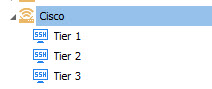
1- Create a Device group/folder session and create 3 SSH sessions under that group/folder.
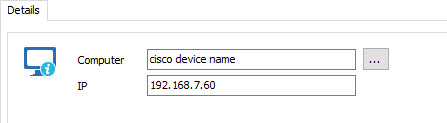
2- In your Device group/folder, enter the name of the device or the IP address
3- In your SSH sessions, you will use the $COMPUTER_HOST$ or $COMPUTER_IP$ variable depending of the information that you have populated in the Device group/folder
4- Each session will have the appropriate credential to use. You can save the credential directly in the session or use the credential repository
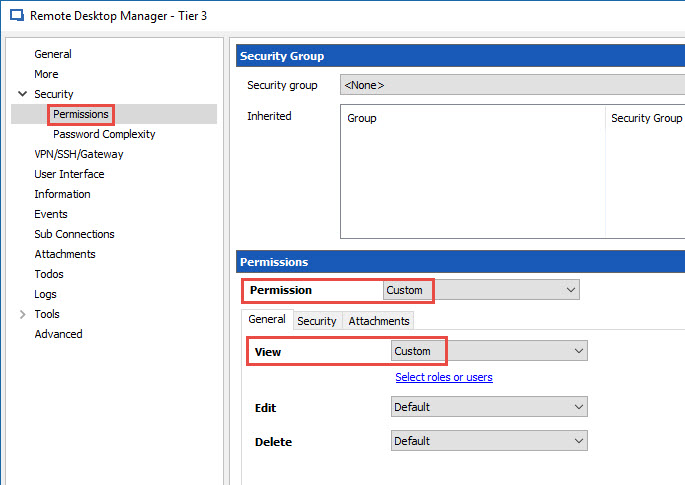
5- In each SSH session, you will configure the appropriate permission so that the appropriate role can see the appropriate session.
With this configuration, the appropriate Tier will see the appropriate SSH session to use. No security group will be configured on the Device group/folder.
Best regards,
Jeff Dagenais
2017-02-20_15-45-00.jpg
2017-02-20_15-41-50.jpg
2017-02-20_15-36-36.jpg