Quick way to see creds (user/domain/pwd)
0 vote

My group is using RDM more and more, but one thing we tend to complain about internally is that its so many clicks to see a password when we need it. Many times we can use a auto-login session, so we need to simply lookup the password. We have to click on it, go to edit, drill down into the password screen (Either on a tab, or in the credential area). If it is using a separate credential entry, then we have to go find that, etc.
We would love to be able to middle click or some other shortcut that would put a hover window up with the username, domain, and password (unmasked) for the duration we hold down the middle button (or some other technique).
Alternatively, if we could click on it and in the dashboard view of it where there is edit entry, if there was just a way to see the credentials resolved there, that would be great.
Basically as a combined session/password launcher its great, but where it is just replacing a password database, its much more cumbersome then our old system ONLY because of all the steps to see the password.
Instead of complaining internally, we though we would ask for it in hopes that it could be added and make a great product even better. Thanks for being open to feature requests.
If there is some shortcut already to do this, please share.
All Comments (9)
Hi Brett,
Maurice and I agree with you. We already have the view password for data entry but we could add the same button for other password as well.
David Hervieux
Hi
David has added a View feature, but I was thinking a macro could do wonders for you. I'm playing around with a macro containing the following : $USERNAME${tab}$PASSWORD${tab}$DOMAIN${enter}. I set the delay to 5 seconds which leaves me enough time to switch to the logon window and set the focus in the first control.
Let me know if you are interested by this solution.
Regards
Maurice
Is this new feature that David added in 8.1.4.0?
In the change history I see "Added a "View Password" action for session entries with the Copy password to clipboard enabled" for 8.1.2.0.
I am not seeing how to quickly view the password in 8.1.4.0. I still have to do all these steps to see a password:
Preferred:
Hi,
Have you seen the new View Password button in ribbon? It's visible if Allow Copy Password To clipboard is enabled. For now it's only the password but I could add other credentials as well.
David Hervieux
I see it if I enable that "Allow Copy Password" option, but it doesn't do what I want. It is just copy and then I have to open notepad or something to paste it.
Those features are great IF you want it in your clipboard, but if you need to SEE the username/domain/password they don't save any time. The goal of my suggestion is to make RDM also a great replacement for general purpose password managers. If you are helping somebody on the phone, or using a different device, say an iPad and I am on my PC looking up a credential, having it my clipboard is useless. I need to SEE all the components necessary for login on another device or to tell somebody the password over the phone. RDM works fantastic if I am trying to connect from the machine that RDM is running on, but when I need to get all the information to communicate to somebody else on the phone or to use on another device (another computer, ipad, phone, or remote control window using a remote control technology that doesn't have a shared clipboard) then its cumbersome compared to the password managers we used before. All it needs to be as useful as a simple password manager is for you to see all the credential information in a single click from the tree view (And w/o the need to have copy to clipboard turned on as seeing them doesn't require the clipboard.
Thanks for listening!
Hi,
I understand your point. However I think that you are not talking about the same button. The View password prompt a dialog and display it. What is missing is the username/domain which is something I could use. What I think is confusing is the Allow copy credentials to clipboard should be name "Allow show credentials". We need this flag because many time, you don't want your employee to be able to see the credentials.
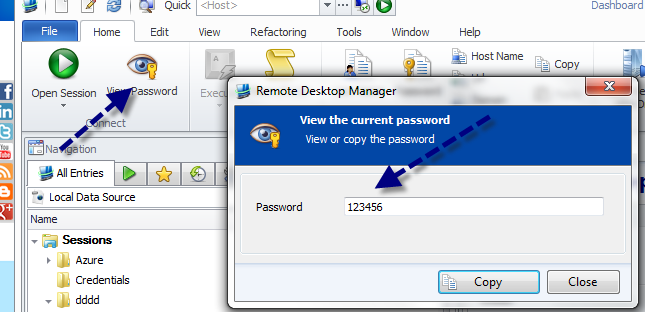
David Hervieux
ViewPassword.png
Could you try this version?
http://download.devolutions.net/Devolutions.RemoteDesktopManager.Bin.8.1.9.0.zip
David Hervieux
David,
Thank you, that is what I was looking for. I unzipped that version and exported my datasource from the installed version and ran the exe in the unzipped folder and imported the datasource to test, as it didn't have an installer.
I don't completely understand the "Allow show credentials" requirement. I totally understand what you are saying, but when I am using RDM, as an admin, I can view all passwords through the GUI as an embedded or shared credential, and also if its in a text fields in a session object regardless of the setting of this checkbox. Thus, shouldn't I be able to use View Password too w/o the "Allow show credential" being checked?
What if I don't want employees to see some credentials but want my senior admins to still be able to see it with that feature?
Hi Brett,
You are absolutely right. I will enable this dialog when you can view everything.
Installer:
http://download.devolutions.net/Setup.RemoteDesktopManager.8.1.9.0.exe
David Hervieux