Credential setup so that each user uses their own credentials for shared hosts
Credential setup so that each user uses their own credentials for shared hosts

Disabled
We are deploying RDM.
I have 12 different corporate sites
I have 12 unique users and permissions per site. We do not share credentials per site
Each site has 100 hosts each est.
We are using Enterprise version of RDM and use the same db on azure.
We all have unique user permissions to the RDM db.
I want to set up the hosts in a way that each unique User uses their own given credentials per site.
I will put each site into a Group folder
I will set the hosts to Inherit credentials from the Group
I am hoping this will save time in the setup process and future changes, in that each person doesn't have to to go each Host in each Group and set up credentials.
However,
As I set my credentials to my Group I over right the credentials of the rest of my Team, because will I update the db with my changes.
How can I uniquely set my credentials to a Group that does no over write my Team members credentials?
I would expect my Team members to set their Credentials per Group on their own.
Thanks
All Comments (3)
hello,
User specific settings, maybe paired with the private vault
https://help.remotedesktopmanager.com/edit_userspecificsettings.htm
https://help.remotedesktopmanager.com/view_navigation_privatevault.htm
Maurice
Thanks
I would like to set the VPN connection details at the Group level.
I am not seeing the option to extend the 'user specific' credentials to the the VPN connection.
I am missing a step?
Thanks
Chris
Hello,
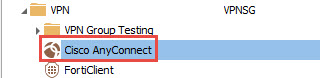
Firstly, you would need to create a VPN entry in your Navigation Pane.
Secondly, right-click on your VPN entry and select Edit -> User Specific Settings to override the credential of the VPN entry
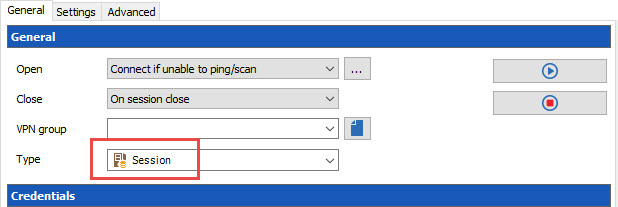
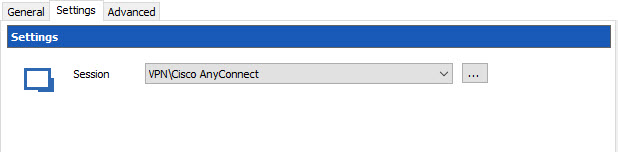
In conclusion, at the folder level in the VPN section, do the following:
Best regards,
Jeff Dagenais
2017-01-20_08-30-57.jpg
2017-01-20_08-30-36.jpg
2017-01-20_08-22-25.jpg