"Command Line" as different User

Hey there,
just started using RDM 8.0 and would like to start a CMD with alternate credentials. Just added an entry "Command Line" and tried to use my stored credentials, but it starts all the time with my windows credentials.
What am I doing wrong?
All Comments (9)
The credentials are stored to be used in variables. You can can use a runas command to apply a new set of credentials.
David Hervieux
Maybe I misunderstand your answer. What I'm trying to achieve is: In Windows, when you go to Start Menu -> Accessoires and press Shift + right Mouse you can select "Run as different user". That's what I like to do with RDM.
So I want to start a shell with different credentials. Does this fit to your answer?
Hi
You're both on the same page, let me explain in details
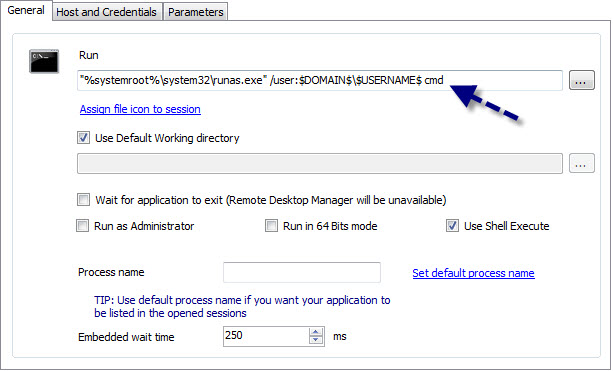
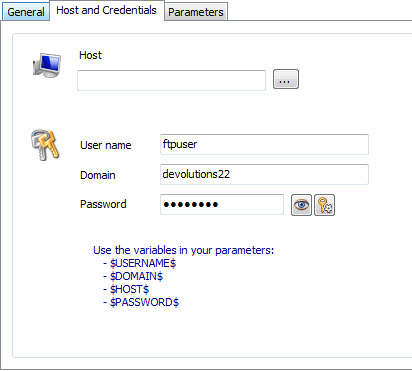
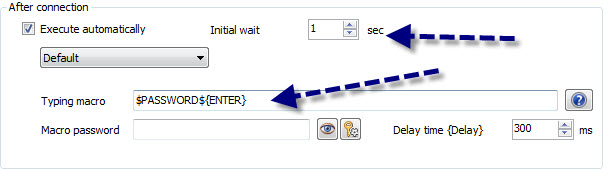
When you run this, you'll see a first command prompt window that will prompt for the password, this will be filled automatically by the typing macro
A few notes :
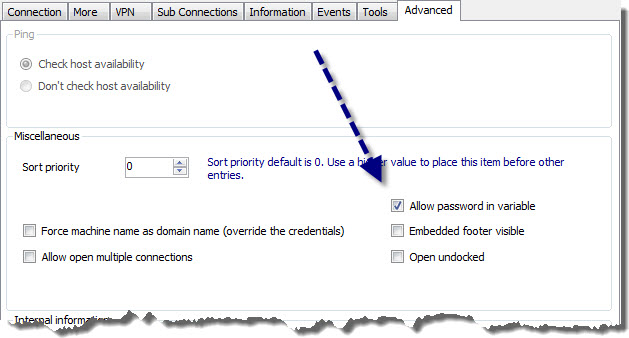
There it is, I will put this in the help right now.
Regards
Maurice
runas1.jpg
runas2.jpg
runas3.jpg
runas4.jpg
Thanks for the excellent assistance and guidance!!!!
Short question: The new CMD which will be started by runas opens in a new external window. Can this changed to embedded? Love to have it inside of RDM
I was afraid you'd ask that ;)
Not at the moment. We actually have to grab the window and embed it, but we do this for the window we just launched and that runs in our user's context. The other cmd is running under the identify of another user. We have to research this.
Thanks for the feedback.
Maurice
Thanks for your assistance!!
And the trophy goes to Maurice!!!

Stéfane Lavergne
trophy_small.jpg
Hi
Please visit http://help.remotedesktopmanager.com/tipsandtricks_runas.htm Not only is it richer, but I also added an example for running SQL Server Management Studio on a different domain while still using Windows Authentication.
Keep your questions coming, it profits to the whole community.
edited by mcote on 3/14/2013
Maurice
Gotcha, well done and fast support!