RDP to Windows 10 and Server 2016 - scaling

We are running Remote Desktop Manager 12.08 on a Windows 10 version 1607 64bit notebook with second monitor - both 1920x1024 res, DPI Scaling 125% for both notebook and second monitor.
If outside of RDM, I manually RDP to a Windows 10 workstation or a Windows 2016 server, fullscreen with smart sizing checked, resolution of both are perfect, desktop icon sizes nice size, etc.
However if I do the same thing from within RDM in Embedded tab mode (which we prefer), the desktop icons, etc (in fact everything) are much larger however still sharp. See attached screenshot images of both. If we select Undocked or External rather than Embedded (tabbed) then screen resoltuion is back to normal and acceptable.
Is there a reason Embedded mode is displaying enlarged our RDP embedded sessions to Windows 10 and Windows 2016 servers? If we RDP embedded to Windows 7 or Server 2008 the issue does not exist. So our thought is it must have something to do with the way embedded interacts with DPI Scaling on Windows 10 hosts.
RDP using RDM.jpg
RDP not using RDM.jpg
All Comments (32)
Hello,
Could you please try the solutions described in this help article?
https://help.remotedesktopmanager.com/index.html?troubleshooting_hdpiscalingissues.htm
Best regards,
Marc Beauséjour
Hi Mark,
We have "Disable display scaling on high DPI settings" already checked (yes restarted RDM) - also tried unchecked and makes no difference either.
Anything else we can try - can you reproduce?
Cheers,
Dale.
Mark,
Also confirming within RDM that our RDP embedded session is set to "Default" for Remote Desktop Size and "Smart reconnect" for Screen Sizing Mode.
I can set to custom Desktop Size of 1920 x 1080 to match my monitors, however even though size wise everything looks great, the entire image itself is pretty unfocused.
Cheers,
Dale.
Hi,
Just for a test could you try to change the RDP to RDP to 7 in File->Options | Type - RDP?
Regards
David Hervieux
David,
Had already tried all lower RDP versions including 7.0, still appears exactly as described in Embedded mode.
Regards,
Dale.
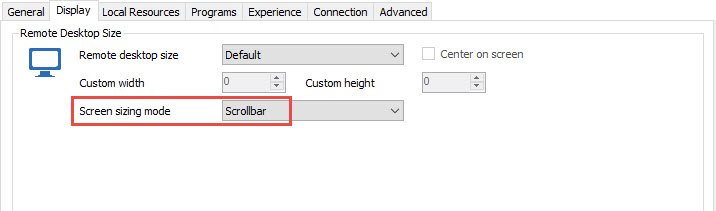
What happen if you set the mode to Scrollbar?
Regards
David Hervieux
David,
Mode to Scrollbar - where is that setting?
Under Display the choices are External, Embedded or Undocked.
Cheers,
Hello,
The setting is in the Display tab of your RDP session. Please have a look at my print screen.
Best regards,
Jeff Dagenais
2017-01-12_10-38-47.jpg
Jean-Francois,
Located that and tried that setting - still same large issue with Windows 10 and Server 2016
Cheers,
Could you try RDCMan to see if it's the default behavior of the ActiveX?
David Hervieux
Looks perfect size in RDCMan - issue only in RDM.
Have you been able to reproduce - did a new install on a new PC and happens there so that hopeful re: troubleshooting.
Could you try to mouse over the tab page and send the print screen? I will see the detail in the tooltip.
Regards
David Hervieux
David,
See screen capture attached.
Regards,
Tab.jpg
David,
A little unrelated however I noticed in RDCMan there is an option under Remote Desktop Size that you can select "Same as client area". What is the equivalent in RDM ? Current work area size seems to display differently in RDM than that.
This option looks the best for RDP to Windows 10 and Server 2016.
Cheers,
Could you export me your session without the password? If you set the resolution to Default and Scrollbar it will use the Same as client area. Could you try this with RDP 7 and show me the tooltip.
By the way thank you for your patience and help.
Regards
David Hervieux
David,
Appreciate all the assistance you are providing so pleased to be patient - being a IT Consultant patience is something I hope for from customers too.
See screen capture of session set to resolution of Default and Scrollbar. Interestingly the tooltip still shows as smart sizing even though set as scrollbar.
Also attached exported RDP file for that sessin to Windows 10 workstation - removed full address.
Cheers,
Windows 10.rdp
RDP7.jpg
Hi,
Indeed from what I see in your screen shot, it still use the smart reconnect which is different than the smart sizing. Could you export the session in .rdm (without the credentials)? Perhaps you have a user specific setting that override the mode.
Regards
David Hervieux
David,
See attached RDM file for that session - I dont know of an overriding seting I may have in place however
Cheers,
Windows 10 PC.rdm
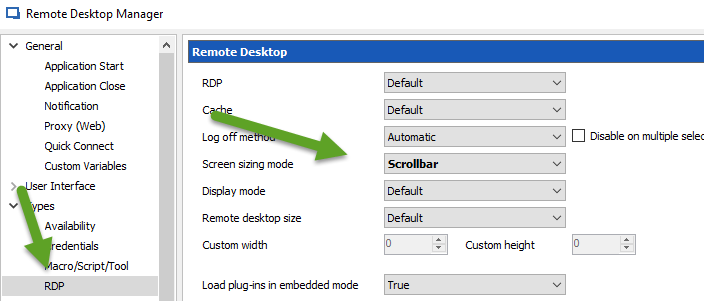
Could you verify the sizing mode in File->Options
David Hervieux
SizingMode.png
David,
Verified that is what we have set in Options, Scrollbar ... still defaults when we hoverr to using Smart Reconnect.
Cheers,
Could you try to create a new entry in a Local data source and check if it still Smart reconnect. I suspect that this setting change the resolution.
Regards
David Hervieux
David,
I was incorrect before ... the scrollbar setting did get engaged, well doesn't say (Smart reconnect) when we hover. I guess that means it is something other and most likely the Scrollbar setting we set.
Did create a new entry to be sure and same thing.
In summary however desktop icons, etc still large and exactly same as Smart Reconnect, etc for Windows 10, Server 2016. So not resolved.
Cheers,
Support,
Any update on this issue .. no progress on resolution for a few weeks now.
Cheers,
Hi,
I have nothing new. I'm unable to reproduce it unfortunately.
Regards
David Hervieux
Hello,
Is there any update on this yet? We are having sort of the same issue. We provide RDM as an RemoteApp from a Windows 2016 server. As a RemoteApp it's giving the same issue (with a Windows 2012 R2 server this works fine), but when I work on the desktop from the Server 2016 server it works fine.
Regards,
Edward de Ruiter
2017-03-09 13_51_10-Remote Desktop Manager [Dashboard] (Work Resources).png
Hi,
I'm not sure to understand from your message. Which one does not work?
Regards
David Hervieux
Hi,
The issue is with the RemoteApp from a Windows 2016 server.
Thanks
Edward,
Support told me they could not recreate or fix the issue - pretty disappointing really as I could recreate it easily.
I gave up trying after many weeks of asking support for assistance to rectify. So I don't like your chance either.
Cheers,
Hi,
We use the Microsoft ActiveX and we don't have access to the source code. This means that if you are able to make it work with RDCMan, we are able to fix the issue. We try to include FreeRDP (Open source) on the Windows version. This might not solve the issue but we will have more control over the source code.
Regards
David Hervieux
Hi,
With RDCMan I don't have the same issue. See the attached screenshot.
Regards,
Edward
2017-03-10 09_00_31-.png
Hi Edward,
I think that I might not understand your issue. Could you post a print screen of RDM with Windows 2012 and one with Windows 2016.
Regards
David Hervieux
Hi David,
Attached the image from RDM as a Windows 2012 R2 Remote App. With the 2016 RemoteApp you can see the scaling is a litte bit wrong.
Regards,
Edward de Ruiter
rdm_2012r2.jpg