Enter key in treeview

Since few releases (i'm on 12.0.8.0 64-bit), I have problems with entries with focus in treeview opened when I press Enter key when I'm in a Remote Desktop session.
I tried to disable this option by checking User Interface/Keyboard/Other Disable open with Enter key but this behavior still occurs.
Do you know how I can stop it?
Thanks
All Comments (6)
Hello,
Could you please try applying the changes described in this help article?
https://help.remotedesktopmanager.com/index.html?troubleshooting_sessionfocusissue.htm
Best regards,
Mark Beausejour
Hi Mark,
I tried this but I cannot use Remote Desktop with those options enabled. They are both disabled on our setup because we have too much Credentials entries and the navigation bar and tree view keep moving at every clic on tab / tree if I use those options.
When they are uncheked, It keeps opening entries that are selected in the treeview when we're connected to an RDP session and press Enter.
Hello,
As I understand, you are in a RDP session, press Enter and this opens a new session instead doing an Enter in the remote session.
Am I understanding your issue properly?
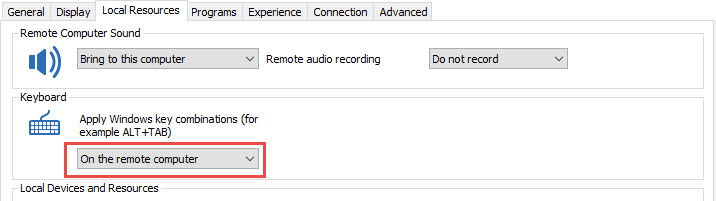
If this is the case, what is selected in the Keyboard section of the Local Resources tab in the properties of your RDP session?
Best regards,
Jeff Dagenais
You are right with the behavior:
I'm in a RDP session, with a "Login Account" entry type selected (in blue) in the treeview since I just used "Copy Username and Password" then press Enter in a running RDP session and this triggers the "Open" of the Login Account entry instead doing an Enter in the remote RDP session.
Here is the print screen of my RDP Session configuration (2017-01-11 11_33_25)
2017-01-11 11_33_25-Clipboard.png
Hello,
Could you try to change the Keyboard setting in your RDP session to On the remote computer.
When this is done, launch your RDP session and verify if the "Enter" is properly sent to the remote session.
Best regards,
Jeff Dagenais
2017-01-12_10-36-33.jpg
Hi,
I figured out that it was a Keyboard shortcut entered by default on my RDM version 12.0.8
I disabled it and it's now working like a charm.
User interface/Keyboard/Actions/Open URL was set to "Enter". I changed it to None.
Thanks!
2017-01-26 11_53_40-Remote Desktop Manager.png