Using PuTTY w/ Port Forwarding via a Bastion Host for Remote Desktop Manager
Using PuTTY w/ Port Forwarding via a Bastion Host for Remote Desktop Manager

I have a script that, upon execution:
and I want to adapt it for use by Remote Desktop Manager.
Is it possible to configure an entry with the name of the remote Windows host and pass that value to the script, perhaps as a "sub-connection?" Or, is there some better way within RDM to accomplish this?
All Comments (16)
Hello,
For full details, see https://blog.devolutions.net/2016/10/how-to-configure-ssh-tunnel-in-remote-desktop-manager.html
You will even have an automatic port selection within a range
Best regards,
Maurice
But, this method requires that one create two sessions for each host; one to create the tunnel to the remote Windows host, then the RDP session to use that tunnel. Certainly there must be an easier way.
Hello,
Most people that have a bastion server reach multiple hosts behind it, in those cases one would set these hosts in a folder, set the vpn on the folder, then set all sessions within it to use inherited vpn settings.
Do you have more of a one-to-one environment, meaning one bastion server for each remote hosts?
Maurice
No, we have over 300 remote hosts and about 8 linux bastion servers.
Perhaps there is a different how-to than the one you referenced? These instructions name a single remote Windows host per tunnel:
I'll also add that the referenced instructions then say to add another RDP session that calls the tunnel session.
Hello Warren,
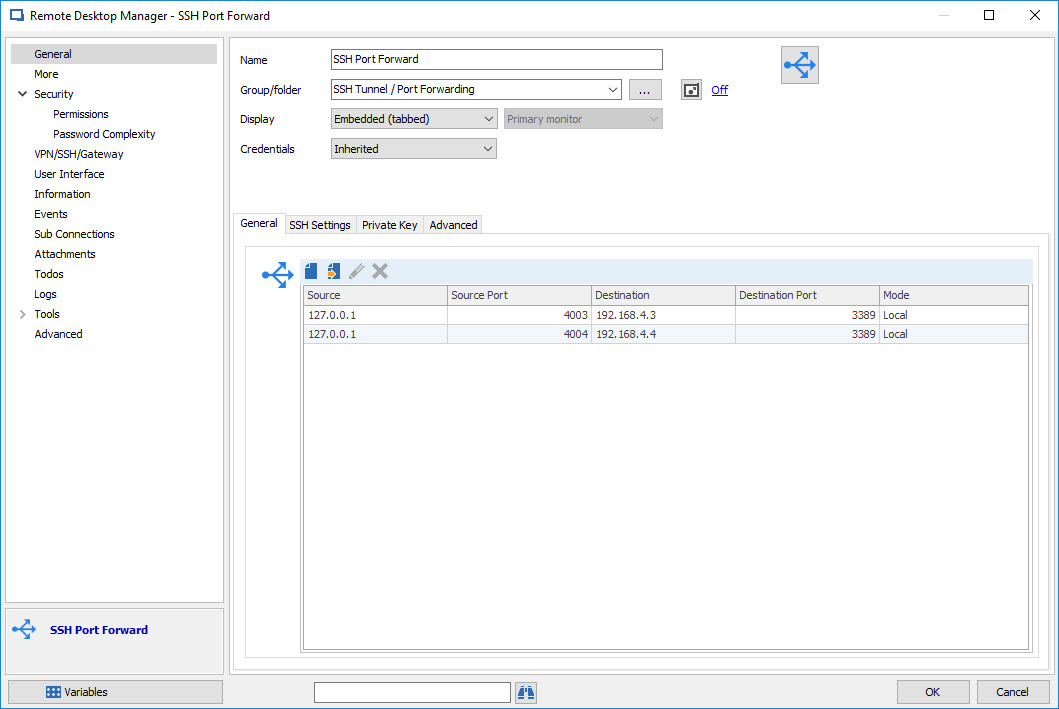
For multiple session you can use an SSH Port Forward entry.
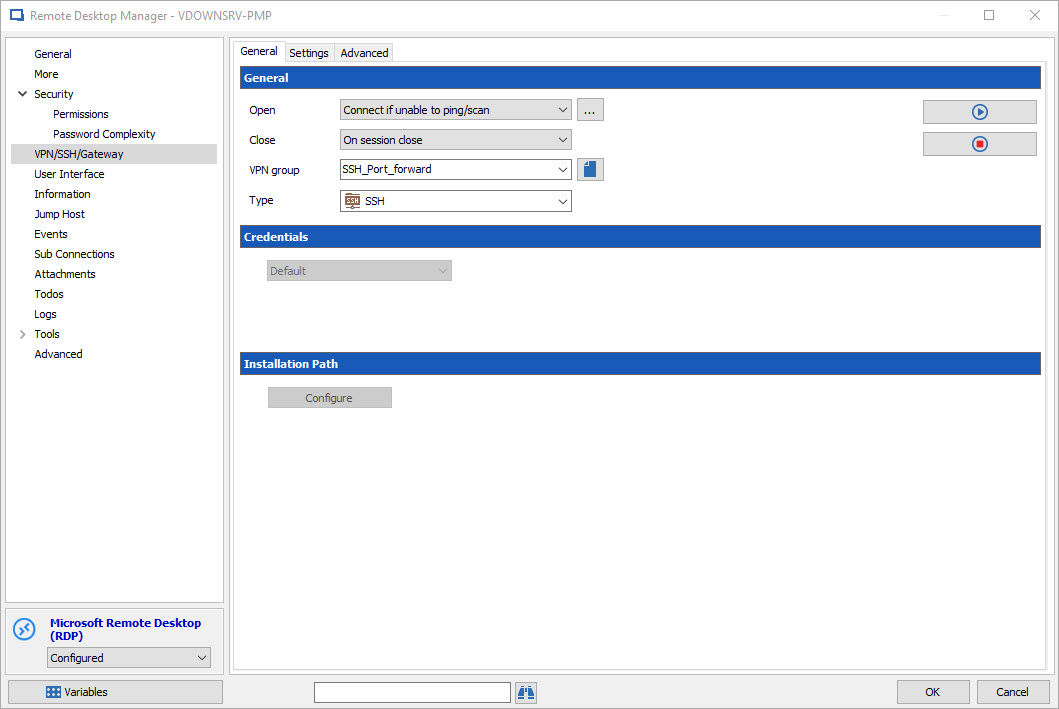
Also for your RDP connexion you can configure an auto connect. Go to the properties of your entry and into the VPN/SSH/Gateway Section , select SSH as type and do not forget to enter a new name of VPN Group, so if you have multiple RDP session open it will not close instead the last RDP session is close.
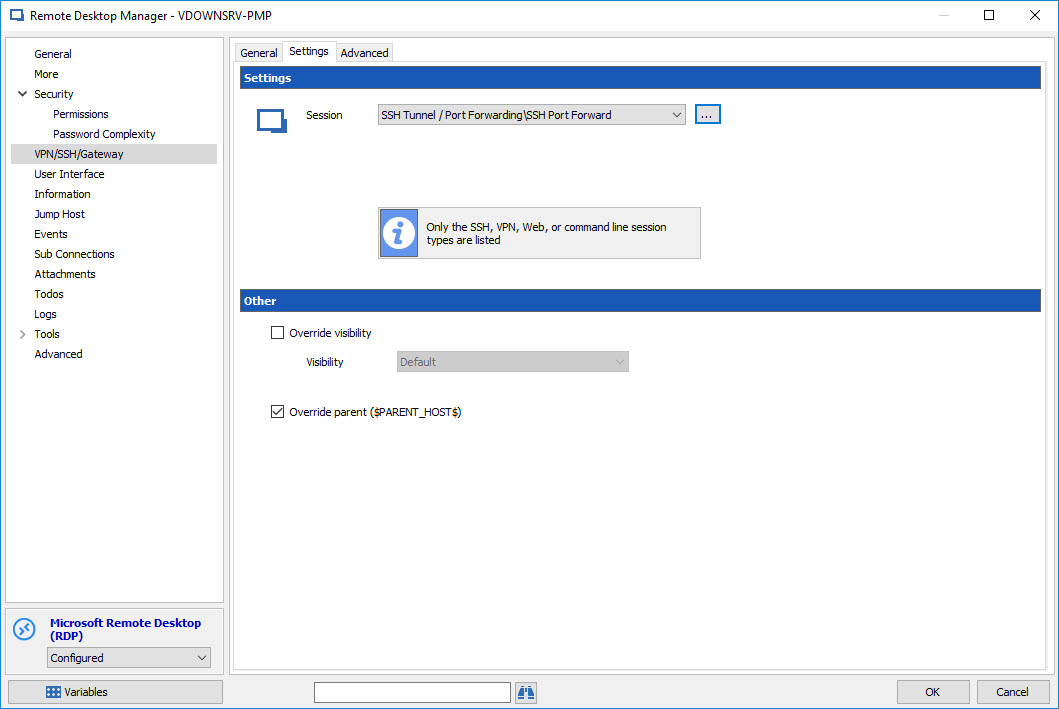
In the settings section you have to select your SSH Port Forward entry.
Best Regards,
David Grandolfo
VPN_Session.jpg
ssh port foward.jpg
VPN_session_selected.jpg
David Grandolfo wrote:
> ...and do not forget to enter a new name of VPN Group, so if you have multiple RDP session open
> it will not close instead the last RDP session is close...
Can I have the RDP sessions in the same group as the port forwarding entry? And, if so, can I open and close them without disconnecting other RDP sessions using that tunnel?
Apologies for hijacking this thread, but how does this work on a folder level when the remote host is different for each endpoint?
As for the OP, the way I work with this type of setup for multiple hosts is to add the bastion within the VPN settings of each RDP connection.
a. RDP connection to localhost
b. Set VPN to use SSH
c. Modify VPN settings - Host = bastion IP / Local Address = 127.0.0.1 / Remote Host = IP of destination / dynamic port
d. I select the option to hide VPN once connected to limit the no. of tabs displayed
e. The SSH tunnel connects, disappears and then RDP connection opens. Once RDP is disconnected, so is the SSH tunnel for that RDP session only.
I also do use the Port Forwarding session type for some, but it doesn't allow for dynamic ports as far as I'm aware, so it may cause conflict where you don't keep track of ports if you have 8 bastions where this may occur for different customers.
rdm4e.png
rdm4d.png
rdm4c.png
rdm4b.png
rdm4a.png
You have to configure only the VPN group on your RDP entry, you do not need to configure your port forwarding entries. So when you open your first RDP it will open the Port Forwarding link to it, you can open multiple rdp with the same vpn configuration and that Port Forwarding will be close only when you disconnect the LAST RDP entry link with that VPN Group.
You can read this topic for a bit of information.
David Grandolfo
Hello Chad,
No Problem it's an open topic, you can ask any question you would like.
When I look at your situation and your configuration, it looks to be the best one for what wants to do. But just to be sure to understand, do you have any problem with that configuration presently or you would like to optimize it ?
Also how many RDP entry do you have with different Port configuration?
Example:
200 RDP entries
50 Port Forwarding host
So that's mean, an average of 4 RDP per bastion server (with different ports for sure)
Best Regards,
David Grandolfo
Hello,
Maybe you are looking for what is called a Dynamic Port Forwarding which is possible with putty, but not with RDM yet.
@Warren, how exactly are you achieving this without RDM? It will give us pointers. 99% of internet search results use Dynamic tunnels for http/https traffic. We would want to support SSH and RDP.
A word of warning about the SSH Forwarder, it opens all ports at once, I wouldnt use this for more then... lets say 16. You milleage may vary.
Maurice
Maurice Cote wrote:
> Maybe you are looking for what is called a Dynamic Port Forwarding which is possible with putty, but not with RDM yet.
> @Warren, how exactly are you achieving this without RDM? It will give us pointers. 99% of internet search results use Dynamic
> tunnels for http/https traffic. We would want to support SSH and RDP.[/quote]
DPF might be a more elegant method, actually, but I'm using a batch script (on the Windows boxes) that sets up a single local port forwarding session for each connection
--------------------------------------------------------------------------------
@ECHO OFF
REM Script to enable RDP connections via a linux bastion host
SETLOCAL ENABLEEXTENSIONS ENABLEDELAYEDEXPANSION
REM Prompt for remote Windows box
set /p remotehost=Enter the hostname or IP address of the remote Windows machine:
REM Generate random local port number
SET /a rand=(%RANDOM%*500/32768)+4000
echo Port Number is %rand%
REM Connect to linux bastion and set port forwarding
wmic process call create "putty -ssh <username>@<bastion host> -L %rand%:%remotehost%:3389" | findstr "ProcessId" > processid.txt
for /f "tokens=3 delims=; " %%p in ('findstr /rc:"ProcessId = [0-9][0-9]*\;" "processid.txt"') do set /a plpid=%%p
REM Pause for 3 seconds
ping 127.0.0.1 -n 4 > nul
REM Launch Remote Desktop Client
mstsc /v:localhost:%rand%
REM Kill connection process
tskill %plpid%
--------------------------------------------------------------------------------
> A word of warning about the SSH Forwarder, it opens all ports at once, I wouldnt use this for more then... lets say 16.
> You milleage may vary.
OK.
David Grandolfo wrote:
> Also for your RDP connexion you can configure an auto connect. Go to the properties of your entry and into the
> VPN/SSH/Gateway Section, select SSH as type and do not forget to enter a new name of VPN Group, so if you
> have multiple RDP session open it will not close instead the last RDP session is close
I'm still hung up on this. What do you mean by "enter a new name of VPN Group?"
Please refer to the attachments.
Now, with each RDP entry, can I count on them to use the port forwarding session as defined?
When I launchone of the RDP sessions, all ports will open, correct?
20170104132354_.jpg
20170104132332_.jpg
20170104131843_.jpg
20170104131631_.jpg
20170104131610_.jpg
20170104131547_.jpg
20170104131427_.jpg
No issue, and it works fine for me. It's just in an earlier post within this thread it was mentioned to set VPN settings on a folder, which would be great, but I don't see how that works for the remote host.
It would be good if I could set VPN settings on a folder level, but then somehow only add the remote host IP to each session properties instead of duplicating the VPN settings for every session.
As for Warren's post. I don't understand why use VPN settings when using Port Forwarding tunnel?
With the port forwarding setup, wouldn't it just be easiest to create the RDP session connecting to localhost:port?
That's how I use mine where port forwarding rather than VPN is in use. Although admittedly for some systems I do try VPN first but when that isn't available I fallback to the port forwarding, but it's the same concept.
My images = a,b are my real settings, but c is what I am referring to without VPN, but using forwarding.
rdm5c.png
rdm5b.png
rdm5a.png
Warren, You are not far from the solution. I'll send you a private message please take a look of it.
Best Regards,
Hi Chad,
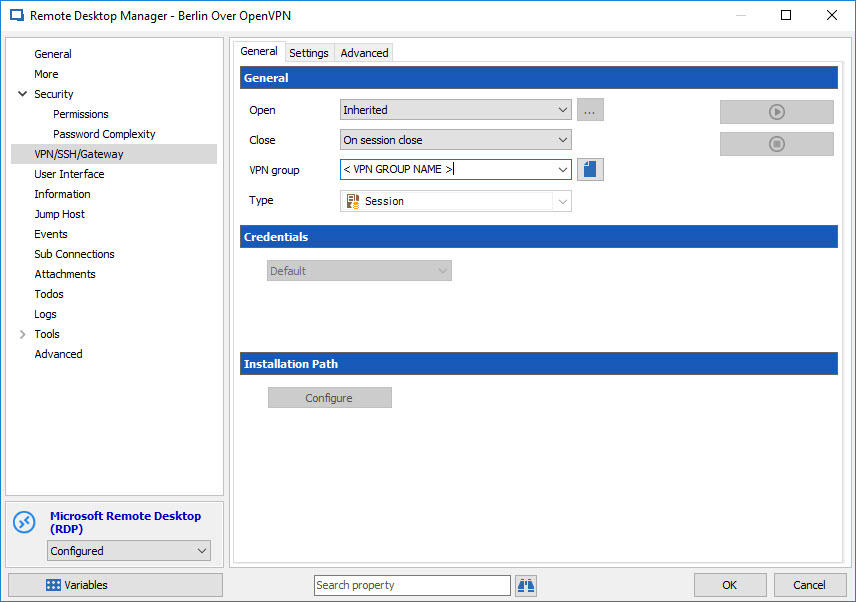
About your question on the folder setting. If you configure your VPN setting as Warren done on the folder that contains your RDP session, the only thing you have to configure on your RDP session is to set your VPN as inherited.
They don't have a better way to use the VPN of the Port Forwarding Tunnel, they have so much environment and many differences will tell you which to use. Also, as you know, in technology they always have 3 ways to do the same thing and only the admin know the reason why he uses that way. What you are doing is a good way too and offer you an alternative when you VPN isn't usable.
Best Regards,
David Grandolfo
vpn_ihnerited.jpg
Thanks David. All good now.
In another thread it was explained how to use a custom variable for me to set the remote ip to get the VPN settings on folder inherited.