Issue with Radius Requests

We have RDM Enterpise version 11.0.14.0. We just patched our RADIUS server, Aruba Clearpass 6.6.3, and are having an issue with RADIUS requests now when connecting to our Cisco switches. Basically clearpass is rejecting the message due to incorrect information in the access request that doesn't comply with RFC 2865. The error message is "eceived INVALID RADIUS packet - WARNING: Malformed RADIUS packet from host 10.100.1.253: Access-Request contains response attribute(Reply-Message)."
If we open up to the device from a straight putty session (IE outside of RDM) we can authenticate without issue, it is only when we attempt to access the device by means of RDM that we receive the error. We use "SSH Shell (REBEX)" connection types
All Comments (20)
Hi John,
Could you try yo use the other SSH Shell. I don't remember the name in the version 11.x but I think it's SSH native or built-in. This one is based on Putty
Regards
David Hervieux
There is another SSH shell and it does the same thing, if I change it to straight Putty however it does work. We haven't tested with this to ensure all functionality still works (login access, keystroke logging, etc)
OK, I just confirmed we do lose automatic session recording which we do utilize for several reasons, it was actually one of the reasons we went with the product.
I see there is a version 12 out, perhaps that resolves the issue? How entailed is the upgrade process? Would hate to attempt it before the holiday but I have to get this functionality restored.
Hello,
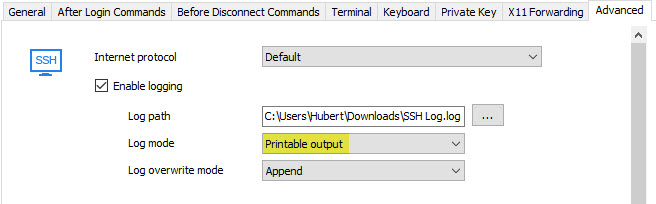
Could you check if you have the option to make logs in the SSH Shell entry (not the rebex one).
If you do, if you set them to Printable Output, it should give the same result as the SSH Shell (Rebex) recording feature, from what I can tell. If the option isn't there, you would have to upgrade to a newer version of RDM.
Regards,
Hubert Mireault
2016-12-22 10-19-41 AM.jpg
That option is not there. Where is the download for the upgrade located? I have the enterprise version so run the server and client
Hello,
I recommend you to update to the following versions as the option exist in RDM 11.7.6.0 :
To perform the upgrade of Devolutions Server, please follow https://helpserver.devolutions.net/upgrade_rdms.htm. It is also possible that you may have some authentication issues after the upgrade. You will get the information on how to resolve it here https://helpserver.devolutions.net/upgrade_dvls32.htm.
Or we can also schedule a remote session to help you with the upgrade. Please contact us at support@devolutions.net if you are interested into the upgrade remote session.
Best regards,
Érica Poirier
Thank you, I will update to this after lunch and test. Can you give the links to latest 12 stable release as well? If I am going to upgrade might as well go up to a current major version. Thanks.
OK, update done, but still don't see that option. See screenshot, also do you have the links to go to 12?
Logging.PNG
You can download the latest version of RDM here https://remotedesktopmanager.com/Home/Download
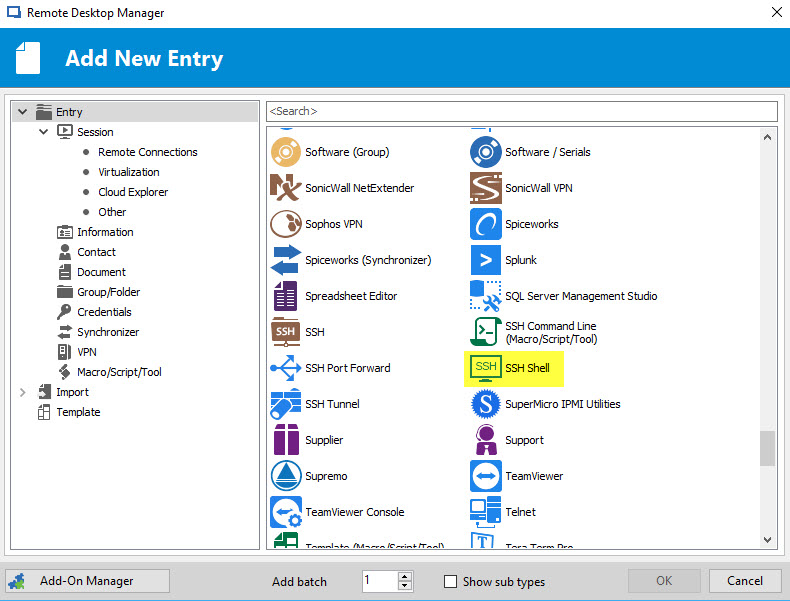
As for the logging, you are using a Putty entry, you need to use an SSH Shell entry:
Regards,
Hubert Mireault
2016-12-22 2-06-54 PM.jpg
Hello,
Please note that if you plan to update your RDM to RDM 12, you will also need to update your Devolutions Server to version 4.0.3.0
https://server.devolutions.net/Home/Download
Let is know if you encounter any issue during the upgrade or after the upgrade.
Best regards,
Jeff Dagenais
Thank you, I will be doing the upgrade shortly. Interesting enough if I use the SSH shell method the original issue goes away (RADIUS) completely. Is there a way to script a change of all my SSH devices currently using the "SSH Shell (Rebex)" to use just the SSH Shell? I have over 800 of them.
Hello,
If you go in View -> Advanced Search, it will be possible possible for you to do a search by connection type.
After, you can select your sessions and do a right-click -> Edit -> Batch Edit -> Batch Actions. In that batch actions window, select Convert putty/rebex session to SSH/Telnet/PortFoward session.
This should do the trick.
Best regards,
Jeff Dagenais
I will do that, if I can connect back to the data source LOL. I completed the upgrade of the enterprise server and RDM client, both without errors, but when connecting I get the error of "DVLS server is not responding". I also get a slew of e-mail alerts, sample below. I have verified the SQL service is running
Error:
SqlException - A network-related or instance-specific error occurred while establishing a connection to SQL Server. The server was not found or was not accessible. Verify that the instance name is correct and that SQL Server is configured to allow remote connections. (provider: SQL Network Interfaces, error: 26 - Error Locating Server/Instance Specified) at System.Data.ProviderBase.DbConnectionPool.TryGetConnection(DbConnection owningObject, UInt32 waitForMultipleObjectsTimeout, Boolean allowCreate, Boolean onlyOneCheckConnection, DbConnectionOptions userOptions, DbConnectionInternal& connection) at System.Data.ProviderBase.DbConnectionPool.TryGetConnection(DbConnection owningObject, TaskCompletionSource`1 retry, DbConnectionOptions userOptions, DbConnectionInternal& connection) at System.Data.ProviderBase.DbConnectionFactory.TryGetConnection(DbConnection owningConnection, TaskCompletionSource`1 retry, DbConnectionOptions userOptions, DbConnectionInternal oldConnection, DbConnectionInternal& connection) at System.Data.ProviderBase.DbConnectionInternal.TryOpenConnectionInternal(DbConnection outerConnection, DbConnectionFactory connectionFactory, TaskCompletionSource`1 retry, DbConnectionOptions userOptions) at System.Data.SqlClient.SqlConnection.TryOpenInner(TaskCompletionSource`1 retry) at System.Data.SqlClient.SqlConnection.TryOpen(TaskCompletionSource`1 retry) at System.Data.SqlClient.SqlConnection.Open() at Devolutions.Server.Providers.RDMSMembershipProvider.GetUserDataByField(String username, String fieldName) in c:\Dev\devolutions\Websites\Server\Providers\RDMSMembershipProvider.cs:line 1546 at Devolutions.Server.Providers.RDMSMembershipProvider.GetUserData(String username) in c:\Dev\devolutions\Websites\Server\Providers\RDMSMembershipProvider.cs:line 1507 at Devolutions.Server.Providers.RDMSMembershipProvider.DoValidateUser(String username, String password, MembershipLoginData loginData) in c:\Dev\devolutions\Websites\Server\Providers\RDMSMembershipProvider.cs:line 1006 at Devolutions.Server.Providers.RDMSMembershipProvider.AuthenticateUser(MembershipLoginData loginData, String userName, String password) in c:\Dev\devolutions\Websites\Server\Providers\RDMSMembershipProvider.cs:line 761 at Devolutions.Server.Providers.RDMSMembershipProvider.DoValidateUserFull(String userName, String password, MembershipLoginData loginData) in c:\Dev\devolutions\Websites\Server\Providers\RDMSMembershipProvider.cs:line 1197 at Devolutions.Server.Controllers.APIControllers.v2.RDMSApiController.DoLogin(HttpRequestMessage request, String userName, String password, ClientApplicationInfo clientApplicationInfo, String twoFactorID, TwoFactorInfo twoFactorInfo, String publicIPAddress, Byte[] sessionKey, String repositoryId, Boolean partialMode) in c:\Dev\devolutions\Websites\Server\Website\Controllers\APIControllers\RDMSApiController.Login.cs:line 890 at Devolutions.Server.Controllers.APIControllers.v2.RDMSApiController.Login2(HttpRequestMessage request, JObject requestData, Boolean partialMode) in c:\Dev\devolutions\Websites\Server\Website\Controllers\APIControllers\RDMSApiController.Login.cs:line 313 at lambda_method(Closure , Object , Object[] ) at System.Web.Http.Controllers.ReflectedHttpActionDescriptor.ActionExecutor.<>c__DisplayClass10.b__9(Object instance, Object[] methodParameters) at System.Web.Http.Controllers.ReflectedHttpActionDescriptor.ExecuteAsync(HttpControllerContext controllerContext, IDictionary`2 arguments, CancellationToken cancellationToken) --- End of stack trace from previous location where exception was thrown --- at System.Runtime.CompilerServices.TaskAwaiter.ThrowForNonSuccess(Task task) at System.Runtime.CompilerServices.TaskAwaiter.HandleNonSuccessAndDebuggerNotification(Task task) at System.Web.Http.Controllers.ApiControllerActionInvoker.d__0.MoveNext() --- End of stack trace from previous location where exception was thrown --- at System.Runtime.CompilerServices.TaskAwaiter.ThrowForNonSuccess(Task task) at System.Runtime.CompilerServices.TaskAwaiter.HandleNonSuccessAndDebuggerNotification(Task task) at System.Web.Http.Filters.ActionFilterAttribute.d__5.MoveNext() --- End of stack trace from previous location where exception was thrown --- at System.Web.Http.Filters.ActionFilterAttribute.d__5.MoveNext() --- End of stack trace from previous location where exception was thrown --- at System.Runtime.CompilerServices.TaskAwaiter.ThrowForNonSuccess(Task task) at System.Runtime.CompilerServices.TaskAwaiter.HandleNonSuccessAndDebuggerNotification(Task task) at System.Web.Http.Filters.ActionFilterAttribute.d__0.MoveNext() --- End of stack trace from previous location where exception was thrown --- at System.Runtime.CompilerServices.TaskAwaiter.ThrowForNonSuccess(Task task) at System.Runtime.CompilerServices.TaskAwaiter.HandleNonSuccessAndDebuggerNotification(Task task) at System.Web.Http.Controllers.ActionFilterResult.d__2.MoveNext() --- End of stack trace from previous location where exception was thrown --- at System.Runtime.CompilerServices.TaskAwaiter.ThrowForNonSuccess(Task task) at System.Runtime.CompilerServices.TaskAwaiter.HandleNonSuccessAndDebuggerNotification(Task task) at System.Web.Http.Controllers.ExceptionFilterResult.d__0.MoveNext() --- Default
Source:
.Net SqlClient Data Provider
Hello,
Could you please check on the Server Settings dialog of your DVLS instance if the information is properly filled about your SQL database connection (Server name, User, Password, database name)?
Best regards,
Érica Poirier
Just verified, all correct, no changes. Was fine before hand, but after the .Net install/reboot as part of the RDM client, it now can't connect. Have rebooted a few more times, no change
In addition I tried the web site and it does connect, but it times out when attempting to authenticate
Hi,
From the error you get, it's a database connection issue. Does it work when you click Test Database?
Regards
David Hervieux
OK, on a complete whim I tried applying all other Microsoft security updates and the connectivity was restored, whew.
I tried the batch actions to do the conversion and that also works. The only thing I don't seem to see is how to bulk modify the following in the advanced tab:
1. Enable logging
2. Change log path to $SESSIONRECORDING$$NAME$_$DATE_TEXT$_$TIME_TEXT$.txt
3. Change log mode to printable output
4. Check "Always accept fingerprint"
Hello John,
To enable the 4 options that you have mentioned in your post above, you would need to do it via a PowerShell Batch Actions.
Select your SSH Shell sessions and click on Edit -> Batch Edit -> Batch Actions -> Custom PowerShell command and enter the following:
$connection.Terminal.EnableLogging = "True"
$connection.Terminal.LogPath = '$SESSIONRECORDING$$NAME$_$DATE_TEXT$_$TIME_TEXT$.txt';
$connection.Terminal.LogMode = "AllPrintableOutput"
$connection.Terminal.AlwaysAcceptFingerprint = "True"
$RDM.Save();
Best regards,
Jeff Dagenais
Perfect, this makes me 100% whole again. This product has been extremely stable, so don't have to contact support often, but when I do you guys always step up to the plate. Thanks for the assistance!