"is Virutal server" is missing

Im trying to see if its possible to get the Hyper-V console working for one of our Large Hyper-V environments.
The only issue is all the Hyper-V hosts in the RDM do not have the option for "Is Virtual Server"
Can someone shed some light on this?
All Comments (10)
Hello Jason,
Are you talking about Hyper-V Console to see all the console for Hyper-V.
Perhaps a good thing for you is the Hyper-V synchoniser in the version 12 of RDM. That will create an entry for all your Hyper-V virtual machine link to your host.
If I'm not right, could you send us a print screen of the entry you are trying to configure.
Best Regards,
David Grandolfo
Hi Jason,
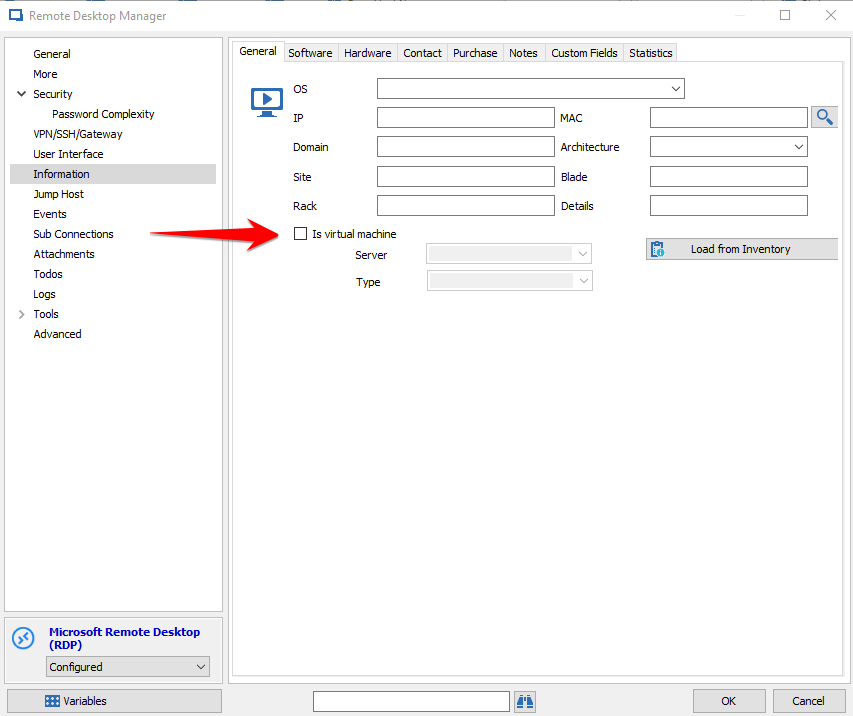
Are you talking about the Is virtual machine option under Information -> General?
Best regards,
Xavier Fortin
IsVirtualMachine.png
What was the resolution for this item? I'm having the same issue. I'd like to make use of the Hyper-V console, but there is not option under Information on a connection to specify that the connection is to a Hyper-V server. My screen looks the same as the screenshot provided above.
@Scott Ladewig,
What version of RDM are you running?
Are you in the properties of a RDP session?
Could you post a print screen of what you see.
Best regards,
Jeff Dagenais
I'm using 12.0.8.0 which my system says is the current version. Yes, I'm in the properties of an RDM session, and my screen shot is identical to the one that Xavier Fortin posted above. Your documentation (https://help.remotedesktopmanager.com/pane_hyperv.htm) says that there should be an option for "Is Hyper-V Server" but that option is not there. Your docs have this screen shot:
But my information window does not have this option along with other differences. I've attached it.
Capture.PNG
Hello,
this feature is currently only available in the beta version (from version 12.0.13.0 - February 22nd 2017)
Here are the Change History.
Regards,
Min
Hello,
You can download RDM 12.0.16.0 Beta at the bottom of this page - https://remotedesktopmanager.com/Home/Download
Best regards,
Jeff Dagenais
Thanks for the link.
I'm confused though how that item has been in the online help for several months, but it was only implemented last month. What version of the product does your online help represent? It seems to be out of sync.
Hi,
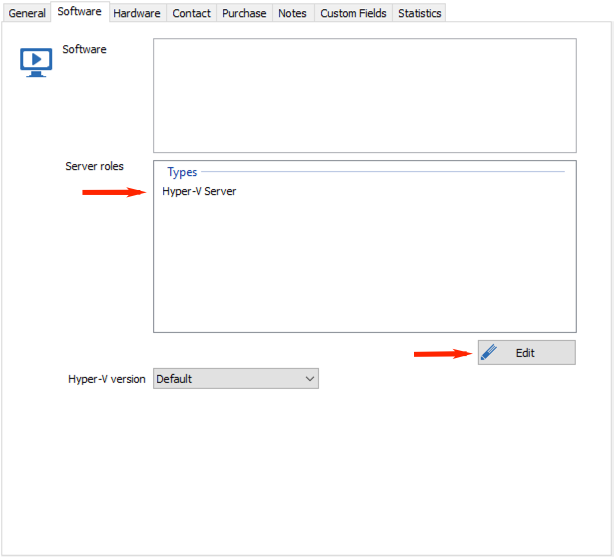
Some months ago this option was moved to the Software tab in the the then new Server roles section:
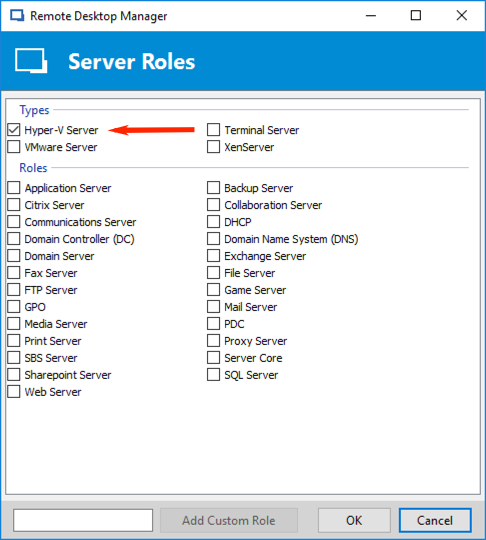
Just click on the Edit button to add new roles:
This section now allows others Server role options and also allows adding custom ones.
Best regards,
Xavier Fortin
AddHyperVServer.png
HyperVServer.png
Got it. Thanks!
RDM is a great product, but I find it has so many layers of functions and options, it's sometimes frustrating to figure out just what everything does. The online help, as I mentioned, isn't always matching up to the actual product.
Appreciate your quick response.