Embedded url - scrollbars missing

Hi,
If I create a simple connection to a embedded url the scrollbars is missing. Have checked all settings (I think) but cannot find a solution to resize the embedded homepage.
Regards
Torben
All Comments (12)
Could you post a printscreen of the what you mean with an example?
Regards
David Hervieux
Weird - just tried with another site without problems, but with our SharePoint site I am not able to use the scrollbar.
Printscreen attached
rdm1.jpg
Hello,
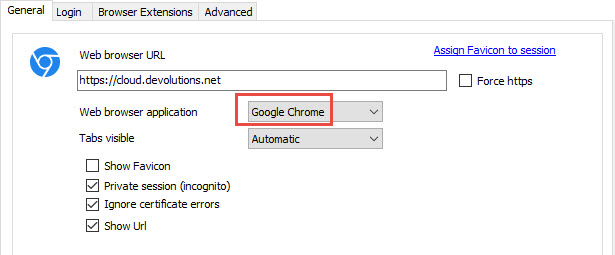
Could you try embedded Chrome instead of embedded IE.
In the properties of your session, select Chrome in the dropdown menu.
Best regards,
Jeff Dagenais
2016-12-06_09-58-09.jpg
Chrome is working. Just noticed that version is released - can try that.
Same problem with latest version :-(
Hello,
Not sure to understand what you mean by just noticed that version is released? Could you elaborate please.
Best regards,
Jeff Dagenais
Sorry...
I noticed a new version 12 was released and hoped that one worked. But tried and it was the same problem.
So now I have upgraded to version 12 and it still is not working with explorer, but with Chrome it does.
Hello,
We don't have much control on this because we are using the Microsoft ActiveX for IE in embedded mode.
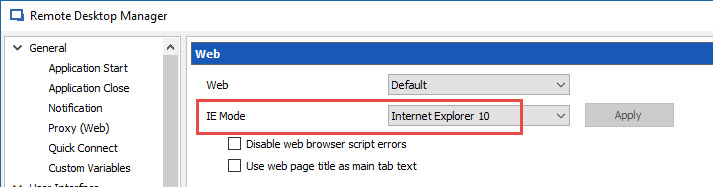
However, you can try to change the IE Compatibility mode in File -> Options -> Types -> Web.
If this is not working, you would need to open this website using Chrome embedded.
Best regards,
Jeff Dagenais
Hi
Thanks for your help.
Last question. Is it the property "Use legacy click"? Cannot find IE Compatibility mode.
See screenshot.
rdm2.jpg
Hello,
The IE Compatibility mode can be change here
Best regards,
Jeff Dagenais
2016-12-06_20-46-10.jpg
Its working - thank you very much